Note: This article uses the familiar word “tweet” because many readers still search for it, while also recognizing that Twitter is now officially called X and tweets are now called posts.
Introduction: The Tiny Button That Starts Big Conversations
Replying to a tweet on Twitter, now known as replying to a post on X, sounds simple enough: tap the little speech-bubble icon, type something brilliant, and hope the internet does not immediately judge your grammar. But a good Twitter reply is more than a digital “yep.” It can start a useful conversation, answer a customer question, make a friend laugh, support a creator, clarify a misunderstanding, or help your brand sound like an actual human being instead of a vending machine with a Wi-Fi signal.
Whether you are new to X, returning after a long break, managing a business account, or simply trying not to reply “same” to everything, this guide walks you through the process step by step. You will learn how to reply to a tweet, when to use a public reply instead of a direct message, how reply visibility works, and how to write responses people actually want to read.
The main keyword here is simple: how to reply to a tweet on Twitter. But the real goal is even simpler: helping you join conversations clearly, politely, and confidentlywithout accidentally starting a comment-section bonfire.
What Is a Twitter Reply?
A Twitter reply, or X reply, is a public response connected to another person’s post. When you reply, your message becomes part of the conversation thread. The original poster may receive a notification, other users may see the reply depending on privacy and visibility settings, and anyone following the conversation can continue reading the discussion.
A reply is different from a direct message. A direct message is private. A reply is generally public. That distinction matters. If you are sharing personal information, order numbers, phone numbers, private screenshots, addresses, or anything you would not want printed on a billboard next to a confused pigeon, use a private message instead.
How to Reply to a Tweet on Twitter: 10 Steps
Step 1: Open Twitter/X and Sign In
First, open the X app on your phone or visit X.com in a web browser. Sign in to your account. If you do not have an account yet, create one and complete the basic setup. A profile photo, display name, and short bio make you look more trustworthy, especially if you plan to reply to brands, creators, or professional accounts.
You can reply from the mobile app or desktop website. The layout may look slightly different depending on your device, but the core process is the same: find the post, tap the reply icon, write your response, and send it.
Step 2: Find the Tweet You Want to Reply To
Next, locate the tweet or post you want to answer. You might find it in your Home timeline, search results, a profile page, a trending topic, a notification, or a conversation thread. If you are replying to a specific point in a long thread, make sure you select the exact post you mean to answer.
This matters because replying to the wrong part of a thread can make your response confusing. Imagine someone posts a thread about five different travel tips, and you reply “That sounds dangerous” under the tip about packing socks instead of the tip about hiking near cliffs. Suddenly, socks are under investigation.
Step 3: Read the Full Context Before Replying
Before you reply, read the original post carefully. If it is part of a thread, open the full conversation. If the post includes an image, video, link, poll, or quote, check that too. Many online misunderstandings happen because people reply to one sentence without reading the rest.
Context is especially important when replying to news, jokes, customer complaints, technical questions, or emotional posts. A funny reply may work under a meme but look insensitive under a serious update. A short “Cool!” may be fine under a product launch but weird under someone’s post about losing their luggage, unless the suitcase was haunted and deserved it.
Step 4: Tap or Click the Reply Icon
Look beneath the post for the reply icon. It usually looks like a small speech bubble. Tap it on mobile or click it on desktop. A reply composer will appear, usually showing the post you are responding to above your text box.
In many cases, X automatically connects your reply to the original post. You do not need to manually copy the person’s username into your response. The platform understands that your message is part of that conversation. Still, if you mention additional users, do so carefully. Tagging random people just to get attention is not engagement; it is the social media version of ringing doorbells and running away.
Step 5: Write a Clear, Relevant Reply
Now write your response. A strong Twitter reply is usually short, specific, and easy to understand. You do not need to write a novel unless the topic truly calls for detail. Replies work best when they add something: an answer, a useful question, a thoughtful opinion, a correction, an example, a thank-you, or a bit of humor.
Here are a few simple reply examples:
- Supportive reply: “This is a helpful breakdown. The part about checking privacy settings is especially useful.”
- Question reply: “Do you recommend using this method for small business accounts too?”
- Customer service reply: “Thanks for flagging this. Could you send us a DM with your order number so we can check it safely?”
- Friendly reply: “I tried this yesterday and somehow made it worse, which is honestly my brand.”
Notice that each example connects directly to the post. That is the secret. A reply should feel like it belongs in the conversation, not like it fell out of a marketing calendar and landed on someone’s sandwich.
Step 6: Understand Who Can See Your Reply
Most replies are public. However, visibility can vary based on account privacy, reply settings, and the relationship between accounts. If your account is protected, people who do not follow you may not be able to see your replies. If the original poster limited who can reply, you may not be able to respond at all.
Some users restrict replies to people they follow, verified accounts, mentioned accounts, or other limited groups. If you do not see an option to reply, it may not be a glitch. It may simply mean the conversation has reply restrictions. In that case, do not create a separate post just to complain that you were not invited to the party. That rarely looks elegant.
Step 7: Add Media, Emoji, or Links Only When Helpful
You can often make a reply more engaging by adding an image, GIF, emoji, or link. But use these extras with purpose. A screenshot can clarify a technical issue. A GIF can make a light conversation funnier. A link can support a recommendation. An emoji can soften the tone of a short reply.
The key phrase is “when helpful.” If someone asks for serious advice and you reply with twelve dancing bananas, you may be memorable, but not necessarily useful. If you add a link, explain why it matters. If you add media, make sure it is relevant, appropriate, and does not expose private information.
Step 8: Choose Between Reply, Quote Post, and Direct Message
Sometimes a regular reply is perfect. Other times, a quote post or direct message is better. A reply is best when you want to participate directly in the existing conversation. A quote post is better when you want to share the original post with your own followers and add a broader comment. A direct message is best for private details.
Use this quick decision rule:
- Use a reply when your response belongs under the original post.
- Use a quote post when your comment is meant for your own audience too.
- Use a direct message when the conversation involves personal, sensitive, or account-specific information.
For brands, this distinction is especially important. Public replies show responsiveness and transparency. Direct messages protect customer privacy. A smart support team often uses both: reply publicly to acknowledge the issue, then move sensitive details into DMs.
Step 9: Review Your Tone, Facts, and Privacy
Before posting, pause for five seconds. Read your reply out loud if needed. Ask yourself three quick questions: Is it clear? Is it kind enough for the situation? Is it accurate?
Twitter moves fast, but fast is not always smart. A rushed reply can spread misinformation, sound rude, reveal private details, or accidentally turn a harmless discussion into an argument with a stranger named “CryptoFalcon777.” Check names, dates, claims, and links. If you are disagreeing, respond to the idea rather than attacking the person.
Good tone does not mean being boring. You can be funny, direct, clever, or passionate. Just avoid cruelty, harassment, spam, and pile-ons. A reply should move the conversation forward, not throw a folding chair into it.
Step 10: Send Your Reply and Follow the Conversation
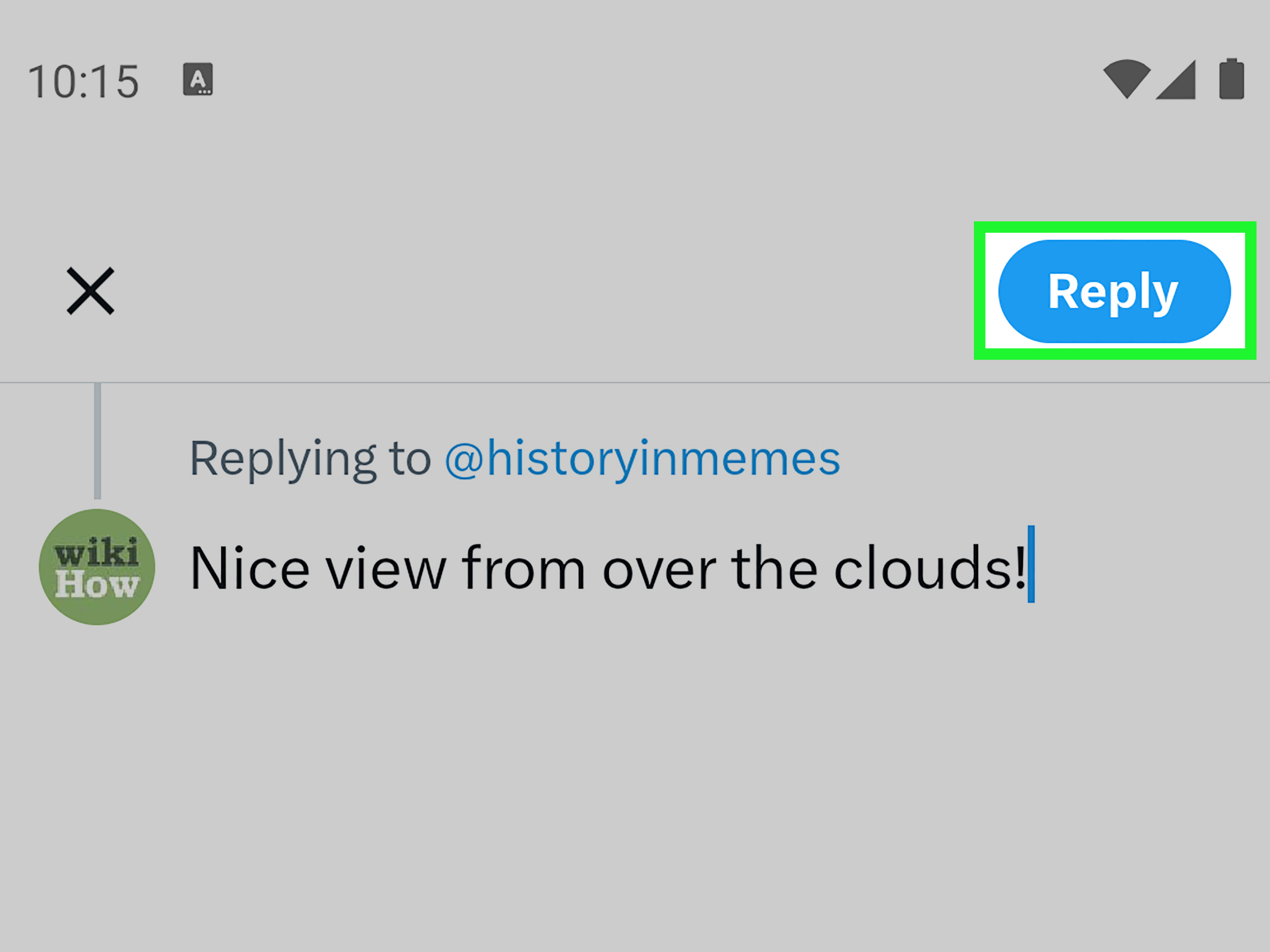
When you are ready, tap or click the reply button to publish your response. After posting, you can monitor notifications to see whether the original poster or other users respond. If someone asks a follow-up question, answer it if you can. If the conversation turns unproductive, you do not have to keep replying forever.
You can also delete a reply if you make a mistake. Depending on your account features and current platform options, editing may or may not be available to you, so it is always better to proofread first. The internet has a long memory and an impressive screenshot collection.
Common Mistakes to Avoid When Replying to Tweets
Mistake 1: Replying Without Reading
The fastest way to look careless is to reply to a headline, image, or single sentence without understanding the full post. Read first, react second. This tiny habit will save you from many awkward “Actually, that’s what I said in the next sentence” moments.
Mistake 2: Using Public Replies for Private Issues
Never post private account details, passwords, phone numbers, addresses, payment information, medical details, or personal documents in a public reply. For customer support, a safe public response might be: “We can help. Please send us a DM with the order number so we can take a closer look.”
Mistake 3: Sounding Like a Bot
Replies like “Great content!” or “Nice post, check my profile!” are not conversation. They are digital confetti, and not the fun kind. If you want engagement, write something specific. Mention the idea you liked, ask a real question, or add a useful example.
Mistake 4: Overusing Mentions
Mentioning people can be useful, but tagging users who are not relevant is annoying. It may also look spammy. Use mentions when someone is directly involved, when you are crediting a source, or when the person truly belongs in the conversation.
Mistake 5: Arguing Forever
Not every reply needs a reply to the reply. Some conversations are worth continuing. Others are just circular debates wearing a fake mustache. If the discussion is no longer useful, step away. Silence is sometimes the most underrated social media feature.
Best Practices for Better Twitter Replies
Be Fast, But Not Careless
Timely replies can help conversations feel alive. For brands, creators, and community managers, responding quickly may improve trust. But speed should not replace accuracy. A fast wrong answer is still wrong, only with better cardio.
Add Value in Every Response
A useful reply teaches, clarifies, supports, entertains, or asks a meaningful question. Before posting, ask: “What does this add?” If the answer is “mostly noise,” rewrite it. The best replies feel natural and intentional.
Match the Energy of the Conversation
A playful post can handle a playful reply. A serious announcement needs a respectful tone. A customer complaint needs empathy and action. Matching the mood helps your reply feel human rather than copy-pasted from a manual titled “Corporate Feelings, Volume 2.”
Use Simple Language
Twitter replies are not the place to show off every word you learned from a dictionary app. Use plain, clear American English. Short sentences work well. If you need to explain something complex, break it into two or three sentences instead of one giant paragraph that needs its own zip code.
Reply Examples for Different Situations
Replying to a Friend
Post: “I finally finished my first 5K!”
Good reply: “That’s awesome. Congrats! The first one is always the hardestand probably the sweatiest.”
Replying to a Brand
Post: “Our new app update is live.”
Good reply: “The new layout looks cleaner. Is dark mode included in this release?”
Replying as a Business
Customer post: “My package says delivered, but I don’t have it.”
Good reply: “We’re sorry about that. Please send us a DM with your order number, and we’ll check the delivery details for you.”
Replying to a Hot Take
Post: “Nobody needs email newsletters anymore.”
Good reply: “Interesting point. I think newsletters still work when they offer original insight instead of recycled announcements.”
Notice how these replies are specific. They do not shout, beg for attention, or use twenty hashtags. They simply join the conversation in a useful way.
How Replies Help Brands, Creators, and Everyday Users
Replies are one of the most underrated tools on Twitter/X. Many people focus only on posting original content, but conversations often create stronger relationships than broadcasts. A creator who replies thoughtfully can build loyal followers. A small business that answers questions quickly can earn trust. A regular user who joins discussions respectfully can meet people with shared interests.
For brands, replies can support customer service, reputation management, product feedback, and community building. For creators, replies can boost visibility and make followers feel noticed. For everyday users, replies are how you move from silently scrolling to actually participating.
That does not mean replying to everything. Quality matters more than volume. Ten thoughtful replies are better than one hundred generic comments that sound like they were assembled in a basement by tired robots.
Privacy and Safety Tips Before You Reply
Because replies are usually public, think carefully before sharing details. Avoid posting personal information, private photos, confidential work details, school information, financial data, or anything that could identify someone without permission. If you are a younger user, be extra cautious about interacting with strangers. Public conversation is fun, but privacy is not optional.
If someone is rude, threatening, harassing, or pressuring you, you do not need to answer. Use platform tools such as mute, block, report, or conversation controls when needed. A good Twitter experience is not about winning every argument. It is about choosing conversations that are worth your time.
Experience Section: What Replying to Tweets Actually Teaches You
After spending enough time around Twitter conversations, one thing becomes clear: the reply box looks small, but it carries a surprising amount of social weight. A reply can be a handshake, a joke, a correction, a customer service ticket, a thank-you note, or a tiny public speech. The technical step is easy. The human part is where things get interesting.
The first practical lesson is that the best replies usually sound like a person wrote them. This sounds obvious, but many users forget it the moment they try to look clever. They write stiff replies, overload them with hashtags, or use generic phrases that could fit under any post on Earth. A reply like “Great insight, thanks for sharing” is not harmful, but it is forgettable. A better reply points to something specific: “The tip about checking reply permissions before posting is useful. I’ve seen brands miss that and wonder why nobody answered.” Specificity makes a reply feel real.
The second lesson is that timing matters, but not as much as judgment. Replying early can help your comment get noticed, especially on fast-moving posts. But being first is not worth being wrong, rude, or irrelevant. A thoughtful reply posted five minutes later is often better than a sloppy reply posted in five seconds. On Twitter/X, people can forgive a typo. They are less forgiving when you confidently misunderstand the entire conversation.
The third lesson is that humor works best when it respects the room. A light joke under a funny post can make people smile. The same joke under a serious complaint can make you look careless. Experienced users learn to read the emotional temperature before replying. Is the post celebratory? Frustrated? Informational? Sensitive? Promotional? The reply should match the situation. Think of it like choosing an outfit. A tuxedo at the beach is memorable, but not always in the way you hoped.
The fourth lesson is that public replies are powerful for accountability. When a brand answers a complaint publicly, other people can see that the brand is listening. That does not mean every detail should stay public. The best pattern is often a public acknowledgment followed by a private channel for sensitive information. For example: “We’re sorry this happened. Please DM us your order number so we can help.” That reply is short, useful, and safe.
The fifth lesson is that not every conversation deserves your energy. Some replies invite discussion. Others invite chaos. If someone is arguing in bad faith, twisting your words, or trying to provoke you, walking away is not losing. It is time management. You can mute, block, report, or simply stop responding. The reply button is an option, not a legal requirement.
Finally, replying well gets easier with practice. Start small. Thank someone for a helpful post. Ask a clear question. Share a relevant example. Correct misinformation politely when you have reliable information. Support people when they share good news. Over time, you will develop a natural voice. The goal is not to become the loudest person on X. The goal is to become someone whose replies are worth reading.
Conclusion
Learning how to reply to a tweet on Twitter is simple on the surface: open the post, tap the reply icon, write your response, and send it. But replying well takes a little more care. You need to understand context, visibility, tone, privacy, and purpose. A strong reply is clear, relevant, respectful, and useful. It adds to the conversation instead of hijacking it.
Whether you are replying as yourself, a creator, or a business, remember that every reply represents you. You do not need to be perfect. You do not need to be hilarious every time. You simply need to be thoughtful enough that people are glad you joined the conversation. That is the real art of Twitter replies: knowing when to speak, what to say, and when to let the little speech bubble rest.