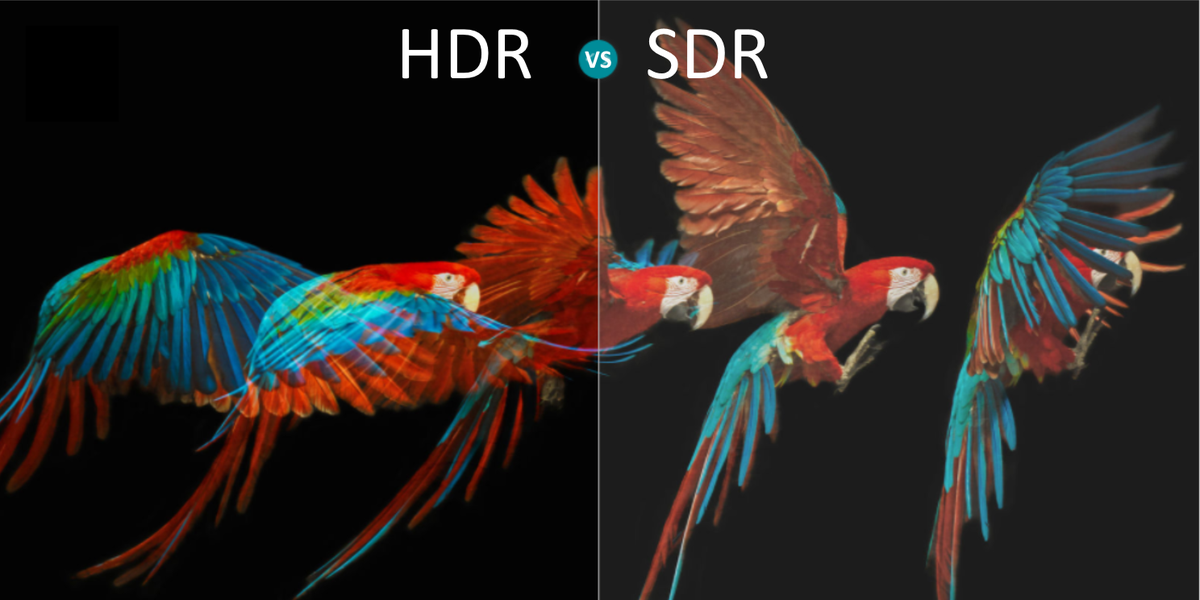
If you have shopped for a TV recently, you have probably seen three little letters standing proudly on the box: HDR. They look simple, but they carry a lot of picture-quality promise. HDR stands for High Dynamic Range, and on a TV, it refers to a video technology that can show brighter highlights, deeper shadows, richer colors, and more realistic contrast than standard TV images.
In plain English, HDR helps your TV stop treating a glowing sunset, a dark cave, and a shiny spaceship explosion as if they all live in the same boring brightness apartment. When HDR works well, a candle flame can look bright without turning the entire room gray. A night scene can stay dark while still showing the outline of a coat, a face, or the villain hiding in the corner like they pay rent there.
But here is the catch: not every TV with an HDR sticker delivers jaw-dropping HDR. Some TVs can read HDR signals but do not have enough brightness, contrast, or color performance to make HDR look truly impressive. That is why understanding what HDR is, how it works, and what to look for before buying a TV can save you from spending money on a feature that sounds fancy but performs like a flashlight with low batteries.
What Does HDR Mean on a TV?
HDR on TV means the display can receive and process video with a wider range of brightness and color information than SDR, or Standard Dynamic Range. SDR is the older video standard used for traditional TV broadcasts, DVDs, and much online content. SDR can still look excellent, especially on a good TV, but it has a more limited range between the darkest black and the brightest white.
HDR expands that range. Instead of simply making the entire picture brighter, it gives the TV more detailed instructions about which parts of the image should be bright, which should stay dark, and how color should behave across that broader range. The result can be a more lifelike picture with better shadow detail, sparkling highlights, and colors that feel less flat.
Imagine watching a scene where sunlight reflects off the ocean. In SDR, the water may look pleasant, but the brightest areas can appear clipped or plain white. In HDR, those reflections can look more intense and textured. You may see the shimmer of the waves, the warmth of the light, and the contrast between the blazing sky and the darker water. HDR is not just “brighter TV.” It is smarter brightness.
HDR vs. 4K: They Are Not the Same Thing
One of the most common TV shopping mix-ups is confusing HDR with 4K. They often appear together, but they describe different things.
4K is about resolution. It tells you how many pixels are on the screen. A 4K TV has about four times the pixel count of a 1080p Full HD TV, which means sharper detail when the screen size and viewing distance make that detail visible.
HDR is about brightness, contrast, and color information. It tells you how much visual range the image can carry. A 4K TV without strong HDR may look sharp but not especially dynamic. A good HDR image can look more realistic because the light and dark parts of the picture have more room to breathe.
The best modern viewing experience usually combines both: 4K resolution for crisp detail and HDR for better depth, sparkle, and color. Think of 4K as getting more crayons in the box, while HDR is learning how to use light, shade, and color like an artist instead of a toddler decorating the wall.
How HDR Works on a TV
HDR depends on several ingredients working together. A TV needs the right signal, the right processing, and the right panel capability. When one of those parts is weak, HDR may look dim, washed out, or barely different from normal video.
1. Brightness and Nits
TV brightness is often measured in nits. A nit is a unit of luminance, and it helps describe how bright a screen can get. HDR content can include very bright highlights, such as sunlight, fire, lightning, metal reflections, or neon signs. To show those highlights convincingly, a TV needs enough peak brightness.
This is where many budget HDR TVs struggle. They may accept an HDR signal, but if the panel cannot get bright enough, the highlights do not pop. The TV may compress the image, making everything look darker than expected. A stronger HDR TV can make small bright details stand out while keeping the rest of the scene balanced.
2. Contrast and Black Levels
Brightness is only half the story. Great HDR also needs strong contrast, which is the difference between the darkest and brightest parts of the image. OLED TVs are known for excellent black levels because individual pixels can turn off completely. Mini-LED and full-array LED TVs use many backlight zones to improve contrast by dimming darker areas and brightening lighter ones.
If a TV has weak black levels, HDR can lose drama. A dark movie scene may look gray instead of shadowy. A star field may look cloudy instead of crisp. Good contrast helps HDR feel three-dimensional, especially in movies, prestige TV shows, and games with dramatic lighting.
3. Wide Color Gamut
HDR is often paired with a wider color gamut, meaning the TV can show a broader range of colors than older standards. This does not mean everything becomes cartoonishly saturated. Good HDR should not make grass look radioactive or skin tones look like they were marinated in orange soda. Instead, it gives creators more subtle color options.
With wide color support, a sunset can show smoother shades of red, orange, and purple. A superhero costume can look richer without losing detail. A nature documentary can show the difference between deep forest green, moss green, and “that plant looks expensive” green.
4. Bit Depth and Smooth Gradients
HDR content commonly uses 10-bit color, which allows more color steps than standard 8-bit video. More steps help reduce color banding, the ugly stripes you sometimes see in skies, shadows, or fog. A good HDR TV should show smoother transitions from dark to light and from one color shade to another.
5. Tone Mapping
Tone mapping is one of the most important parts of HDR. Movies and shows may be mastered for brightness levels that exceed what your TV can actually display. Tone mapping is the process your TV uses to fit that HDR image into its own real-world capabilities.
A high-end TV with excellent tone mapping can preserve detail in bright clouds, dark clothing, and glowing lamps. A weaker TV may crush dark areas into black blobs or clip bright areas into plain white patches. This is why two TVs can both support HDR10 but look completely different while playing the same movie.
Common HDR Formats Explained
Not all HDR is delivered in the same format. The format tells your TV how HDR information is packaged and interpreted. Here are the main HDR formats you will see when shopping for a TV or streaming device.
HDR10
HDR10 is the most common HDR format. It is widely supported by TVs, streaming devices, game consoles, Ultra HD Blu-ray players, and many streaming services. If a TV says it supports HDR, it almost certainly supports HDR10.
HDR10 uses static metadata. That means the HDR instructions are set for the entire movie or show rather than changing scene by scene. It can still look excellent, especially on a capable TV, but it is less flexible than formats that use dynamic metadata.
Dolby Vision
Dolby Vision is an advanced HDR format that uses dynamic metadata. Instead of sending one set of instructions for the whole video, it can guide the TV scene by scene or frame by frame. This gives compatible TVs more precise information about how to handle brightness, contrast, and color.
Many streaming services and premium TVs support Dolby Vision, and it is especially popular for movies and high-end streaming content. However, not every TV brand supports it. Samsung, for example, has historically focused on HDR10 and HDR10+ instead of Dolby Vision.
HDR10+
HDR10+ is similar in concept to Dolby Vision because it also uses dynamic metadata. It was developed as an open alternative to improve HDR performance beyond basic HDR10. HDR10+ can help compatible TVs adjust brightness and contrast more precisely from scene to scene.
You will find HDR10+ support on many Samsung TVs, some Panasonic and Hisense models, select streaming devices, and certain streaming services. As with Dolby Vision, you need compatible content, a compatible playback device, and a compatible TV to get the full benefit.
HLG
HLG, short for Hybrid Log-Gamma, is an HDR format designed mainly for live broadcast television. It is useful because it can work in broadcast environments where traditional HDR metadata may not be practical. Sports and live events are natural fits for HLG because broadcasters need a format that can handle real-time production.
Why HDR Sometimes Looks Too Dark
HDR has a reputation for looking amazing, but many viewers have also asked a fair question: “Why does my HDR look so dark?” The answer usually comes down to the TV, the room, the settings, or the content itself.
Some HDR movies are mastered to preserve a cinematic look. They are not designed to blast your living room like a car dealership sign at midnight. If you watch dark HDR content in a bright room, it may look dim because your eyes are fighting reflections and ambient light.
Your TV settings can also cause trouble. Energy-saving modes often reduce brightness. Some picture modes aim for accuracy but may look too subdued in daylight. Motion smoothing, contrast enhancers, and automatic brightness settings can also change the look of HDR. The result may be a picture that is technically “correct” but not enjoyable in your room.
Finally, some TVs simply do not have enough HDR horsepower. If a TV has low peak brightness, weak local dimming, or limited color performance, HDR may look underwhelming. The TV can read the HDR signal, but it cannot fully perform the HDR trick. It is like giving a kazoo the sheet music for a symphony.
How to Know If You Are Watching HDR
Most smart TVs show a small badge when HDR content starts playing. You may see labels such as HDR, HDR10, HDR10+, Dolby Vision, or HLG. Streaming apps may also display these labels on a movie or show’s details page.
To actually watch HDR, you need all parts of the chain to support it. That includes the content, the streaming plan or disc, the app, the streaming device, the HDMI cable if one is used, the HDMI port, and the TV itself. One weak link can force playback into SDR.
For example, a movie may be available in Dolby Vision, but if your TV only supports HDR10, you may get HDR10 instead. If your streaming plan does not include HDR playback, you may get SDR even on an expensive TV. If your device is plugged into an HDMI port that does not support the required settings, HDR may not trigger at all.
What to Look for When Buying an HDR TV
When shopping for an HDR TV, do not stop at the words “HDR compatible.” That phrase can mean the TV accepts an HDR signal, not necessarily that it displays HDR beautifully. Look deeper.
Strong Peak Brightness
A brighter TV usually has an advantage with HDR highlights, especially in rooms with sunlight or lamps. Mini-LED TVs often perform well here because they can get very bright. OLED TVs may not always match the brightest Mini-LED models in full-screen brightness, but their perfect black levels can make HDR look dramatic and precise.
Good Local Dimming or OLED Black Levels
For LED and Mini-LED TVs, local dimming matters. More effective dimming zones can improve contrast and reduce gray-looking blacks. For OLED TVs, pixel-level control is the big advantage. Each pixel can light up or turn off independently, which helps dark scenes look clean and cinematic.
Support for the Formats You Use
If you watch a lot of Netflix, Disney+, Apple TV+, or 4K Blu-ray discs, Dolby Vision support may matter to you. If you prefer Samsung TVs or use services and devices that support HDR10+, that format may be useful. For gaming, make sure the TV supports HDR10 at minimum, and check whether it supports features such as Dolby Vision gaming, variable refresh rate, and low input lag if those matter to your console or PC setup.
Accurate Picture Modes
Look for TVs with good Movie, Cinema, Filmmaker, or calibrated modes. These modes usually avoid the over-sharpened, neon-colored showroom look. A TV that handles HDR accurately can make content look closer to the creator’s intent while still giving highlights plenty of punch.
Best HDR Settings for Better Picture Quality
Once you have an HDR TV, a few settings can make a big difference. Start by turning off energy-saving or eco modes when watching HDR. These settings often reduce screen brightness, which is the exact opposite of what HDR needs.
Use a picture mode designed for movies or HDR accuracy. On many TVs, that means Cinema, Movie, Filmmaker Mode, Dolby Vision Cinema, or HDR Movie. For a bright room, you may prefer a brighter version of those modes, such as Cinema Home or Dolby Vision Bright, if available.
Check your HDMI settings if you use an external streaming box, game console, or Blu-ray player. Many TVs require you to enable an enhanced HDMI mode for 4K HDR signals. The name varies by brand, but it may be called Enhanced Format, HDMI Deep Color, Input Signal Plus, or something equally charming and mysterious.
For Apple TV 4K and similar devices, match dynamic range settings can help. Instead of forcing everything into HDR all the time, the device can switch between SDR and HDR depending on the content. This prevents regular SDR shows from being artificially stretched into fake HDR, which can make menus and older content look strange.
Is HDR Worth It?
Yes, HDR is worth it when the TV has the hardware to show it well and the content is mastered properly. A strong HDR presentation can be more noticeable than the jump from 1080p to 4K, especially from a normal couch distance. Better contrast, brighter highlights, and richer color can make the image feel more alive.
HDR is especially impressive for movies with dramatic lighting, nature documentaries, science fiction, animation, premium dramas, and modern video games. A glowing dragon flame, a moonlit city, a bright desert, or a neon cyberpunk street can all benefit from HDR.
However, HDR is not magic dust. A poor HDR TV will not transform every movie night. A bad stream will still look compressed. A bright room can still flatten contrast. And a TV set to the wrong picture mode can make expensive technology look like it gave up before dinner.
Real-World Experiences With HDR on TV
The first time many people notice good HDR is not during a technical test pattern. It is usually during an ordinary scene that suddenly feels less ordinary. A lamp in a dark room glows with shape instead of turning into a white blob. A sunset looks warm without washing out the clouds. A black jacket in a night scene still has folds, texture, and detail. That is when HDR stops being a feature on a spec sheet and starts feeling like a window that someone finally cleaned.
In a living room, HDR performance can vary a lot depending on the time of day. During daytime viewing, a very bright Mini-LED TV can make HDR sports, travel shows, and animated movies look bold and punchy even with curtains open. Reflections still matter, but strong brightness helps the picture fight back. In a dark room, an OLED TV can feel more cinematic because blacks look truly black and small highlights stand out sharply. A starry sky on OLED can look beautifully precise, while a good Mini-LED may deliver a brighter overall image that feels more powerful in action scenes.
Gaming is another area where HDR can be fantastic when configured correctly. In a racing game, sunlight bouncing off a windshield can look intense without hiding the road. In an adventure game, a torchlit cave can show both the glowing fire and the damp stone walls around it. But HDR gaming also reveals how important setup is. Console calibration screens exist for a reason. If the black level is set too low, you lose shadow detail. If peak brightness is set too high for your TV, bright clouds and explosions can clip into flat white patches. A few minutes of calibration can make the difference between “wow” and “why did I buy this?”
Streaming HDR is convenient, but quality can depend on internet speed, app support, and compression. A 4K HDR Blu-ray disc often gives the cleanest picture because it can use higher bitrates than streaming. Still, modern streaming HDR can look excellent on a stable connection, especially from services that clearly label Dolby Vision, HDR10, or HDR10+ titles. The trick is checking the label after playback starts, not just trusting the movie page like it is a legally binding contract.
One practical lesson: HDR is easiest to enjoy when you stop chasing the brightest mode at all costs. Vivid mode may look exciting for five minutes, especially in a store, but it can crush details, exaggerate colors, and make faces look like wax fruit. A good Cinema or Movie mode may seem calmer at first, then reveal more natural skin tones, smoother highlights, and better shadow detail. HDR is not supposed to scream at your eyeballs. It is supposed to give light more range, more shape, and more realism.
Another real-world lesson is that not every show needs HDR. Sitcoms, older TV series, news, and many YouTube videos may look perfectly fine in SDR. Forcing SDR content into HDR can make it look oddly bright or unnatural. The best setup lets SDR stay SDR and HDR play as HDR. That way, each type of content looks the way it was meant to look.
Conclusion
HDR on TV means High Dynamic Range, a technology designed to improve brightness, contrast, color, and detail beyond traditional SDR video. When done well, HDR makes highlights sparkle, shadows reveal more information, and colors look richer without becoming silly. It is different from 4K resolution, although the two often work together in modern TVs and streaming content.
The most important thing to remember is that HDR quality depends on the entire viewing chain. You need HDR content, a compatible app or device, the right settings, and a TV with enough brightness, contrast, color performance, and processing skill to display HDR properly. HDR10 is the most common format, while Dolby Vision and HDR10+ can use dynamic metadata for more precise scene-by-scene optimization. HLG is mainly useful for broadcast HDR.
If you are buying a new TV, look beyond the HDR logo. Pay attention to peak brightness, black levels, local dimming, OLED or Mini-LED performance, HDMI support, and the HDR formats you actually use. A great HDR TV can make movie nights, games, and nature documentaries feel more vivid and immersive. A weak HDR TV may only make you wonder why everyone keeps talking about glowing sunsets.