Imagine sitting at a café, placing your hands on a plain wooden table, and typing a message without a keyboard, touchscreen, or camera watching your fingers. No glowing keys. No foldable gadget. No “please pair your futuristic toaster” drama. Just two wrist-worn bands, a flat surface, and a system smart enough to infer what your fingers are doing from tiny vibrations traveling through your hands.
That is the idea behind TapType, an AI-assisted text entry system that turns everyday surfaces into invisible keyboards using accelerometers. Developed as a research project in human-computer interaction, TapType explores a surprisingly elegant question: can we track hand and finger input well enough using only wrist-worn inertial sensors?
The answer is not a simple “yes, throw away your keyboard tomorrow.” The more interesting answer is: yes, under the right conditions, accelerometer-based hand motion tracking can become accurate enough to support real typing, especially when machine learning and language modeling work together. TapType is not merely a clever wearable prototype; it is a glimpse into how future mobile computing, mixed reality, and eyes-free interfaces may handle one of technology’s oldest problems: entering text without making users miserable.
What Is TapType?
TapType is a portable, wireless text entry system designed to let users perform ten-finger touch typing on passive surfaces. Instead of relying on a physical keyboard, a touchscreen, or optical hand tracking, the system uses wristbands equipped with accelerometers. When a user taps a finger on a table, desk, bench, or other surface, the impact creates a vibration pattern. TapType captures that pattern and uses artificial intelligence to estimate which finger tapped.
The system then maps those finger probabilities to a standard QWERTY keyboard layout. Because one finger is responsible for several possible letters in touch typing, TapType does not stop at finger detection. It combines the finger prediction with a probabilistic language model that estimates the most likely character or word sequence. In everyday terms, TapType listens to the tiny “thumps” of your fingers and makes an educated guess about what you meant to type.
This is where the system becomes genuinely interesting. TapType does not need to know the exact x-y location of every fingertip the way a camera-based tracker might. Instead, it leans on a familiar human habit: touch typists already associate certain keys with certain fingers. If the system can infer the finger, a language model can help narrow down the intended letters. That makes TapType less like a magic invisible keyboard and more like a smart collaboration between muscle memory, sensors, and AI.
Why Accelerometer-Only Hand Tracking Matters
Accelerometers are already common in phones, smartwatches, fitness trackers, game controllers, and many wearables. They are small, power-efficient, affordable, and do not need light, cameras, or external tracking infrastructure. That gives accelerometer-based hand motion tracking several advantages over more complex input systems.
It Avoids Camera Dependence
Camera-based hand tracking can be powerful, but it has obvious limitations. It may struggle when hands are hidden, lighting is poor, or the user is outside the camera’s field of view. In mixed reality, cameras also consume power and raise privacy concerns. Nobody wants every casual typing session to feel like a tiny surveillance documentary.
TapType takes another route. The wristbands detect motion and vibration directly from the wearer’s body. That makes the system potentially useful in settings where cameras are impractical, blocked, or socially awkward.
It Keeps the Fingers Free
Some wearable typing systems place sensors on individual fingers or use rings to detect gestures. Those approaches can work, but they may interfere with natural touch, comfort, or social acceptability. TapType’s wrist-based design is closer to a smartwatch or fitness band, which people already understand and tolerate.
That matters because the best interface is often the one users forget they are wearing. A wristband is less intrusive than five finger sensors per hand, and it leaves the fingertips free to touch real surfaces naturally.
It Supports Portable Text Entry
Mobile devices are excellent at many things, but long-form typing is not always one of them. Smartphone keyboards are compact. Tablet keyboards consume screen space. Foldable keyboards add another object to carry. TapType suggests a different path: use the surface already in front of you.
With wrist-worn accelerometers, a user could theoretically type beside a phone, around a tablet, or in a mixed reality workspace without needing a full hardware keyboard. The table becomes the keyboardnot because it contains electronics, but because the body-worn sensors interpret the typing motion.
How TapType Works
TapType’s core workflow can be understood in three stages: sensing, classification, and decoding.
1. Sensing Finger Taps
Each TapType wristband uses accelerometers to capture vibration signals caused by finger taps. When a finger hits a surface, the vibration travels through the hand and wrist. The accelerometers detect sudden changes in motion, creating a signal pattern that differs depending on which finger produced the tap.
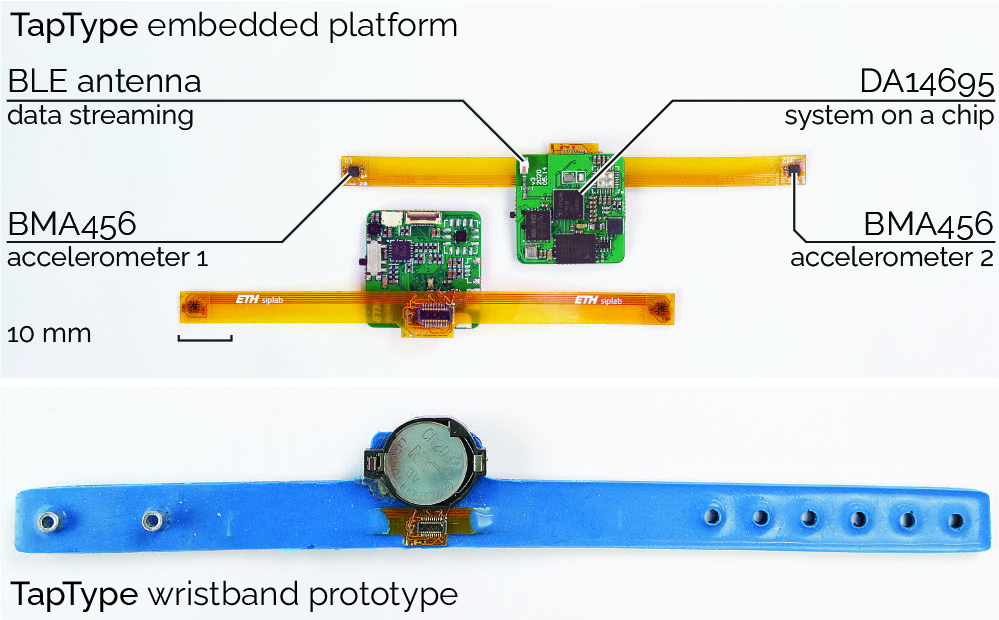
The hardware used in the research prototype was intentionally compact and wearable. The bands integrated high-resolution three-axis accelerometers, a mainboard, Bluetooth Low Energy communication, and a small battery. This kind of design points toward an important goal: practical wearable input should not require a backpack full of electronics or a PhD student hiding under the table with cables.
2. Classifying the Finger with AI
After detecting a tap, TapType needs to determine which finger caused it. This is not easy. The signals are subtle, and different users tap with different strength, timing, wrist posture, and habits. A middle-finger tap from one person may not look exactly like a middle-finger tap from another.
To handle this uncertainty, TapType uses a Bayesian neural network classifier. Instead of producing only a single hard answer, the model estimates probabilities. For example, it may determine that a tap was most likely from the left index finger, but with some chance that it came from the left middle finger. That uncertainty is not a weakness; it is useful information for the next stage.
In real-world typing, ambiguity is normal. Even smartphone keyboards survive because autocorrect and language models clean up the chaos. TapType applies a similar philosophy to invisible surface typing.
3. Decoding Text with a Language Model
Finger identity alone does not equal a letter. On a QWERTY keyboard, one finger may be responsible for several keys. For example, the left index finger commonly handles letters such as R, T, F, G, V, and B. If TapType only knows “left index finger,” it still needs context to infer the intended character.
This is where the language model enters. TapType combines the classifier’s finger probabilities with an n-gram language model. The model considers likely character sequences and word patterns, helping the system convert ambiguous finger taps into readable text.
Think of it as a two-part conversation. The accelerometers say, “This tap probably came from this finger.” The language model replies, “Given the previous letters, this word is more likely than that word.” Together, they produce a ranked list of likely text outputs.
Performance: How Fast and Accurate Is TapType?
In the reported evaluation, participants using TapType averaged about 19 words per minute with a low character error rate after training. Expert typists achieved speeds above 25 words per minute at a similar error level. That is much slower than a physical keyboard, where skilled typists may reach 60 to 100 words per minute, but it is still meaningful for a research system that uses no physical keys and no camera tracking.
The more impressive part is not that TapType beats a laptop keyboard. It does not. The impressive part is that it produces usable text from wrist vibrations alone. That is a hard sensing problem disguised as a typing demo.
The research also showed that performance depends on training, user familiarity, and confidence. Participants had to learn to trust the system, much as people once had to trust smartphone autocorrect. At first, users may type cautiously, watching suggestions and correcting errors. Over time, speed could improve as users become comfortable with the invisible interface.
TapType vs. Traditional Keyboards
A traditional keyboard remains the champion of speed, feedback, and reliability. Physical keys provide spacing, resistance, travel, and tactile confirmation. You know where your fingers are because the keyboard tells your hands. TapType removes that physical structure and asks muscle memory to do more work.
That trade-off is both TapType’s limitation and its superpower. It cannot replace a mechanical keyboard for marathon writing sessions, coding sprints, or angry emails composed with dramatic key presses. However, it could shine when portability matters more than maximum speed.
For quick notes, messages, search queries, mixed reality input, or mobile productivity, a keyboard-free text entry method could be extremely valuable. The goal is not to destroy the keyboard. The goal is to make text entry available when a keyboard is inconvenient, unavailable, or too bulky.
Potential Applications of TapType
Mobile Typing Around Phones and Tablets
TapType could make phones and tablets more useful for longer text input. Instead of pecking at a small touchscreen, users could place their device on a table and type on the surrounding surface. The device would display suggestions or entered text while the wristbands handle input detection.
This could be especially helpful for students, travelers, journalists, field workers, or anyone who regularly writes in places where carrying a keyboard is inconvenient.
Mixed Reality and Virtual Reality
Text entry is one of the stubborn problems in VR and AR. Floating keyboards can be slow. Mid-air typing causes fatigue. Controllers are awkward for serious writing. Voice input is not always private or practical.
TapType offers a promising alternative: use a real surface for passive haptic feedback while the system interprets taps through wrist sensors. In a mixed reality workspace, users could type on a desk while seeing virtual suggestions, documents, or commands. The surface provides comfort; the wearable sensors provide input.
Eyes-Free Interaction
Because TapType relies on touch typing habits, it could support eyes-free input with audio feedback. A user might enter short messages or commands without staring at a screen. This matters for mobile scenarios where attention is divided, though safety and context would still matter. Nobody should compose a novel while walking into a lamppost.
Accessibility Research
TapType also fits into a broader conversation about accessible computing. Different users need different input methods. Some may benefit from alternatives to small touchscreens, speech input, or hand-held controllers. While TapType itself is still a research prototype, its approach may inspire future tools that adapt to individual motor skills, typing habits, or sensory preferences.
Challenges and Limitations
TapType is exciting, but it is not magic. Several challenges remain before accelerometer-only hand motion tracking becomes a polished consumer product.
It Depends on Touch Typing Skill
TapType works best when users already know which fingers correspond to which keys. People who hunt and peck may struggle because the system assumes a consistent ten-finger typing pattern. In other words, TapType rewards the keyboard discipline your middle school typing teacher tried to install while everyone secretly played browser games.
Surface Conditions May Matter
Different surfaces produce different vibration patterns. A wooden desk, glass table, plastic tray, and cushioned armrest may not transmit taps in the same way. A robust commercial system would need to handle variation in surface material, posture, wrist placement, and typing intensity.
Privacy Needs Careful Design
Any system that decodes text input from body motion must be designed with privacy in mind. The same intelligence that makes TapType useful could also create concerns if sensor data were stored, transmitted, or analyzed without clear user control. Future systems should process data locally when possible, minimize retention, and make input states obvious to the wearer.
Language Models Can Make Mistakes
Language models improve accuracy, but they also introduce prediction bias. Common words are easier to infer than unusual names, passwords, technical terms, or slang. In testing, out-of-vocabulary words were harder and slower to enter. That is expected, but it shows why suggestion controls, correction gestures, and custom dictionaries would be important in real products.
Why TapType Feels Like a Big Idea
The most important lesson from TapType is not that we need invisible keyboards everywhere. It is that low-cost sensors can become much more powerful when paired with smart probabilistic software. An accelerometer does not “understand” typing. It simply measures motion. The intelligence comes from modeling, context, and uncertainty-aware decoding.
This reflects a larger shift in human-computer interaction. Interfaces are moving away from rigid hardware layouts and toward adaptive systems that interpret user intention. The mouse understood movement. The touchscreen understood touch location. TapType tries to understand the action behind the motion.
That shift could reshape wearable computing. Future devices may use sensor fusion, AI inference, and personalized models to recognize subtle gestures without requiring bulky equipment. A smartwatch could detect finger taps, wrist motions, hand poses, or surface interactions. Glasses could combine visual context with wrist vibration. Phones could become displays while wearables handle input.
TapType is one research project, but it points toward a broader design philosophy: the body can be an input device, everyday surfaces can become temporary interfaces, and AI can bridge the gap between messy human motion and structured digital commands.
Real-World Experience: What TapType-Style Interaction Might Feel Like
From a user-experience perspective, TapType would probably feel strange for the first few minutes. Most people are used to receiving feedback from keys. Even on a laptop keyboard, the smallest click or key travel tells your brain that something happened. With TapType, the table does not move. There is no key edge, no spacebar ridge, and no satisfying clack to announce, “Congratulations, you typed the letter E.”
The first experience would likely involve hesitation. A user would place both hands on a flat surface, start tapping as if a keyboard were there, then glance at the screen to see whether the system understood. The early feeling might be similar to using voice dictation in public: impressive when it works, slightly embarrassing when it confidently writes the wrong thing. The difference is that TapType is silent, which makes it socially easier than talking to your device like it is a tiny office assistant.
After a short training period, the interaction could become more natural. Touch typists already carry a mental keyboard in their hands. They know where letters live even when the keys are not visible. That is why many people can type on a blank keyboard or recover quickly when key labels wear off. TapType builds on that hidden skill. The system does not teach a brand-new alphabet of gestures; it borrows the muscle memory people already have.
In a practical mobile scenario, TapType could be useful for writing a quick email beside a tablet. A traveler could place a tablet on an airport table, rest both hands nearby, and type without pulling out a keyboard case. A student could take short notes in a lecture hall. A designer wearing a mixed reality headset could enter file names, commands, or comments without waving hands in mid-air. The experience would not be identical to using a keyboard, but it could be much better than tapping glass with two thumbs for ten minutes.
There would still be awkward moments. Users might lose their place on the invisible layout. They might tap too softly or shift their wrists. A noisy or soft surface might change the signal. Typing rare names, code snippets, passwords, or made-up words could feel slower because the language model cannot rely as heavily on common word patterns. For serious writing, users would still prefer a physical keyboard. For lightweight, portable input, however, TapType-style interaction could feel surprisingly freeing.
The most compelling part of the experience is psychological. Once the system works, the surface stops feeling like a dead table and starts feeling like a temporary keyboard that appears only when needed. That is the kind of interface that feels futuristic without requiring users to learn an entirely new behavior. It is not science fiction with lasers and holograms; it is a practical trick built from sensors, probability, and human habit. In the best case, TapType would feel less like using a gadget and more like discovering that your hands had a secret wireless keyboard mode all along.
Conclusion
TapType shows how much can be achieved with simple sensors when they are paired with thoughtful AI. By using wrist-worn accelerometers, Bayesian finger classification, and language-model decoding, the system turns passive surfaces into potential text entry spaces. It does not eliminate the need for physical keyboards, but it challenges the assumption that useful typing always requires visible keys.
For mobile computing, mixed reality, and future wearable interfaces, TapType is a strong reminder that innovation often comes from rethinking ordinary actions. Typing is not just pressing keys; it is a pattern of learned finger movements. If a system can read those patterns from vibration alone, the keyboard can become less of an object and more of an idea.
TapType is still a research prototype, and real-world adoption would require better robustness, privacy protections, personalization, surface adaptation, and polished feedback. Even so, its core concept is powerful. The future of input may not be another screen or another gadget in your bag. It may be the table already in front of you, quietly waiting for your fingers to start talking.
Note: This article is written for web publication and synthesizes real research findings, hardware information, and human-computer interaction context without inserting source links into the article body.
: