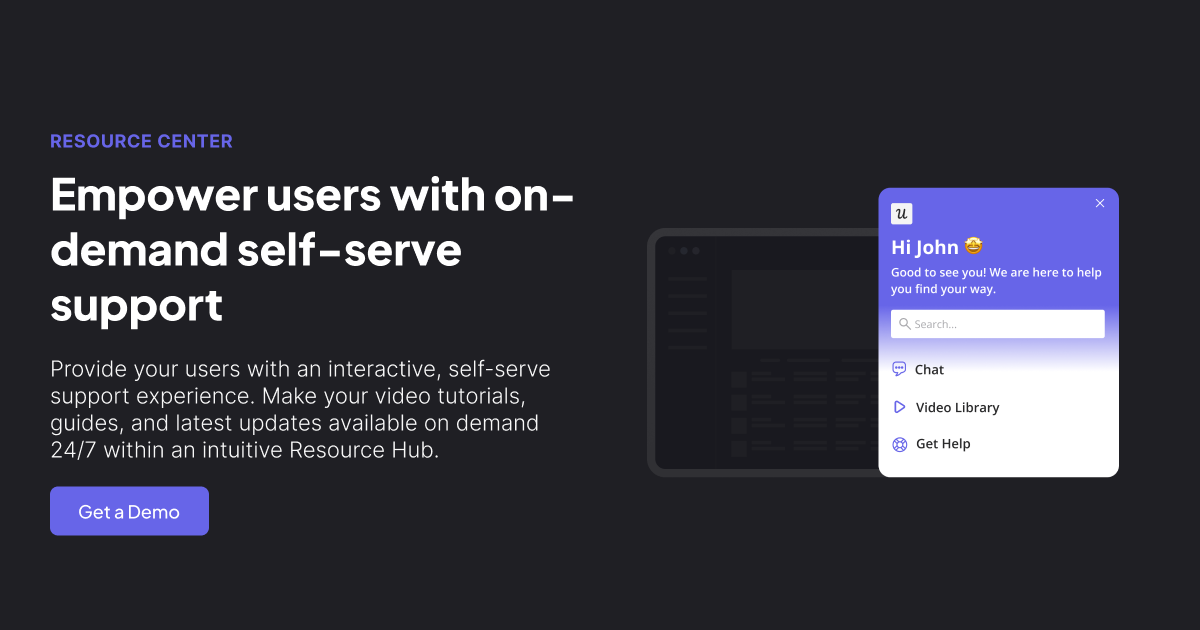
Imagine opening a software product, getting stuck, and finding the exact answer you need without leaving the app, opening seventeen browser tabs, or sending a support ticket that begins with the tragic phrase, “Hi, I can’t find…” That is the promise behind the Userpilot Resource Center: an in-app, self-service hub designed to help users learn, troubleshoot, discover features, and move forward while they are still inside the product.
For SaaS companies, this is not a cute little widget sitting politely in the corner. It is a strategic product adoption tool. A well-built resource center can reduce repetitive support questions, guide users toward activation, promote new features, collect feedback, and make onboarding feel less like homework and more like a helpful tour guide with excellent timing. Userpilot brings this idea into its broader product growth platform, combining in-app guidance, segmentation, analytics, onboarding flows, checklists, surveys, and knowledge base access in one place.
In this guide, we will explore what the Userpilot Resource Center is, how it works, why it matters for SaaS growth, what teams can include inside it, and how to use it without turning your app into a digital junk drawer. Because yes, your customers want help. No, they do not want a pop-up circus.
What Is the Userpilot Resource Center?
The Userpilot Resource Center is an in-app help and engagement center that gives end users on-demand access to relevant resources directly inside a software product. Instead of forcing users to leave the app and search a separate help center, teams can surface tutorials, articles, videos, checklists, announcements, surveys, and product guidance right where users are working.
At its core, the Resource Center is built around a simple idea: users need different kinds of help at different moments. A brand-new customer may need onboarding checklists and beginner tutorials. A power user may want advanced workflow tips. A user who has ignored a new feature for three months may need a gentle nudge, not a 42-page manual. Userpilot lets SaaS teams personalize resource center content based on user segments, behaviors, product usage, and lifecycle stage.
This makes the Resource Center more than a static help menu. It becomes a living support and product adoption channel. It can answer questions, relaunch in-app flows, promote product updates, connect to external knowledge base articles, and show performance analytics so teams can understand what users actually open, search for, and complete.
Why In-App Resource Centers Matter for SaaS Products
Modern users are impatient, and honestly, who can blame them? They have been trained by search engines, mobile apps, and same-day delivery to expect answers quickly. When users hit friction inside a SaaS product, every extra step matters. Leaving the app to search documentation creates context switching. Waiting for a support reply creates delay. Guessing creates mistakes. Rage-clicking creates… well, dashboards that product managers do not enjoy reviewing.
An in-app resource center helps reduce that friction. It gives users a place to self-serve without interrupting their workflow. This is especially important for B2B SaaS products, where users may be trying to complete real business tasks under real deadlines. A resource center can turn “I have no idea what this button does” into “Oh, there’s a two-minute tutorial right here.” That small moment can protect activation, retention, and user satisfaction.
Research-backed UX principles also support contextual help. Users often forget long onboarding tutorials when they are shown too early. Help works better when it appears close to the moment of need. A Resource Center supports this approach by letting users pull guidance when they want it rather than being pushed through every lesson upfront.
Key Features of Userpilot Resource Center
1. Fully Customizable Content Modules
Userpilot allows teams to add different types of content to the Resource Center, including videos, checklists, surveys, knowledge base articles, product tutorials, and in-app experiences. This flexibility matters because not every user learns the same way. Some want a short help article. Some prefer a video. Some need a checklist. Some just want the answer and a snack.
For example, a project management SaaS company could create modules such as “Getting Started,” “Invite Your Team,” “Create Your First Project,” “Advanced Reporting,” and “What’s New.” Each module can serve a specific purpose, helping users find the right resource without wandering through a maze of generic documentation.
2. In-App Search for Help Content
A strong resource center needs search. Userpilot supports search functionality that can connect users to relevant help documentation, including external knowledge base content. This is valuable because many SaaS companies already have a large help center. The Resource Center does not need to replace that library; it can make it easier to access from inside the product.
Search also reveals intent. When users search for “billing,” “invite user,” “export,” or “cancel,” they are telling you what they need in plain language. Smart teams review these patterns to identify documentation gaps, confusing UI areas, and product features that may need better education.
3. Personalized Content by Segment
One of Userpilot’s most useful strengths is segmentation. The Resource Center can show different content to different users based on who they are and what they have done in the product. This avoids the classic help center problem where everyone sees everything, including articles that are totally irrelevant to their plan, role, or maturity level.
A customer success manager might see onboarding resources for account setup. An admin might see billing and permissions content. A trial user might see activation checklists and upgrade education. An enterprise customer might see advanced configuration guides. Personalization makes the Resource Center feel less like a dusty filing cabinet and more like a helpful concierge.
4. Checklists for Activation
Checklists are especially powerful for onboarding. Userpilot can use checklists inside the Resource Center to guide users through important activation steps. These may include completing a profile, importing data, inviting teammates, creating a first campaign, launching a workflow, or connecting an integration.
Good checklists work because they give users a visible path. They reduce uncertainty and create small wins. Nobody wants to “explore the platform” when they have actual work to do. They want to know what to do next. A checklist answers that question with the confidence of someone who has read the assembly instructions before touching the screwdriver.
5. Product Announcements and News
The Resource Center can also support product communication. Teams can use it to share release notes, feature announcements, updates, and product news. This is useful because email announcements are easy to miss, and modal pop-ups can feel intrusive if overused. A news section inside the Resource Center gives users a place to discover updates when they are ready.
This is especially useful for SaaS products that ship frequently. Instead of shouting “New feature!” every week, teams can organize updates in one accessible place. Users who care can explore; users who are busy can keep working. Peace is maintained in the kingdom.
6. Resource Center Analytics
Userpilot provides analytics to help teams understand how the Resource Center performs. Teams can track engagement, see which modules users interact with, identify popular resources, and evaluate whether content is helping users complete important actions.
Analytics are what separate a strategic Resource Center from a decorative one. Without data, teams are guessing. With data, they can ask better questions: Are users opening onboarding guides but not finishing them? Are they searching for topics that do not exist? Are certain segments ignoring key resources? Are support tickets dropping after a new module goes live?
7. Localization and Branding
Userpilot supports branding customization so the Resource Center can match the product’s visual identity without heavy CSS work. It also offers localization capabilities, which is important for SaaS companies serving users in multiple markets. A helpful resource center loses much of its charm if users cannot understand it. Multilingual support helps teams scale education without creating a separate experience for every region manually.
How Userpilot Resource Center Supports Product Adoption
Product adoption is not just about getting users to sign up. It is about helping them discover value, build habits, and use the product successfully over time. The Resource Center supports this by connecting education with action.
For new users, it can shorten time to value by showing setup guides and activation checklists. For existing users, it can promote underused features. For advanced users, it can surface deeper tutorials. For confused users, it can provide troubleshooting resources before frustration turns into churn risk.
Let’s say a SaaS analytics platform launches a new dashboard feature. Instead of sending one email and hoping users remember it, the product team can create a Resource Center module called “Build Your First Custom Dashboard.” That module might include a short video, an interactive walkthrough, a checklist, and a link to documentation. The team can target it only to users who have access to the feature but have not used it yet. That is feature adoption with a seatbelt.
Userpilot Resource Center vs. Traditional Help Center
A traditional help center usually lives outside the product. It is often organized by categories, articles, and search results. That is useful, but it requires users to leave their workflow. The Userpilot Resource Center lives inside the product experience, which makes it more contextual and more immediate.
The two are not enemies. They should work together. A traditional help center can store long-form documentation, troubleshooting guides, policy pages, and detailed tutorials. The Resource Center can surface the most relevant pieces inside the app, connect users to those articles, and combine documentation with interactive guidance.
Think of the traditional help center as the library. The in-app Resource Center is the librarian who appears exactly when you are standing in the wrong aisle holding a confused expression.
Best Practices for Building a Userpilot Resource Center
Start With User Intent
Do not begin by asking, “What content do we have?” Begin by asking, “What are users trying to accomplish?” Your Resource Center should be built around user goals, not internal folder names. A module called “Account Configuration Documentation” may make sense to your team, but “Set Up Your Account” is clearer for users.
Keep the Structure Simple
A Resource Center should feel helpful, not overwhelming. Avoid stuffing it with every article, webinar, release note, and PDF your company has ever produced. Too much content creates choice paralysis. Organize resources into clear categories such as onboarding, tutorials, FAQs, product updates, and advanced tips.
Use Segmentation Carefully
Personalization is powerful, but it should be thoughtful. Show users what is relevant to their role, plan, lifecycle stage, and behavior. Do not show beginner setup content to a customer who has been active for two years. Do not promote enterprise-only features to a starter-plan user unless the goal is a carefully designed upsell journey.
Blend Static and Interactive Help
Articles are useful, but some tasks are easier to learn interactively. Userpilot lets teams include in-app flows and checklists, which can guide users step by step. Use articles for explanations, videos for visual learning, and interactive walkthroughs for processes users need to complete inside the app.
Review Search Data and Module Engagement
Your Resource Center will become more valuable if you treat it as an evolving product surface. Review what users search for, which modules they open, and where engagement drops. If users constantly search for “export data,” make that resource easier to find. If nobody opens your “Quarterly Product Philosophy Update,” consider that the title may be working against you.
Common Mistakes to Avoid
The first mistake is creating a Resource Center and never updating it. SaaS products change quickly. Old screenshots, outdated instructions, and missing feature names create distrust. If your help content says “Click the blue button” and the button is now green, square, and named “Launch,” users will question everything, including your company’s commitment to reality.
The second mistake is making the Resource Center too generic. If every user sees the same content, you lose much of the benefit of using Userpilot. Segmentation is what makes in-app help feel relevant.
The third mistake is using the Resource Center only for support. It can also support onboarding, product marketing, customer success, expansion, and feedback collection. When used well, it becomes a cross-functional growth channel.
The fourth mistake is ignoring design. The Resource Center should match your brand, use clear labels, and feel native to the product. If it looks like a strange third-party gadget bolted onto the interface, users may ignore it.
Who Should Use the Userpilot Resource Center?
The Userpilot Resource Center is especially useful for product-led SaaS companies, customer success teams, product managers, onboarding specialists, growth teams, and support teams that want to scale user education without relying entirely on human support.
It is a strong fit for products with multiple features, different user roles, frequent releases, or a need for guided onboarding. It is also valuable for companies trying to reduce repetitive support tickets. If your support team answers the same “How do I invite a teammate?” question every day, a Resource Center module may save everyone’s sanity.
However, the tool works best when teams commit to maintaining content. A Resource Center is not a “set it and forget it” appliance. It is more like a garden. Plant useful resources, prune outdated content, watch the analytics, and occasionally remove the weird thing nobody remembers adding.
Practical Example: Building a Resource Center for a SaaS Product
Suppose you run a customer feedback platform. Your users include admins, managers, and regular team members. A strong Userpilot Resource Center might include:
- Getting Started: A checklist for setting up the workspace, inviting teammates, and creating the first survey.
- Survey Tutorials: Interactive walkthroughs for building NPS, CSAT, and product feedback surveys.
- Reports and Analytics: Videos explaining dashboards, filters, exports, and trend analysis.
- Product Updates: Short announcements about new integrations and reporting features.
- Help Articles: Searchable documentation connected to the company’s knowledge base.
- Contact Support: A clear path for cases where self-service is not enough.
With Userpilot segmentation, admins could see setup and billing content, while regular team members could see usage tutorials. Trial users could see activation-focused checklists, while long-term customers could see advanced feature education. This keeps the Resource Center relevant and prevents users from feeling like they opened a closet and got buried under every manual the company has ever written.
How the Resource Center Fits Into the Userpilot Platform
Userpilot is known as a no-code product growth platform that helps teams improve onboarding, feature adoption, user engagement, feedback collection, and product analytics. The Resource Center fits naturally into that ecosystem because it connects education with behavior.
Teams can use analytics to identify friction, then create in-app content to solve it. They can use surveys to collect feedback, then add resources that address common confusion. They can use onboarding flows to guide first-time users, then let users replay those flows later from the Resource Center. This creates a loop: observe, educate, measure, improve.
That loop is important because product growth is rarely solved by one big onboarding flow. It is built through many small moments of clarity. The Resource Center gives teams a scalable way to deliver those moments.
Experience Section: Real-World Lessons From Using a Resource Center Like Userpilot
From a practical SaaS growth perspective, a Resource Center works best when it is treated as part of the product experience, not as a side project owned by “whoever has time on Friday.” In real teams, the most successful resource centers usually come from collaboration between product, support, customer success, and marketing. Each team sees a different part of the customer journey, and the Resource Center becomes stronger when those views are combined.
Support teams know which questions repeat every week. Customer success teams know where accounts get stuck before renewal. Product managers know which features are underused. Product marketing teams know how to explain value clearly. When those insights come together, the Resource Center becomes more than a help widget. It becomes a map of the user journey.
One useful experience-based approach is to start small. Many teams get excited and try to launch a giant Resource Center with dozens of modules. That sounds productive, but it often creates clutter. A better first version might include five high-impact resources: a getting-started checklist, one beginner tutorial, one advanced tutorial, a product updates section, and a searchable help area. Once users begin interacting with it, analytics can guide what to add next.
Another lesson is that naming matters more than teams expect. Users do not think in internal product terms. They think in tasks. A button labeled “Data Synchronization Configuration” may be technically accurate, but “Connect Your Data” will almost always perform better. The Resource Center should use plain language that mirrors the words customers use in support tickets, sales calls, chat conversations, and onboarding sessions.
It is also wise to connect resource center improvements to measurable goals. For example, if a company wants to reduce onboarding-related support tickets, it can build modules around the top five ticket topics and track whether ticket volume changes. If the goal is feature adoption, the team can target users who have not used a feature and measure whether Resource Center engagement leads to product usage. If the goal is retention, teams can surface advanced education to active accounts before renewal periods.
In my experience with SaaS content strategy, the best resource centers have a friendly tone, but they do not try too hard. Users want clarity first. Humor can make help content more human, but it should never hide the answer. A sentence like “Click Export, because apparently spreadsheets still rule the world” is fine. A five-paragraph comedy routine before the export instructions is not fine. The user came for help, not dinner theater.
Finally, the Resource Center should be reviewed regularly. A monthly or quarterly content audit can catch outdated screenshots, broken links, confusing module titles, and low-performing resources. The team should ask: What are users searching for? What are they ignoring? Which modules support activation? Which ones exist because someone liked the idea in a meeting six months ago?
A Userpilot Resource Center can become one of the most valuable surfaces in a SaaS product when it is clear, targeted, updated, and measured. It gives users control, helps teams scale support, and turns product education into an always-available experience. Done well, it feels less like “support content” and more like a quiet product expert sitting inside the app, ready to help before frustration knocks over the furniture.
Conclusion
The Userpilot Resource Center is a practical solution for SaaS companies that want to deliver self-service support, improve onboarding, and drive product adoption from inside the application. By combining searchable help content, checklists, videos, surveys, product updates, segmentation, analytics, and interactive guidance, it helps users find answers without leaving their workflow.
Its real value comes from context. Instead of showing every resource to every user, Userpilot allows teams to personalize content based on behavior, role, lifecycle stage, and product usage. That means users get help that feels relevant, timely, and useful. For product-led companies, this can reduce support pressure, improve activation, increase feature discovery, and create a smoother customer experience.
The best Resource Center is not the biggest one. It is the clearest one. Start with user intent, organize content around common goals, use analytics to improve, and keep the experience fresh. Do that, and your Resource Center can become a quiet growth engine hiding in plain sight.
Note: This article is based on current public information about Userpilot, in-app resource centers, SaaS self-service support, product adoption practices, and UX guidance. Before publishing, verify plan-specific product availability and feature details directly with Userpilot.