If the name “HelenOS” makes you think of ancient myths, wooden horses, and a very dramatic travel incident involving Troy, you are not alone. But HelenOS is not a history lesson, a Trojan horse, or a shiny Linux remix wearing a new hat. It is something far more interesting for operating-system lovers: a portable, open-source, microkernel-based multiserver operating system built from scratch.
In a world where most people talk about Windows, macOS, Linux, Android, or the occasional BSD flavor, HelenOS feels like the quiet genius sitting at the back of the classroom. It does not shout. It does not promise to replace your gaming PC, your office laptop, or your grandmother’s tablet. Instead, it offers something more unusual: a clean, research-friendly operating system that shows how an OS can be designed when legacy compatibility is not the boss of every decision.
So, forget Troy. Try HelenOS. Not because it will run every app you own, but because it can teach you how operating systems work under the hood. And frankly, that is more exciting than arguing about which desktop theme has the roundest corners.
What Is HelenOS?
HelenOS is an open-source operating system designed around a microkernel and multiserver architecture. That sounds like something found on a whiteboard in a computer science lab, so let’s unpack it.
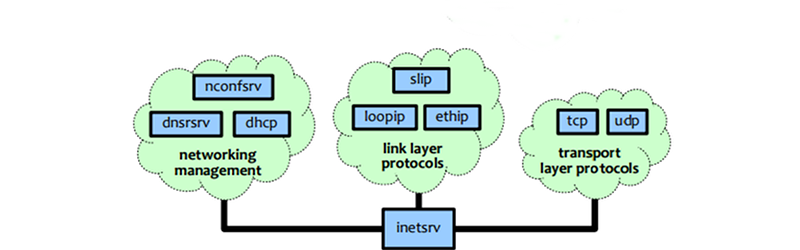
A traditional monolithic operating system keeps many core services inside the kernel. That can be fast and practical, but it also means a lot of important code lives in one powerful, sensitive place. HelenOS takes another route. Its kernel stays relatively small, while major operating-system functions such as file systems, networking, device drivers, and the graphical user interface are split into separate user-space components. These components communicate through message passing.
Think of it like a restaurant. A monolithic system is one superhero chef doing everything: taking orders, chopping onions, cooking pasta, washing dishes, and somehow remembering table seven wanted no parsley. HelenOS is more like a properly organized kitchen. Different stations handle different jobs, and they talk to each other. If one station drops a pan, the whole restaurant does not necessarily burn down.
Why HelenOS Is Different From Another Linux Distro
One of the first things to understand is that HelenOS is not Linux. It is not Unix. It is not a compatibility layer pretending to be a new operating system. It was designed and implemented from scratch, with its own architecture, its own services, and its own personality.
That matters because many alternative operating systems begin by borrowing familiar assumptions from Unix-like systems. HelenOS does not aim to clone existing operating systems. Its developers have intentionally traded some legacy compatibility for cleaner design. That decision makes HelenOS less convenient as a daily driver, but much more valuable as a learning platform and research system.
A Clean Design Instead of Legacy Baggage
Legacy compatibility is useful. It lets old software keep running, which is why businesses love it and developers occasionally mutter at it over cold coffee. But compatibility can also become a backpack full of bricks. HelenOS takes the cleaner path: build the essential parts specifically for HelenOS instead of stacking layers of adaptation code.
The result is an operating system that feels less like a clone and more like a laboratory. It invites users to ask basic questions again: What belongs in the kernel? How should drivers communicate? How should file systems be isolated? How can a graphical environment work when the system is composed of many cooperating services?
The Microkernel Idea, Explained Without Pain
The word “microkernel” can sound intimidating, but the idea is simple. Put only the most essential functions in the kernel, then move as much as possible into separate user-space services. The kernel handles foundational tasks such as scheduling, memory management, and inter-process communication. Other services run outside the kernel.
In HelenOS, this approach is paired with a multiserver design. Instead of one giant system service doing everything, HelenOS uses multiple smaller servers. File systems can be separate. Networking can be separate. Drivers can be separate. The user interface can be separate. They communicate with one another through structured message passing.
This separation creates a system that is modular and easier to reason about. A failure in one component does not automatically mean every other component has to collapse in a heap. For developers, students, and researchers, that isolation is gold. It makes the operating system easier to study, debug, extend, and discuss without needing to untangle a giant ball of kernel yarn.
What Can HelenOS Actually Do?
HelenOS is not just a diagram in a textbook. It is a real, bootable operating system with practical features. It supports multiple processor architectures and can run on virtual machines as well as selected real hardware. Its feature set includes textual and graphical interfaces, SMP support, multiple file-system types, networking, USB support, disk drivers, sound support, and more.
Graphical and Text Interfaces
HelenOS includes both command-line and graphical user-interface capabilities. Recent releases have improved the desktop experience with usability features such as a taskbar Start menu, window minimization, active-window highlighting, system menu access from the keyboard, and display configuration tools. No, it is not trying to be the next flashy consumer desktop. But it is far beyond a blinking cursor in a cave.
Networking Support
HelenOS supports TCP/IP networking with IPv4, including TCP, UDP, and ICMP. It also has basic IPv6 support. Network configuration can be handled automatically through DHCP for IPv4 or manually when needed. Supported network adapters include several real and emulated Ethernet devices, which makes testing in virtual environments more approachable.
File Systems and Storage
HelenOS supports several file-system types, including TMPFS, FAT, Ext2/Ext3/Ext4 through ext4fs, MFS, CDFS, exFAT in testing, and UDF in read-only testing. It also supports MBR/BIOS and GPT/UEFI partitioning schemes. These details matter because they show that HelenOS is not merely a kernel experiment. It has the plumbing needed to explore real operating-system behavior.
Hardware and Architecture Variety
HelenOS has been designed with portability in mind. It has supported architectures such as IA-32, AMD64, ARM, MIPS, PowerPC, SPARC V9, IA-64, and RISC-V in different contexts. That range makes the project especially interesting for anyone studying how operating systems adapt across processor families. Portability is not glamorous, but neither is dental floss, and both prevent terrible future pain.
HelenOS 0.14.1: A More Usable Experimental OS
HelenOS 0.14.1, also known as “Aladar,” was released in May 2024. The release included a newer build toolchain, kernel framebuffer improvements on supported ia32 and amd64 systems, and a noticeable list of user-interface upgrades.
The Start menu is one of the more visible changes. It replaced the older Launcher approach and brought more entries, mouse and keyboard control, editable menu items, and console-mode support. Windows can be minimized and restored. Active windows are highlighted in the taskbar. Keyboard users can access window-manager functions through a system menu. These may sound like ordinary desktop features, but for a research operating system, they represent the practical polish that makes experimentation less painful.
HelenOS also added utilities for taskbar configuration and display configuration. Applications such as the image viewer and Barber Pole gained text-mode support improvements. Benchmarking and tester tools received updates too, including IPC-related tests and benchmarks. In short, HelenOS continues to evolve not just as a concept, but as a usable environment for people who want to poke, test, learn, and build.
Who Should Try HelenOS?
HelenOS is not for everyone, and that is perfectly fine. Not every tool needs to be a toaster. Some tools are microscopes.
Operating-System Students
If you are learning operating-system concepts, HelenOS is a fascinating playground. It helps make abstract topics concrete: IPC, scheduling, file systems, user-space drivers, modular services, and graphical subsystem design. Reading about microkernels is useful. Booting one and exploring its structure is better.
Developers Who Like Clean Architecture
Developers who appreciate modular design will find HelenOS refreshing. Instead of squeezing everything into a familiar Unix-shaped mold, HelenOS shows a different way to organize system responsibilities. It is a chance to see how a modern OS can be assembled from cooperating pieces.
Open-Source Hobbyists
If you enjoy trying unusual operating systems, HelenOS belongs on your list. It is more educational than most “look, I changed the wallpaper” distributions and more approachable than many bare-metal hobby kernels. It gives you a working environment while still feeling experimental enough to keep your curiosity awake.
Researchers and Systems Thinkers
HelenOS has long been associated with academic and research use. Its design makes it suitable for exploring software components, verification ideas, modularity, and dependable-system concepts. For researchers, it offers a living codebase rather than a purely theoretical model.
How to Try HelenOS Without Angering Your Main Computer
The safest way to try HelenOS is inside a virtual machine such as QEMU. The project provides downloadable images for several architectures, and the official tutorial includes QEMU command examples for running an x86-64 ISO. This is the right approach for most users because it keeps HelenOS contained, reversible, and unlikely to interfere with your main system.
A basic experiment might look like this: download the appropriate HelenOS image, boot it in QEMU, explore the graphical environment, open the command line, inspect the file-system layout, test networking if configured, and browse available system utilities. You do not need to install it on bare metal to learn from it.
If you are feeling adventurous, you can explore supported hardware combinations, but treat that as an advanced project. HelenOS is a research-oriented operating system, not a consumer installer that will hold your hand while playing inspirational music.
HelenOS vs. Linux: Not a Fight, a Different Question
Comparing HelenOS to Linux as if they are direct competitors misses the point. Linux is a production-grade kernel ecosystem powering servers, phones, embedded devices, desktops, supercomputers, and countless appliances. HelenOS is a research and development operating system designed to explore a different architecture.
Linux asks, “How do we support an enormous real-world ecosystem?” HelenOS asks, “How cleanly can we design an operating system when modularity and understandability are first-class goals?” Both questions matter. One builds the highway. The other teaches you why roads work.
Strengths of HelenOS
HelenOS shines in several areas. First, its architecture is unusually clear for learners. Because major components are separated into user-space servers, it is easier to understand relationships between system parts. Second, it is portable, which makes it useful for studying architecture-dependent and architecture-independent design. Third, it is open source, which allows inspection, experimentation, and contribution.
Another strength is its refusal to be just another clone. HelenOS has its own direction. That can be inconvenient if you want instant software compatibility, but it is valuable if you want fresh thinking. In technology, not every project should be optimized for app stores and login screens. Some should exist to expand the map.
Limitations You Should Know Before Trying It
HelenOS is not a replacement for your daily operating system. It does not have the application ecosystem of Linux, the commercial polish of macOS, or the hardware support breadth of Windows. You should not expect to install it and immediately edit videos, run office suites, or join a video meeting where your microphone works perfectly and nobody says, “Can you hear me?”
Its biggest limitation is also part of its purpose: it is experimental and research-focused. Compatibility with legacy APIs is not the main objective. That means you try HelenOS to learn, test, develop, or explorenot to replace your production workstation.
Why “Forget Troy” Is the Right Mood
The title “Forget Troy. Try HelenOS” works because HelenOS invites you to move past the familiar myth. In tech, we often retell the same stories: Linux versus Windows, macOS versus everything, Unix philosophy versus modern complexity. HelenOS offers a different story. It is not about winning the desktop war. It is about understanding operating systems from a cleaner angle.
The project’s name may wink at ancient mythology, but the lesson is modern. Instead of sneaking complexity through the gates in a wooden horse, HelenOS pulls components apart and asks them to communicate clearly. That is a pretty good metaphor for better system design.
Experience Notes: What Trying HelenOS Feels Like
Trying HelenOS is less like installing a mainstream operating system and more like walking into a well-organized workshop. You will not find every consumer convenience waiting on the bench. You will find labeled tools, interesting machinery, and a strong sense that the builders care about how things fit together.
The first useful experience is booting HelenOS in a virtual machine. This is where expectations matter. If you arrive expecting a Linux distribution with a different logo, you may feel confused. If you arrive expecting an educational operating-system environment, the experience becomes far more rewarding. The boot process itself is a reminder that HelenOS is its own system. It is not a wrapper around Linux. It has its own services and its own rhythm.
Once inside, the interface feels modest but meaningful. The graphical environment is not trying to hypnotize you with animations. Instead, it gives you enough structure to explore. A taskbar, Start menu, windows, utilities, and configuration tools make the system feel approachable. It is the difference between reading about a house blueprint and actually walking through the rooms.
The command-line side is where HelenOS becomes especially interesting. Exploring the directory layout reveals how the system organizes applications, configuration, drivers, libraries, services, temporary files, and volumes. Seeing server applications separated from ordinary applications helps connect theory with reality. Suddenly, the phrase “multiserver operating system” is not just a phrase. It has folders, commands, and behavior attached to it.
Networking experiments can be satisfying too, especially in QEMU or another supported virtual environment. Configuring or testing network utilities shows how HelenOS handles practical communication without abandoning its architectural principles. The same goes for file-system exploration. Mounting, listing volumes, checking supported formats, or inspecting storage behavior gives you a hands-on view of how user-space services cooperate.
The best mindset is curiosity over productivity. Do not ask, “Can this replace my laptop today?” Ask, “What can this teach me about operating-system design?” That shift changes everything. HelenOS becomes less frustrating and more exciting. Every missing convenience becomes a clue about how much invisible work mainstream systems do. Every working feature becomes evidence that alternative architecture is not just academic poetry.
A beginner’s ideal session might be simple: boot HelenOS, open the graphical interface, explore the Start menu, launch a few utilities, switch to console mode, inspect the file-system layout, run basic commands, and read parts of the documentation alongside the system. That small journey can teach more than a dozen abstract articles because it turns concepts into experiences.
For developers, the experience can become deeper. You can browse the source code, examine how services communicate, study drivers, inspect IPC behavior, and look at how the system separates responsibilities. HelenOS rewards people who like asking “why” and “how.” It is not merely an operating system to use. It is an operating system to study.
For hobbyists, HelenOS scratches the rare itch of discovering something genuinely different. Many alternative operating systems are either too tiny to explore comfortably or too close to familiar systems to feel surprising. HelenOS sits in a sweet spot: functional enough to boot and investigate, distinct enough to challenge assumptions, and open enough to invite learning.
The experience may not be polished in the consumer sense, but it has personality. It feels like a system built by people who care about architecture more than marketing slogans. And honestly, in a world where every app claims to be revolutionary because it moved a button three pixels to the left, that kind of sincerity is refreshing.
Conclusion: HelenOS Is Worth Trying Because It Teaches You to Think Differently
HelenOS is not the operating system you try because you need another daily desktop. It is the operating system you try because you want to understand how operating systems can be designed differently. Its microkernel-based multiserver architecture, clean-from-scratch design, portability, open-source codebase, and practical features make it a valuable project for students, developers, researchers, and curious open-source explorers.
Forget Troy, at least for a while. HelenOS is the more interesting adventure. It will not launch a thousand ships, but it might launch a thousand questions about kernels, drivers, message passing, modularity, and the hidden machinery that makes computers feel alive. That is a pretty good bargain for a free operating system with a mythological name and a serious architectural brain.