Let’s begin with the question that sends half the internet into a cold sweat: does iMessage notify when you save a photo or take a screenshot? The practical answer is no. For regular photos, regular conversations, and ordinary screenshots in Apple Messages, the other person does not get a magical “Aha! They saved it at 9:42 p.m.” alert. Your phone is not a tattletale. At least not in this situation.
That said, this topic gets messy fast because Apple’s Messages app has a few privacy-adjacent features that look similar from a distance. Read receipts can reveal that you opened a message. Shared with You can surface photos in your library and other Apple apps. Audio messages have their own weird little rules. And once you mix in rumors, old forum posts, and one panicked friend who swears “my cousin saw a notification,” confusion spreads faster than a group chat meme.
This guide breaks it all down in plain English: what iMessage actually shows, what it does not show, why people get confused, and how to manage your privacy without wearing a digital tinfoil hat. If you want the short version, here it is: saving a photo or screenshotting an iMessage photo does not send a standard notification to the sender. Now let’s unpack the fine print.
The Quick Answer: Does iMessage Notify When You Save a Photo?
No. If someone sends you a photo in iMessage and you tap Save, download it to your Photos app, or otherwise keep it on your device, iMessage does not normally notify the sender. There is no standard popup, banner, or in-thread message that says, “Congrats, your image has been adopted into somebody else’s camera roll.”
This is the point most users care about, especially in conversations where a picture was sent casually and then suddenly becomes socially radioactive. Maybe it was a goofy selfie, a receipt, an outfit photo, or a screenshot of your grocery list that somehow looked way more dramatic than intended. Whatever the image was, saving it does not trigger a built-in iMessage alert for regular photos.
That also means there is no normal way for the sender to see when you saved it, how many times you looked at it, or whether you tucked it neatly into an album named “Random Stuff I Swear I Needed.” iMessage simply does not present that kind of save-tracking for ordinary image attachments.
Does iMessage Notify When You Screenshot a Photo or Conversation?
Again, no. If you take a screenshot of an iMessage photo, an entire conversation, or a single bubble that deserves to be framed in the Museum of Bad Decisions, the other person does not receive a built-in screenshot notification.
This is where iMessage differs from apps that are intentionally designed around disappearing or highly monitored content. Apple Messages is much more conventional in this respect. You can screenshot a chat, crop it, send it to a friend, save it for records, or keep it because someone typed something absolutely unbelievable. The act of taking the screenshot itself does not create a notification for the sender.
There is also no separate “screenshot history” that the other person can check. They cannot open the thread and review a dramatic log of your camera-roll crimes. If you take the screenshot, it stays on your device unless you choose to share it.
Why So Many People Think iMessage Does Notify
If the answer is that simple, why does this question keep bouncing around the internet like a rogue shopping cart? Because several iPhone features can look suspiciously like screenshot or save alerts when they are really something else entirely.
1. Read Receipts Get Blamed for Everything
The biggest culprit is read receipts. If read receipts are turned on, the sender can see that you opened their message. To a nervous person, that can feel like proof you saved the photo, screenshot it, studied it under a microscope, and maybe even discussed it in a side chat named “evidence.” But a read receipt only shows that you opened the message. It does not prove you saved or screenshotted anything.
In other words, “Read” means exactly what it says. It does not secretly mean “read, zoomed in, screenshotted, and emotionally evaluated.”
2. Shared with You Can Make Photos Show Up Elsewhere
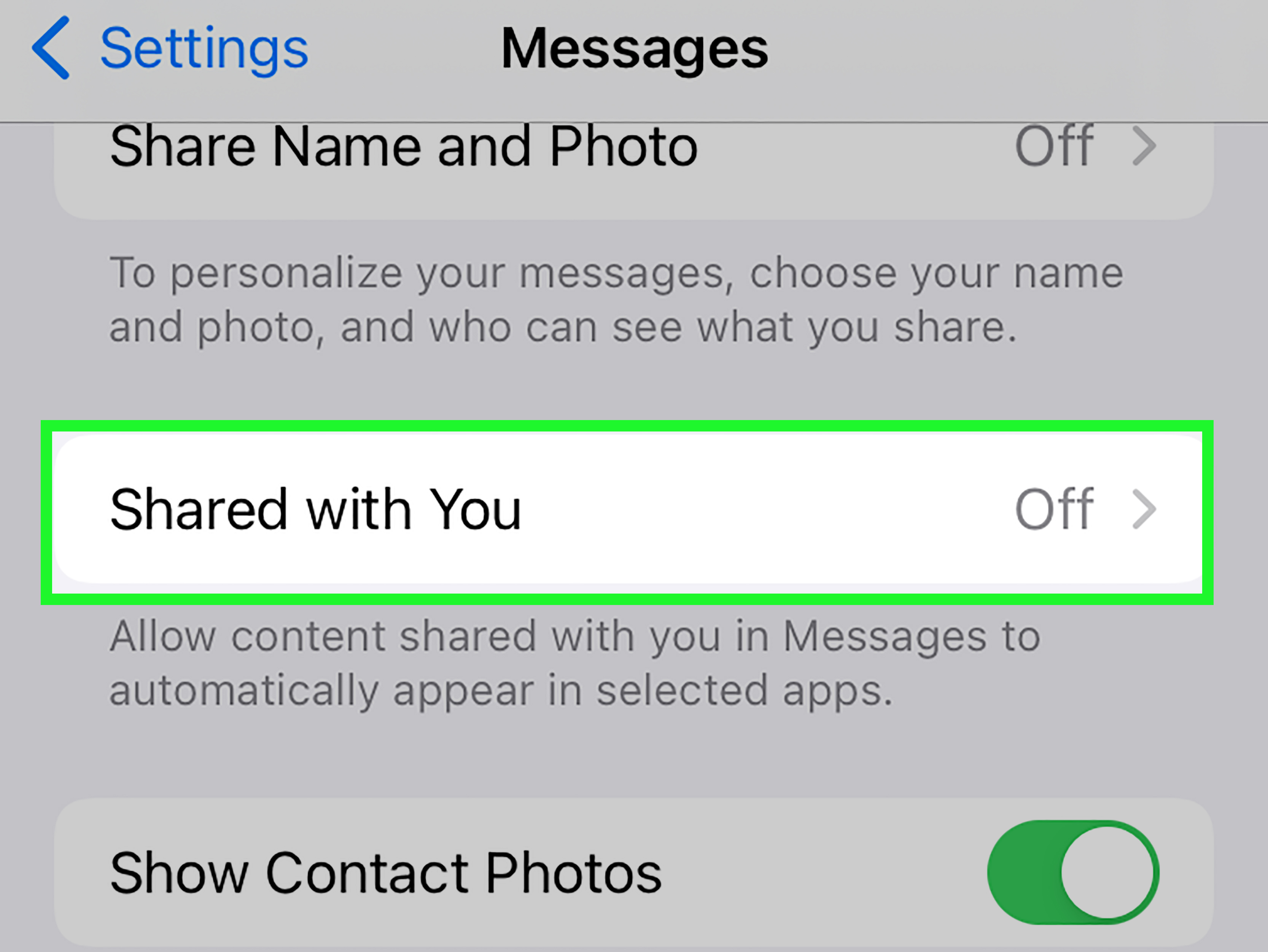
Apple’s Shared with You feature can automatically organize content that was sent in Messages. That means photos and links shared in a chat may later appear in places like the Photos app or other supported Apple apps. For users who are not expecting that behavior, it can look like a photo was “saved” automatically when really it was surfaced through Apple’s ecosystem.
This is one reason people sometimes assume the sender must have been told. They were not. The system may simply be helping you find shared content later. Helpful? Sometimes. Slightly creepy the first time you notice it? Also yes.
3. Audio Messages Are a Different Animal
Here is the sneaky exception that confuses everyone: audio messages. In Apple Messages, audio clips can expire unless someone taps Keep. That action can show up in the conversation as a visible change. So users hear that “saving something in iMessage can show up” and then assume the same rule applies to photos. It does not. Audio messages follow their own rules, and regular photos do not behave the same way.
4. Screenshot Metadata Can Look Suspicious
Sometimes a user takes a screenshot and then later sends or forwards that screenshot. The image itself may display as a screenshot, and depending on context, that can make it obvious when it was created. But that is not the same as iMessage notifying someone that you took it. That is just the screenshot existing, like a raccoon caught on a doorbell camera: the evidence is visible because it was sent, not because the app reported it.
5. Internet Rumors Never Truly Die
Every few years, a rumor resurfaces that Apple has added screenshot alerts to iMessage. Then everybody panics, group chats wobble, and nothing actually changes. The rumor keeps surviving because it sounds plausible. Lots of people expect messaging apps to work that way now. But expectation and reality are not twins. More like distant cousins who never text back.
What iMessage Can Actually Show the Other Person
If you want a practical privacy checklist, this is the section that matters most. Here is what another person may be able to see in iMessage, depending on settings and context:
- Whether a message was delivered
- Whether it was read, if read receipts are enabled
- When you are typing
- In some cases, visible actions tied to audio messages, such as keeping them
What they generally cannot see for regular photos is this:
- That you saved the photo to your library
- That you took a screenshot of the photo
- That you took a screenshot of the conversation
- The exact time you saved an ordinary image
- A count of how many times you viewed the image
That distinction matters because a lot of users confuse message visibility with media tracking. Apple’s Messages app exposes some communication signals, but it does not turn every tap into a confession.
How to Save a Photo in iMessage Without Confusion
If you receive a photo in Messages and want to keep it, you have a few normal options. You can tap and hold the image and choose a save option, open the photo and download it, or rely on Apple’s Shared with You behavior if that feature is enabled. None of those ordinary actions are the same thing as sending a notification to the original sender.
Still, smart users know that privacy is not only about app alerts. It is also about common sense. If someone sends you a personal image, a family photo, a legal document, or something shared in confidence, the bigger question is not “Will iMessage snitch?” but “Should I be saving this in the first place?” Technology answers one question. Character answers the other.
How to Manage Your Own Privacy in Messages
If you are the one sending photos and feeling slightly nervous about what happens next, you do have some control, even if you cannot stop screenshots outright.
Turn Off Read Receipts if You Want Less Visibility
Read receipts are the feature most often mistaken for screenshot alerts. If you do not want people to know when you opened their messages, turn them off in your Messages settings. That reduces one of the easiest ways people make incorrect assumptions about your behavior.
Review Shared with You Settings
If you do not like shared content appearing in other Apple apps or in your photo library, check your Shared with You settings. This is especially helpful if you are tired of random images from old conversations resurfacing like digital ghosts from 2024.
Be Careful With Sensitive Photos
The biggest privacy truth here is a simple one: once a photo leaves your device, you lose control over what another person can do with it. Even if iMessage does not send screenshot notifications, the other person can still save, screenshot, crop, forward, or photograph the screen with another device. Glamorous? No. Effective? Annoyingly, yes.
If a photo is highly private, highly personal, or something you would not want living forever in somebody else’s cloud backup, assume it could be preserved somehow. That is not paranoia. That is just modern digital hygiene.
Common Questions About iMessage Photo Privacy
Does iMessage notify when you save a picture from the chat?
No, not for regular photos. Saving an image does not typically alert the sender.
Does iMessage notify when you screenshot a disappearing photo?
iMessage is not built around the same mainstream screenshot-alert model people associate with other apps. For ordinary message photos and standard conversation content, users do not get a screenshot alert.
Can someone tell if I screen-record an iMessage photo?
For normal message content, Apple Messages does not provide a standard notification just because you captured what was on your screen. The bigger privacy issue is not detection. It is what you choose to do with the content afterward.
Can someone tell if I saved their photo because it shows up in my Photos app?
No. A photo appearing in your library or in Shared with You does not mean the sender was alerted. Those are features on your device, not a report card sent back to them.
What about audio messages that say “Kept”?
That is a different feature. Audio messages can show a visible “Keep” action in the conversation. That behavior often gets mixed up with photo saving, but the two are not the same.
Real-World Experiences: Why This Question Feels So Personal
Here is the human side of the topic, because this question is never really just about software. It is about social anxiety wearing an Apple logo.
A lot of people search this question right after one very specific moment: they take a screenshot, stare at the chat, and instantly regret every life choice that led to that finger movement. The screenshot was supposed to be harmless. Maybe it was a sweet message from a partner. Maybe it was a wild typo from a friend. Maybe it was proof that someone absolutely did promise to bring snacks and then showed up with “good vibes” instead. But the moment after the screenshot is always the same: a silent internal scream followed by a frantic search.
Work chats create a different flavor of panic. Someone sends a photo of a whiteboard, a shipping label, a mockup, or a quote from a client. You save it because you genuinely need it. Then the brain does what brains do best and invents a disaster movie: “Did my boss just get a notification? Does everyone in the thread now know I saved it? Am I about to be perceived?” Usually, no. What happened is much less dramatic. You saved a useful image. The app moved on. Your anxiety, meanwhile, started writing fan fiction.
Dating adds even more emotional seasoning. Someone sends a cute selfie, a funny candid photo, or a picture they definitely took after checking six different angles. You want to keep it because, well, you like them. Then suddenly the save button feels like a public declaration. People worry that saving a photo reveals too much interest, too much attachment, or too much evidence that they are, in fact, a person with feelings. The truth is less cinematic: iMessage does not announce it. The only thing giving away your crush is probably the grin on your face.
Family group chats are their own circus. A relative sends a baby photo, an old vacation picture, or a recipe screenshot that looks like it was photographed through steam and destiny. You save it because that is what families do. Then someone else in the group says, “Can you all see when a photo gets saved now?” and suddenly the digital room catches fire. In reality, the misunderstanding usually comes from read receipts, Shared with You, or confusion with another app entirely.
And then there are the people who screenshot conversations for self-protection, not gossip. They save messages to document plans, store addresses, keep receipts, preserve instructions, or hold onto evidence when a conversation matters. For them, the question is not juicy at all. It is practical. Can I keep a record without notifying the other person? For normal iMessage chats, the answer remains reassuringly boring: yes, a standard screenshot does not trigger a normal alert.
That is why this topic keeps trending. It sits at the intersection of privacy, etiquette, memory, relationships, and tiny daily moments of panic. The technology answer is simple. The emotional answer is not. Saving and screenshotting are often less about secrecy and more about uncertainty. People do not just want to know what the app does. They want to know what the action means. And that, unfortunately, is beyond the reach of any settings menu.
Final Verdict
So, does iMessage notify when you save or screenshot a photo? For regular images and ordinary conversations, no. iMessage does not send a built-in alert just because you saved a photo or took a screenshot. What people often mistake for screenshot tracking is usually one of three things: read receipts, Shared with You behavior, or the separate rules for audio messages.
The safest takeaway is simple. If you are receiving a photo, you can generally save it or screenshot it without triggering a standard iMessage notification. If you are sending a photo, remember that no app feature can fully control what happens once the image lands on someone else’s screen. In the digital world, a little caution goes a long way. So does not sending anything you would not want resurfacing in a group chat named “For Legal Reasons.”