Facebook is wonderful for sharing birthday snapshots, vacation sunsets, and that one suspiciously photogenic sandwich. It is also wonderful at reminding you that a photo posted five years ago can still pop up at the exact wrong moment. Maybe your boss sends you a friend request. Maybe your aunt comments on everything. Maybe you simply looked at your old albums and thought, “Wow, I really let 2017 do whatever it wanted.”
If that sounds familiar, the good news is that Facebook gives you several ways to make your photos more private. The less cheerful news is that Facebook privacy can feel like a maze designed by a very confident raccoon. Some photos can be locked down in seconds, while others require a little cleanup work. And a few, such as your current profile picture and current cover photo, play by their own rules.
This guide breaks the process into four practical methods. You will learn how to hide individual photo posts, lock down albums, control tagged photos, and clean up older content in bulk. Along the way, you will also see the limits of Facebook photo privacy, common mistakes people make, and smart examples that help you choose the right setting without turning your account into a digital bunker.
Before You Start: Know What “Private” Means on Facebook
On Facebook, “private” does not always mean the same thing. Sometimes it means Only Me. Sometimes it means Friends. Sometimes it means Friends except… that one coworker who somehow reacts to every photo with a thumbs-up at 6:13 a.m. In other words, privacy on Facebook is really about audience control.
That is why the smartest approach is not to hunt for one giant “make everything private” button and hope for the best. Instead, think in layers:
- Individual photo posts can often be changed one by one.
- Albums can usually be edited as a group.
- Tagged photos need separate controls because someone else may have posted them.
- Older posts and images may need to be limited, archived, or deleted through Activity Log.
One more important detail: your current profile picture and current cover photo are generally public. That means you can reduce visibility for many photos on Facebook, but not every single image in the exact same way. If you are trying to protect personal privacy, keep that exception in mind from the start.
Way #1: Change the Audience for Individual Photo Posts
The quickest way to make a Facebook photo private is to change the audience for the specific post that contains it. This method works best when you only need to hide a few images instead of cleaning up your entire account.
How it works
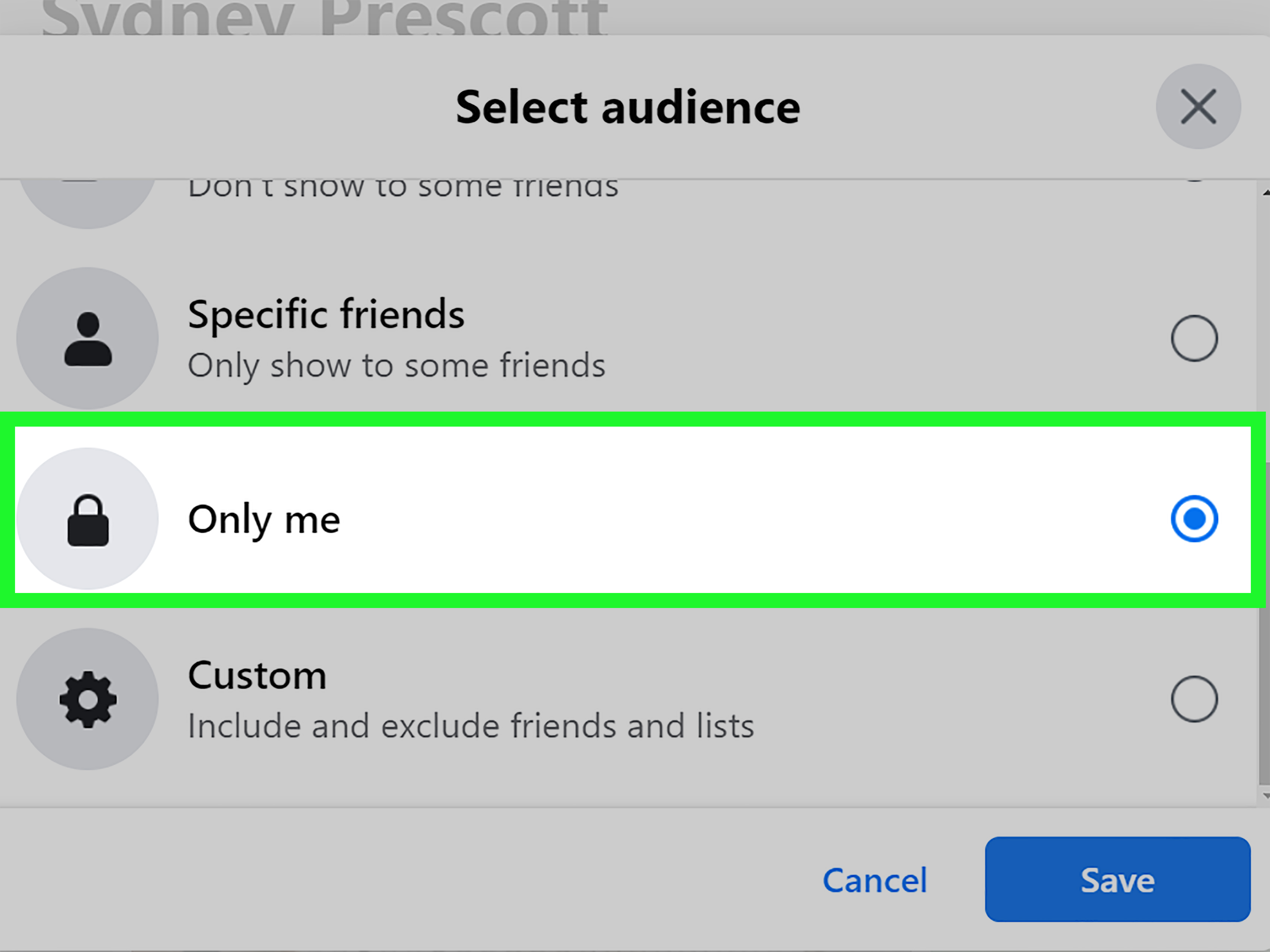
When you open a photo post on Facebook, you can usually access the post options and choose a new audience. Depending on how the photo was shared, you may see choices like Public, Friends, Friends except…, Specific friends, or Only Me.
If you want maximum privacy, Only Me is the setting that turns your photo into a little digital hermit. It still exists on your account, but only you can see it.
When to use this method
This option is ideal when:
- You posted a photo publicly by accident.
- You want to hide one or two images without touching an entire album.
- You need to exclude specific people, such as coworkers, clients, classmates, or relatives who think every old haircut deserves a public hearing.
Example
Let’s say you posted photos from a family party and later realized the post was visible to everyone. Instead of deleting the entire thing, you can edit the audience and switch it from Public to Friends. If the post is especially personal, switch it to Only Me or create a custom audience.
Best practice
Do not just change privacy after posting. Get in the habit of checking the audience selector before you upload new photos. That one tiny audience icon is the difference between “shared with close friends” and “accidentally open to the entire internet.”
Way #2: Make Entire Photo Albums More Private
If individual photo edits feel like using tweezers to clean a garage, album privacy is your better option. Facebook lets you change the privacy setting for many albums, which means you can control multiple photos at once instead of editing them one by one.
Why album privacy matters
Albums are often where your biggest privacy leaks live. Vacation albums, birthday albums, old school albums, and event albums can contain dozens or even hundreds of images. If an album is set to Public, every photo inside it may be far more visible than you intended.
Changing the album setting can instantly reduce the audience for the whole collection. That is a much cleaner move than chasing each photo individually like a tired digital hall monitor.
Privacy options to consider
- Friends if you still want your network to see the photos
- Friends except… if you want to exclude certain people
- Specific friends if the album is meant for a small circle
- Only Me if the album is purely personal
The catch
Not every Facebook album behaves the same way. Some system-created albums have restrictions. For example, your current profile picture and current cover photo are treated differently from regular albums. Older profile or cover photos may offer more flexibility, but the current ones are not fully private in the same sense as a normal album photo.
Example
Imagine you have an old “Summer 2019” album with 87 photos, and it is still set to Public. Instead of editing every beach shot manually, open the album, change its audience to Friends, and you have solved the problem in one move. That is the privacy equivalent of using the elevator instead of the fire escape.
Smart tip
Review old albums one at a time and ask yourself a simple question: Who actually needs to see this? If the answer is “nobody but me” or “just a few people,” that album should not be public.
Way #3: Control Tagged Photos and Turn On Review Settings
This is where many people get tripped up. Even if you are careful with the photos you post, other people can still tag you in photos and posts. That means your face can appear in content you never uploaded, never approved, and in some cases did not even know existed until your phone buzzed with a notification and a sense of dread.
Why tagged photos are different
Tagged photos involve someone else’s post. That means you do not always control the original audience. However, Facebook does let you control how tagged content appears on your profile and who can see certain tagged posts connected to you.
What to adjust
- Review posts you are tagged in before they appear on your profile
- Choose who can see posts you are tagged in on your profile
- Remove the tag from photos you do not want associated with your account
Turning on review settings is one of the most useful privacy steps on Facebook. It does not stop people from tagging you completely, but it helps prevent surprise appearances on your profile.
Example
Suppose a friend uploads reunion photos and tags you in twenty of them, including one where you are mid-sneeze, mid-blink, and somehow both. With review turned on, those tagged posts do not automatically show up on your profile. You can approve the good ones, ignore the weird ones, and remove tags where needed.
Important reminder
Review settings do not rewrite the laws of the internet. If someone else shares a photo publicly, you may still need to remove your tag or ask them directly to change the audience or delete the photo. But Facebook’s profile and tagging settings are still an excellent first line of defense.
Way #4: Clean Up Old Photos with Limit Past Posts, Archive, or Delete
If your Facebook account has been around for years, there is a good chance you are carrying some digital baggage. Old mobile uploads. Forgotten timeline photos. Event pictures from an era when everyone believed low lighting and dramatic angles were a personality. This is where cleanup tools become your best friend.
Use “Limit Past Posts” for a faster privacy reset
Facebook offers a feature that limits the audience for older posts in bulk. This is helpful when you want to reduce visibility on past content without auditing every single item individually.
It is not perfect, and it does not solve every privacy issue, but it is one of the fastest ways to make your older Facebook content less exposed. If you used to post publicly and now want a more locked-down profile, this feature can save a huge amount of time.
Use Activity Log for detailed cleanup
For a more precise approach, go into Activity Log. There, you can review your posts, photos, videos, and tagged content. You may be able to:
- Change audiences
- Archive posts so only you can see them
- Move content to trash
- Remove tags from photos and posts
Archiving is useful when you are not ready to delete something forever. It is basically the “I still have feelings about this photo, but the public does not need to participate” option.
Example
Maybe you posted dozens of public photos during college, and now you are job hunting. You do not necessarily want to erase your entire history, but you also do not want a recruiter finding your “themed costume night” album before they even finish reading your resume. Limit Past Posts can reduce exposure quickly, while Activity Log lets you clean up the most sensitive items one by one.
When to delete instead
If a photo is embarrassing, outdated, or simply unnecessary, deletion may be better than privacy edits. A private photo is still stored on your account. A deleted photo is gone. When in doubt, ask yourself whether the image has any reason to exist beyond nostalgic chaos.
Common Facebook Photo Privacy Mistakes to Avoid
Assuming “Friends” means total privacy
It does not. Friends can still screenshot, share, or show other people. Choose your audience carefully, but remember that online privacy always has limits.
Ignoring old albums
Many people focus on new posts and forget albums created years ago. Those old uploads may be the most exposed content on the account.
Forgetting tagged content
You can lock down your own posts and still have your profile connected to photos shared by other people. Tag settings matter.
Overlooking profile and cover photo exceptions
Your current profile picture and current cover photo are not as private as regular images. Choose them with that in mind.
Which Privacy Setting Should You Choose?
If you are not sure which audience to use, here is a simple rule of thumb:
- Use Public only for content you would be comfortable showing to literally anyone.
- Use Friends for normal everyday sharing.
- Use Friends except… when you want control without total lockdown.
- Use Specific friends for personal albums or event photos.
- Use Only Me for archives, memories, drafts, or anything that belongs in your private digital attic.
The goal is not to become invisible. The goal is to become intentional. Facebook privacy works best when you decide who a photo is actually for before the algorithm cheerfully tries to make it everyone’s business.
Final Thoughts
If you want to make your photos private on Facebook, the best strategy is a combination of small fixes and one-time cleanup. Start by changing the audience on individual photo posts. Then lock down your albums. Next, tighten your tag review settings so other people do not turn your profile into a surprise gallery. Finally, use Limit Past Posts and Activity Log to clean up older images in bulk.
That combination gives you a real privacy plan instead of a false sense of security. It also helps you avoid the classic Facebook trap: thinking a photo is “basically private” when it is actually one audience icon away from public view.
So yes, you can absolutely make your Facebook photos more private. Just remember that privacy on Facebook is less like flipping a switch and more like organizing a messy closet. It takes a little work, a little patience, and occasionally the emotional strength to admit that some photos should never see daylight again.
Experiences People Commonly Have When Making Facebook Photos Private
One of the most common experiences people report is pure surprise. They assume their photos have been visible only to friends for years, then they check an old album and discover it has been public since the Obama administration. That moment usually comes with a long stare at the screen, followed by a deep sigh, followed by several minutes of muttering things like, “Why did nobody tell me this?” If you have ever had that reaction, you are in very good company.
Another common experience is realizing how different Facebook’s privacy tools feel depending on the type of photo. Changing one recent image can be easy. Cleaning up ten old albums is less easy. Managing tagged photos can feel like a separate part-time job. People often say the most frustrating part is not that the controls do not exist, but that they are spread across posts, albums, profile settings, and Activity Log. It is like trying to organize your house and discovering the light switches are in different zip codes.
There is also a strong emotional side to the process. Making photos private is not always about secrecy. Often it is about context. A picture from a birthday party may be perfectly harmless, but you may not want clients, casual acquaintances, or strangers seeing it. Parents often tighten privacy after having children. Job seekers do it before interviews. Some people do it after a breakup. Others do it simply because they have grown up and no longer want their entire digital scrapbook sitting out on the sidewalk.
Many users also feel relief once they learn about tools like tag review, archive options, and custom audiences. Suddenly, Facebook feels a little less chaotic. You realize you do not have to delete every memory just to control who sees it. You can keep certain photos for yourself, share others with close friends, and quietly remove the ones that should retire from public life immediately. That sense of control matters more than people expect.
And then there is the comedy portion of the experience: the actual photos themselves. Once people start reviewing old uploads, they often rediscover strange captions, blurry party pictures, mystery screenshots, and enough aggressively filtered selfies to stock a small museum. Privacy cleanup turns into a time capsule whether you planned it or not. You begin with a practical goal and end up wondering why you once documented every cup of coffee like it was breaking news.
In the end, the experience is usually worth it. People come away feeling more confident, more organized, and more aware of what their online presence actually looks like. That is the real benefit of making your Facebook photos private. It is not just about hiding images. It is about deciding what belongs in public, what belongs among friends, and what belongs safely tucked away where only you can revisit it on a rainy afternoon.