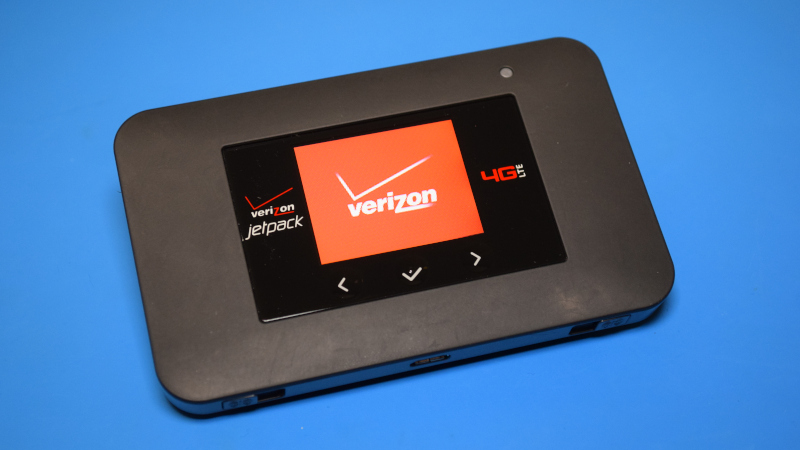
The Verizon AC791L Jetpack 4G Mobile Hotspot is one of those small gadgets that looks boring until you realize how much engineering is packed inside. At first glance, it is just a black pocket router with a tiny screen, a battery door, and the personality of a hotel TV remote. But under that simple shell sits a compact LTE modem, dual-band Wi-Fi hardware, antenna routing, battery management, SIM access, external antenna ports, and enough thermal compromise to make any hardware nerd lean closer.
This teardown-style look at the Verizon AC791L Jetpack focuses on what the device is, how it is built, why its design mattered, and what real-world users can learn from opening the metaphorical hood. The AC791L was manufactured by NETGEAR for Verizon and positioned as a premium 4G LTE mobile hotspot. It supported LTE Category 6, 2x carrier aggregation, simultaneous dual-band Wi-Fi, up to 15 connected devices, a removable 4,340 mAh lithium-ion battery, and a claimed battery life of up to 24 hours. For a pocket-sized hotspot from the mid-2010s, that was not just respectable. That was “leave the charger at home and feel reckless” territory.
What the Verizon AC791L Jetpack Was Designed to Do
The AC791L was built for people who wanted a dedicated internet connection without relying on public Wi-Fi. Travelers, remote workers, RV owners, field technicians, students, and families on road trips all fit the target audience. Instead of tethering a phone and draining its battery, users could turn on the Jetpack, connect laptops and tablets, and share one Verizon 4G LTE connection across multiple devices.
The device supported Wi-Fi 802.11ac/b/g/n with simultaneous 2.4 GHz and 5 GHz dual-band operation. That was a major selling point because many older hotspots leaned heavily on 2.4 GHz Wi-Fi, which can get crowded quickly in apartments, offices, airports, and coffee shops. With 5 GHz support, the AC791L could deliver better short-range performance for compatible laptops and tablets, while 2.4 GHz remained useful for range and older devices.
On the cellular side, the AC791L supported LTE Category 6 with 2x carrier aggregation. In plain English, it could combine compatible LTE channels to improve potential download performance when Verizon’s network supported it. The official specifications listed LTE bands including Band 13, Verizon’s important 700 MHz coverage band, plus Bands 2, 3, 4, and 7. It also supported legacy CDMA, GSM, and UMTS/HSPA bands, which made the device more flexible than a single-band domestic hotspot.
External Teardown: The Case, Screen, Ports, and Battery Door
The outside of the Verizon AC791L Jetpack is practical rather than glamorous. The body is a rounded rectangular plastic shell, small enough for a jacket pocket but thick enough to house a large removable battery. The front includes a 1.77-inch color LCD with touch navigation buttons. The screen shows essential information such as signal status, Wi-Fi name, connected devices, battery level, data usage, and system messages.
The back cover is removable, which is one of the most repair-friendly parts of the design. Under the cover sits the removable lithium-ion battery. This matters because batteries age faster than most electronics. A hotspot might still function perfectly after years in a drawer, but if the battery has swollen, lost capacity, or become unreliable, a removable pack makes replacement far easier than surgery on a sealed device.
The SIM card slot is located under the battery. The AC791L uses a 3FF microSIM format. This placement keeps the SIM secure, but it also means users must remove the back cover and battery to access it. That is a mildly annoying design choice if you swap SIMs often, but for a carrier-focused Verizon Jetpack, it makes sense. Verizon likely expected most users to install the SIM once and forget about it.
The device also includes two TS-9 antenna connectors. These are small external antenna ports that allow users to connect optional 4G or 3G antennas. For people in weak-signal areas, that feature can be more important than raw modem speed. A better signal often improves stability, reduces connection drops, and helps the modem avoid working harder than necessary. In mobile internet setups, antennas are not magic wands, but they can be the difference between “usable” and “why is this page still loading?”
Internal Design: What Is Likely Happening Under the Shell
Inside the AC791L, the architecture follows the typical layout of a premium mobile hotspot. A central printed circuit board carries the LTE modem section, Wi-Fi radio components, power-management circuitry, SIM contacts, display connector, buttons, charging circuitry, and antenna pathways. The exact board layout is compact because the device must balance signal performance, heat, battery size, and durability in a very small space.
The LTE side handles communication with Verizon’s cellular network. The RF front-end manages supported frequency bands, filtering, amplification, and antenna switching. The Wi-Fi section then rebroadcasts that cellular connection locally as a private wireless network. In other words, the Jetpack is both a cellular modem and a tiny router. It talks to a cell tower in one direction and to your laptop in the other, like a very serious translator wearing a plastic jacket.
The battery-management system is another key internal area. The AC791L’s 4,340 mAh removable battery was large for a pocket hotspot, enabling the device’s headline battery-life claim. The device also supported universal charging, sometimes called Jump Boost, allowing it to charge small USB devices such as smartphones. That means the internal power circuit had to manage not only charging itself but also safely providing power outward.
Battery and Power: The AC791L’s Biggest Advantage
The battery is one of the most important reasons the AC791L earned attention. Many mobile hotspots are technically portable but practically married to a charging cable. The AC791L was designed to survive long workdays, road trips, and travel sessions with far less battery anxiety.
Its removable lithium-ion battery was rated at 4,340 mAh, with official claims of up to 24 hours of active use and up to 650 hours of standby time. Real-world battery life always depends on signal strength, number of connected devices, Wi-Fi band, data activity, and screen usage. A hotspot sitting near a strong tower with two connected devices will behave very differently from one buried in a backpack, feeding five tablets during a family streaming marathon.
From a teardown perspective, the large battery influences the entire physical design. The AC791L is not ultra-thin because it was never meant to be ultra-thin. It was meant to last. The battery takes up a major portion of the internal volume, while the electronics are arranged around the need for safe power delivery, heat control, and serviceable battery replacement.
Wireless Performance: LTE Cat 6 Meets Dual-Band Wi-Fi
The Verizon AC791L Jetpack supported LTE Category 6, which allowed theoretical download speeds up to 300 Mbps under ideal conditions. That number should be treated as a lab ceiling, not a promise. Cellular speed depends on tower congestion, signal quality, plan limits, firmware, band availability, network configuration, and whether the universe is feeling generous that afternoon.
Still, LTE Cat 6 and carrier aggregation gave the AC791L a meaningful advantage over older LTE hotspots. Carrier aggregation allows compatible devices to use multiple LTE channels together. When supported by the network, this can improve throughput and efficiency. Later firmware updates also expanded some network capabilities, including additional LTE band and carrier aggregation support.
The Wi-Fi side was also strong for its time. Support for 802.11ac and simultaneous dual-band 2.4/5 GHz Wi-Fi meant the hotspot could serve modern devices better than older single-band units. The AC791L also supported guest Wi-Fi, multiple SSIDs, WPS, Wi-Fi security encryption, VPN pass-through, NAT firewall functions, device blocking, and an admin website protected by a password.
Ports and Antennas: Small Details That Matter
The AC791L includes a microUSB port for charging and USB-related functions. MicroUSB now feels ancient next to USB-C, but at the time it was standard and widely supported. The package also included a USB cable, wall charger, and universal charging cable depending on the bundle.
The dual TS-9 antenna ports are the more interesting hardware feature. These ports give the AC791L flexibility for users in fringe coverage areas. In a home, cabin, RV, or job site, an external MIMO antenna can improve the cellular link when positioned properly. The device itself also supports antenna diversity, which helps maintain signal quality by using multiple antenna paths.
For teardown-minded readers, the antenna system is worth respecting. Small wireless devices rely on precise antenna placement, grounding, shielding, and case geometry. Randomly modifying the shell, covering antenna areas with metal, or using poor adapters can make performance worse instead of better. Wireless engineering is a little like cooking rice: simple from a distance, surprisingly easy to ruin up close.
Repairability and Safe Teardown Notes
The AC791L is more serviceable than many modern sealed gadgets because the battery and SIM area are accessible without special tools. That said, deeper disassembly should be approached carefully. Mobile hotspots contain small ribbon cables, snap-fit plastic clips, delicate connectors, and lithium-ion battery components. If a battery is swollen, leaking, unusually hot, or physically damaged, it should not be reused or forced back into the device.
A safe inspection starts with powering the device off, removing external cables, taking off the back cover, and removing the battery. That is enough for most users who want to check the SIM, confirm the battery model, clean contacts gently, or inspect for obvious damage. Going beyond that can damage the case, screen connector, antenna leads, or RF shielding. For many owners, the smartest teardown is a visual inspection rather than a full plastic-clips-everywhere adventure.
What the Teardown Tells Us About the AC791L’s Strengths
1. The Design Prioritized Battery Life
The removable 4,340 mAh battery is the star of the hardware. The AC791L was designed as a workhorse, not a fashion accessory. That decision made it thicker but far more practical for people who needed long mobile sessions.
2. It Was Built for Better Wi-Fi Than Basic Hotspots
Dual-band 802.11ac support gave the AC791L better local networking capability than many older hotspots. It could serve multiple devices more comfortably, especially when users separated older 2.4 GHz devices from faster 5 GHz connections.
3. External Antenna Ports Added Real Utility
The two TS-9 connectors made the device more useful in weak-signal environments. This feature helped the AC791L appeal to RV users, travelers, rural users, and anyone who understood that signal quality often beats marketing speed.
4. The Interface Was Simple but Useful
The small color screen reduced the need to log in to the admin page for basic information. Seeing the network name, password, connected devices, battery level, and usage data directly on the device made everyday use easier.
Limitations: Where the AC791L Shows Its Age
The AC791L remains interesting, but it is not modern hardware. It does not support 5G, newer LTE categories, USB-C, Wi-Fi 6, eSIM, or the latest carrier aggregation combinations found in newer hotspots. Its microUSB charging port feels dated, and old batteries may need replacement before the device can be trusted for travel.
Carrier compatibility is another important limitation. Although the hardware supports multiple bands and was marketed as global-ready, practical service depends on SIM policies, carrier provisioning, firmware, APN settings, and network shutdowns. Verizon’s older CDMA network support, for example, is no longer a meaningful advantage in today’s environment. The AC791L’s best use case is as a legacy 4G LTE hotspot where compatible service is still available.
Who Should Still Care About a Verizon AC791L Jetpack?
The AC791L is still worth understanding for repair hobbyists, used-device buyers, mobile internet enthusiasts, and anyone comparing older LTE hotspots. It is also a good example of a product that balanced portability, battery capacity, and wireless performance before modern 5G hotspots became common.
A used AC791L can be useful for basic backup internet, travel, testing SIMs, or learning about mobile hotspot hardware. However, buyers should check battery condition, charging behavior, IMEI status, firmware, SIM compatibility, and whether the intended carrier still supports the necessary bands and provisioning. A cheap hotspot is only a bargain if it actually connects.
Experience Notes: Living With the Verizon AC791L Jetpack
Using the Verizon AC791L Jetpack feels different from using phone tethering. A phone hotspot is convenient, but it competes with everything else the phone is doing: calls, notifications, GPS, apps, photos, and battery drain. The AC791L has one job, and it does that job with the calm confidence of a lunchbox full of antennas.
The first thing most users notice is the battery life. In normal travel use, the AC791L is the kind of device you turn on in the morning and forget about for hours. That is exactly what a mobile hotspot should be. Nobody wants their internet connection to become another needy rectangle begging for a charger every two hours.
The second noticeable advantage is stability. A dedicated hotspot can be placed where signal is best, such as near a window, on a desk, or higher up inside an RV. Your laptop does not have to sit there too. This separation sounds small, but it matters. Cellular signals can change dramatically depending on location inside a building or vehicle. Moving the AC791L just a few feet can sometimes improve performance.
The small display is also more useful than it looks. Instead of digging through settings on a phone or browser page, users can quickly check battery level, signal, Wi-Fi details, and connected devices. For families or teams, that visibility helps. If the connection suddenly slows down, the screen may reveal that too many devices are connected, or that someone’s tablet has quietly decided to update every app known to civilization.
The external antenna ports add another layer of practicality. For casual city use, most people will never touch them. For rural cabins, campgrounds, work trailers, or long road trips, they can become valuable. Pairing the hotspot with a properly placed MIMO antenna can improve signal conditions in places where the built-in antennas struggle. It is not guaranteed magic, but it gives users a way to experiment intelligently.
The AC791L’s age is noticeable, though. MicroUSB charging is less convenient now, and battery health varies widely on used units. A secondhand Jetpack may look fine but behave badly if the battery is tired. Slow charging, sudden shutdowns, swelling, overheating, or rapid battery drain are signs to stop using the battery and replace it safely.
Another real-world lesson is that hotspot performance is only partly about the device. The AC791L can have solid hardware and still perform poorly on a congested tower or an incompatible plan. Mobile internet is a chain: device, battery, firmware, SIM, plan, tower, band, signal, and local Wi-Fi environment. One weak link can make the whole experience feel broken.
As a teardown subject, the AC791L is satisfying because it shows practical engineering choices clearly. The thick body makes room for a real battery. The removable back improves serviceability. The TS-9 ports acknowledge that antennas matter. The dual-band Wi-Fi makes sharing more flexible. It is not a futuristic gadget anymore, but it remains a well-designed example of what a serious 4G mobile hotspot looked like.
Conclusion
The Verizon AC791L Jetpack 4G Mobile Hotspot is more than an old pocket router. Its teardown story reveals a device built around endurance, wireless flexibility, and practical travel use. With LTE Category 6, carrier aggregation, dual-band 802.11ac Wi-Fi, a removable 4,340 mAh battery, TS-9 antenna ports, and support for up to 15 devices, it was a strong mobile hotspot for its era.
Today, the AC791L is best viewed as a capable legacy 4G LTE device. It cannot compete with modern 5G hotspots, but it still teaches useful lessons about mobile hardware design. Good battery access matters. External antennas matter. Screen-based controls matter. And sometimes the most interesting gadget on the desk is not the shiny new one, but the older one that still has screws, clips, ports, and a little story hiding under the battery door.