Sunny Custom Keyboard Illuminates The Past sounds like the title of a tiny sci-fi film about a desk accessory with feelings. In reality, it points to something even better: a custom mechanical keyboard that blends retro computing nostalgia, telephone keypad oddities, old workstation design, and modern maker culture into one gloriously overbuilt typing machine.
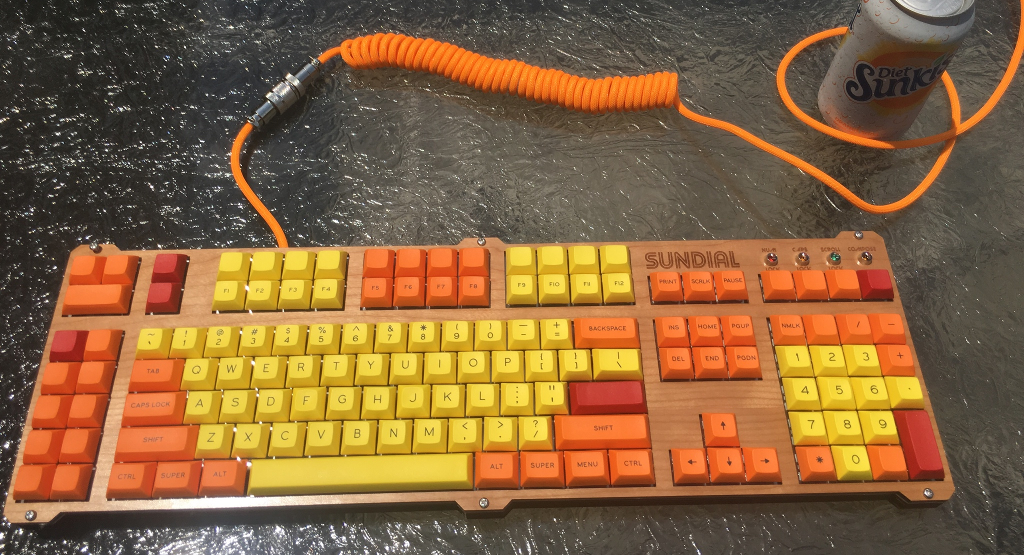
At the center of the story is the Sundial Keyboard, a hand-built project by maker Jesse Robinson that combines design cues from classic Sun keyboards, IBM 122-key terminal keyboards, and the familiar-but-weird layout of a phone dial pad. It is not merely a keyboard. It is a glowing reminder that computer history is full of strong opinions, strange standards, and enough function keys to make a spreadsheet blush.
In today’s world of ultra-thin laptops and minimalist keyboards, the Sundial feels like a cheerful rebellion. It says, “What if the past was right about big keyboards?” Then it adds extra keys, clicky switches, lock indicator lights, macro controls, and a number pad inspired by Ma Bell’s telephone layout. Subtle? Not at all. Delightful? Absolutely.
What Is the Sunny Custom Keyboard?
The Sunny Custom Keyboard, better known through the Sundial Keyboard project, is a custom mechanical keyboard designed to celebrate older input devices while still working as a modern computer keyboard. Its layout takes inspiration from several places: Sun Microsystems workstation keyboards, IBM’s large terminal keyboards, and the push-button telephone keypad.
That combination may sound like someone cleaned out a museum drawer and accidentally invented a peripheral. But the result is surprisingly coherent. The keyboard includes F13 through F24, media keys, macro keys, a distinctive number pad, and classic lock indicator lights. Those features give it the spirit of a workstation keyboard from an era when computers looked like serious machines and keyboards were built like office furniture with ambitions.
Instead of chasing the smallest possible layout, the Sundial leans into abundance. Many modern keyboards delete keys to save desk space. This one adds them back with a grin. It remembers that keyboards used to be command centers, not just rectangles for typing passwords and apologizing in Slack.
Why This Keyboard Feels Like a Time Machine
The magic of the Sundial Keyboard is not just in its parts. It is in the historical mashup. Sun keyboards were famous in Unix and workstation environments, where dedicated keys helped users control powerful systems. IBM 122-key keyboards were built for terminals and business computing, where extra function rows were not decoration; they were daily tools.
Then there is the telephone keypad influence. Most people eventually notice that calculator keypads and phone keypads are reversed. Calculators usually place 7, 8, and 9 at the top. Phones place 1, 2, and 3 at the top. The difference came from separate design histories, including human-factors research behind push-button telephone layouts. The Sundial Keyboard brings that phone-style arrangement into a computer keyboard, which is exactly the kind of harmless chaos that keyboard enthusiasts appreciate.
It also includes the bottom-row telephone trio: asterisk, zero, and octothorpe. Yes, octothorpe is the fancy name for the pound or hash symbol. It sounds like a medieval sea creature, but it belongs on a keypad.
The Design: Retro, Functional, and Proudly Extra
Many custom mechanical keyboards are designed around elegance, symmetry, or compactness. The Sundial Keyboard is designed around usefulness and personality. It has room for specialized keys, system controls, and visual signals. It does not whisper “productivity.” It loudly clacks it in a conference room until everyone understands.
Function Keys for Days
One of the standout features is the inclusion of F13 through F24. These keys are rarely seen on standard consumer keyboards today, but they have real utility. Power users can map them to macros, shortcuts, media controls, terminal commands, development tools, creative software actions, or automation workflows.
For example, F13 might open a code editor, F14 could launch a screenshot tool, and F15 could mute every app that thinks autoplay video is a personality trait. In design software, extra function keys can trigger common tools. In streaming setups, they can switch scenes. In writing workflows, they can paste formatting, insert templates, or launch research notes.
Macro Keys and Media Keys
Macro keys are the keyboard equivalent of having a tiny assistant who does not ask for coffee breaks. They can perform repeated actions with one press. For programmers, that could mean compiling code or inserting boilerplate. For writers, it could mean opening a content outline. For gamers, it might mean executing a complex command sequence.
Media keys add another layer of convenience. Volume control, play, pause, and track navigation may seem ordinary now, but on a large custom layout, they feel intentional. The board becomes less like a keyboard and more like a personal console.
Lock Indicator Lights
Remember lock indicator lights? Caps Lock, Num Lock, Scroll Lockthe tiny glowing signals that saved many people from accidentally typing an entire paragraph like a ransom note. The Sundial Keyboard keeps this tradition alive. In an age where some keyboards hide status indicators or remove them entirely, visible lock lights feel refreshingly practical.
They also reinforce the retro aesthetic. A small light can do more than indicate state; it can make a keyboard feel alive. That is part of why the phrase “illuminates the past” works so well. The board literally lights up old ideas and makes them useful again.
The Build: Hand-Wired Hardware With Modern Brains
The Sundial Keyboard was hand-wired, which means the switches were connected manually instead of relying entirely on a mass-produced printed circuit board. Hand-wiring is common in one-off keyboard projects because it gives builders freedom to experiment with unusual layouts. It also requires patience, precision, and the emotional resilience to stare at a wiring matrix until it stops looking like electronic spaghetti.
The board uses a Teensy 2.0 microcontroller, a small USB development board popular in older custom keyboard projects. Microcontrollers like the Teensy act as the keyboard’s translator. They read switch presses, process the layout, and send commands to the computer over USB.
This is where retro inspiration meets modern flexibility. A vintage keyboard from the 1980s may need adapters or repairs to work with today’s systems. A custom keyboard inspired by that era can use modern firmware, USB support, and programmable layers while preserving the feeling of old hardware.
Switches and Keycaps: The Feel Matters
A keyboard is not only a layout. It is a physical experience. The Sundial Keyboard uses Kailh BOX Navy switches, which are known for being clicky, tactile, and bold. They are not quiet switches. They are not shy switches. They are the switches you use when you want each keystroke to sound like a tiny mechanical decision.
Clicky switches are loved because they provide clear feedback. You press a key, you feel the bump, you hear the click, and your brain receives a tiny reward. Of course, your roommate, coworker, or cat may receive a different reward, such as “mild concern.”
The keyboard also uses DSA keycaps with dye-sublimated legends. DSA is a uniform keycap profile, meaning keys have a consistent shape across rows. Dye sublimation is a durable printing method where legends are infused into the plastic rather than simply printed on top. This helps the labels resist wear over time, which matters when a keyboard has enough special keys to qualify as a small alphabet zoo.
Why Retro Keyboards Still Matter
Retro keyboards remain popular because they represent a period when computer input devices were designed with serious tactile intention. IBM’s Model M, for example, became legendary for its buckling spring feel, durability, and strong typing feedback. Sun keyboards became beloved among workstation users for their layout and Unix-friendly keys. These devices were not always sleek, but they had presence.
Modern keyboards often optimize for thinness, silence, portability, and manufacturing efficiency. That is not wrong. A slim laptop keyboard is useful on an airplane tray table, assuming the person in front of you does not recline with the force of a collapsing bridge. But for long typing sessions, coding, writing, design work, and technical tasks, many users prefer a keyboard with travel, feedback, and customizable controls.
The Sundial Keyboard shows that old ideas do not have to stay old. Extra keys, visible indicators, durable caps, strong switches, and programmable firmware can all be relevant today. The past is not a museum shelf. Sometimes it is a better desk setup.
The Phone Keypad Twist
The phone-style number pad is one of the most memorable parts of the design. It forces users to confront a design question hiding in plain sight: why do number pads disagree with one another?
Calculator keypads and computer numpads generally follow adding-machine traditions, where larger numbers sit at the top. Telephone keypads came from a different design path tied to push-button dialing and human-factors testing. Both layouts became standards because people kept using them. Once a layout becomes familiar, changing it is like moving the bathroom light switch two inches to the left. Technically possible, emotionally unforgivable.
By using the phone layout, the Sundial Keyboard turns a historical design quirk into a feature. It is playful, but it also makes users think. A custom keyboard can be more than a typing tool; it can be a conversation with interface history.
Custom Keyboards as Personal Technology
The custom keyboard movement has grown because people want tools that match their habits. Some users want compact 40% boards. Some want split ergonomic layouts. Some want silent tactile switches. Some want full-size boards heavy enough to survive a small meteor. The point is choice.
Open-source firmware such as QMK has helped fuel this culture by allowing builders to customize layouts, layers, macros, lighting, and special behaviors. A keyboard no longer has to be limited to what came in the box. It can become a personal interface designed around the user’s work.
The Sundial Keyboard fits perfectly into that philosophy. It is not trying to appeal to everyone. It is trying to satisfy a specific vision: a retro-inspired, feature-rich, hand-built keyboard that honors old workstations while operating in a modern environment.
Practical Lessons From the Sundial Keyboard
Even if you never build a keyboard with 24 function keys, the Sundial offers useful lessons for anyone interested in custom hardware.
First, Layout Is a Design Language
Every key placement communicates priorities. A compact keyboard says portability matters. A split keyboard says ergonomics matter. A giant keyboard with F24 says, “I have macros, and I am not afraid to use them.” The Sundial uses layout as storytelling.
Second, Nostalgia Works Best With Utility
Retro design is fun, but it becomes powerful when it solves modern problems. The Sundial does not simply copy old keyboards. It borrows their strengthsextra controls, status lights, durable hardwareand adapts them for present-day computing.
Third, Physical Interfaces Still Matter
Touchscreens are everywhere, but physical keys remain unmatched for speed, accuracy, and muscle memory. A good keyboard lets users act without looking. A great custom keyboard makes those actions feel natural, satisfying, and maybe just a little theatrical.
Who Would Love a Keyboard Like This?
The Sundial Keyboard is ideal for enthusiasts who love retro computing, Unix workstation aesthetics, unusual layouts, and deep customization. Programmers may appreciate the macro potential. Writers may enjoy the tactile typing experience. Designers may admire the layout as a functional art object. Vintage computer fans may simply enjoy seeing Sun and IBM influences treated with affection rather than dust.
It is probably not for people who want a tiny, silent keyboard for a shared office. Kailh BOX Navy switches are not known for whispering. They are known for announcing themselves like a tap-dancing accountant. But for a personal workspace, workshop, or hobby desk, that sound can be part of the charm.
Experience Section: Living With a Keyboard That Illuminates the Past
Using a retro-inspired custom keyboard like the Sundial is less like switching accessories and more like changing the mood of the entire desk. The first thing you notice is the size. It occupies space with confidence. There is no apology in the layout, no attempt to hide its extra keys, no minimalist shame. It sits there like a control panel from a friendly spaceship built in 1987.
The second thing you notice is the sound. Clicky switches transform typing into a rhythm. Emails feel more official. Notes feel more deliberate. Even deleting a typo has drama. On a flat laptop keyboard, writing can feel like tapping on a lunch tray. On a tactile mechanical board, each sentence feels constructed, not merely entered.
The extra keys change behavior, too. At first, F13 through F24 may seem excessive. Then you map one key to open your writing app, another to paste a favorite HTML snippet, another to launch a browser profile, and suddenly the excess becomes convenience. The keyboard teaches you to think in workflows. Repeated tasks become single presses. Small frictions disappear. You begin to wonder why normal keyboards stopped at F12, as if productivity politely ends there.
The phone-style keypad creates a different kind of experience. It is familiar and unfamiliar at the same time. Your hand recognizes the pattern from phones, but your computer habits may hesitate. That tiny moment of confusion is part of the fun. It reminds you that “standard” does not mean “inevitable.” It means enough people agreed, forgot why, and kept going.
The lock lights add a surprisingly emotional detail. They are small, but they make the board feel responsive. When Num Lock glows, the keyboard is not just sending data; it is communicating. Modern devices often hide their state behind software menus. A physical indicator light is honest. It says what is happening without requiring a notification, a tooltip, or a support article titled “Why Is My Keyboard Doing That?”
There is also a deeper satisfaction in knowing that a keyboard like this was built by hand. Hand-wired keyboards carry the personality of their maker. Every switch, wire, and decision reflects intention. The result may not be mass-market perfect, but it has character. In a world of identical devices, character is refreshing.
Most importantly, a keyboard like the Sundial changes how you think about tools. It proves that the best interface is not always the newest one. Sometimes a good tool looks backward, borrows wisely, and returns with better ideas. It illuminates the past not by copying it exactly, but by showing which parts still shine.
Conclusion
Sunny Custom Keyboard Illuminates The Past is more than a clever title. It captures the appeal of a custom keyboard that turns computing history into a working, clicking, glowing object. The Sundial Keyboard blends Sun workstation flavor, IBM terminal-key abundance, telephone keypad history, hand-wired craftsmanship, clicky mechanical switches, and modern programmability into one memorable project.
Its charm comes from refusing to treat the past as obsolete. Old keyboards had personality, durability, dedicated controls, and visual feedback. Modern keyboard culture adds open firmware, custom layouts, better materials, and personal workflow design. Put those ideas together, and you get something that feels both nostalgic and useful.
The lesson is simple: a keyboard does not have to be boring. It can be a tool, a hobby, a design statement, and a small museum of interface history. The Sundial Keyboard proves that when makers revisit old ideas with curiosity, the past does not just sit there. It lights up.
SEO Tags
Note: This article is written in original American English and synthesized from real information about the Sundial Keyboard project, custom mechanical keyboards, retro computing design, keypad history, and modern keyboard firmware culture.