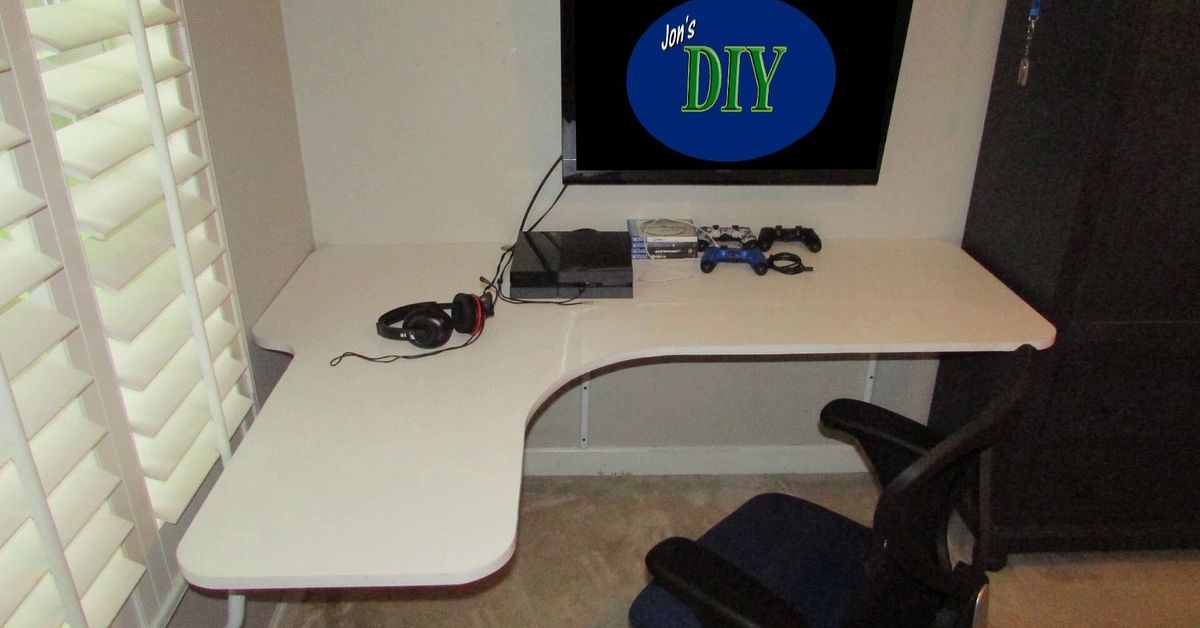
A floating wall mounted corner desk is a clever way to turn an ignored corner into a real workstation. Because the desktop attaches to the wall instead of standing on bulky legs, it preserves floor space, makes a small room feel lighter, and leaves more room for knees, chairs, storage boxes, or a robot vacuum with strong opinions.
The idea looks simple, but a good result depends on careful sizing, safe mounting, comfortable working height, and realistic storage. A tiny triangular shelf may hold a laptop, yet daily work often requires room for a monitor, keyboard, mouse, notebook, charger, and coffee cup. This guide covers the practical details that separate a useful floating corner desk from a decorative ledge with an identity crisis.
What Is a Floating Wall Mounted Corner Desk?
A floating corner desk is a work surface designed for a 90-degree corner and supported by wall-mounted hardware. Designs range from compact triangular tops to curved-front and L-shaped desks with drawers, shelves, cable holes, or folding panels. The “floating” appearance comes from concealed rods, low-profile steel brackets, wooden cleats, or a mounting rail hidden beneath or behind the desktop.
Its main advantage is efficient use of space. A corner desk can create a laptop station in a bedroom, a homework nook near the kitchen, a compact gaming setup, a vanity, or a household paperwork center. With no front legs, the area beneath remains visually open and easier to clean. Corner and L-shaped layouts also place supplies close to the user without pushing a large rectangular desk into the room.
Measure the Corner Before Choosing a Desk
Check Both Walls and the Walking Path
Measure outward from the corner along both walls. Mark baseboards, outlets, switches, windowsills, vents, trim, and nearby doors. Then outline the proposed desktop with painter’s tape or a cardboard template. This reveals whether the front edge will block a walkway or make a chair difficult to use.
As a practical starting point, a light laptop or writing station may use about 30 to 36 inches of wall length on each side. A deeper workstation with a monitor and full-size keyboard may need 36 to 48 inches or more. These are planning ranges, not universal rules. Desktop shape, equipment, room layout, and user size matter more than the label on the box.
Judge the Usable Surface, Not the Maximum Depth
A triangular desk may look deep at the back but become narrow near the sides. Focus on the rectangular area directly in front of the chair. Confirm that the keyboard and mouse fit comfortably and that the monitor can sit far enough away. Also check that armrests slide beneath the front edge and that knees will not collide with brackets, drawers, or cable trays.
Choose an Ergonomic Mounting Height
A wall-mounted desk can be installed for its primary user rather than accepting a fixed factory height. Sit in the intended chair and place the work surface near relaxed elbow height. Keep shoulders down, elbows close to the body, and wrists straight. If the chair must be raised, support the feet with a footrest instead of letting them dangle.
Center the main monitor in front of the body, with its top at or slightly below eye level, and keep it roughly an arm’s length away. A laptop stand with an external keyboard and mouse can improve posture without requiring a deeper desk. OSHA and Cornell workstation guidance emphasize neutral wrists, relaxed shoulders, sufficient leg clearance, and direct monitor alignment.
Match the Support System to the Wall
The wall carries the desk, the equipment, and the repeated forces created by typing, bumping, and leaning. For wood-framed drywall, structural brackets or cleats should generally fasten into studs whenever possible. Use a stud finder, verify the framing location, and follow the bracket or desk manufacturer’s fastener instructions. Major home-improvement installation guides consistently recommend stud attachment for heavier wall-mounted surfaces and properly rated anchors only where the product and wall condition permit them.
Metal studs, brick, concrete, hollow block, and plaster require different anchors and installation methods. Do not assume that screws supplied for wood framing will work everywhere. Check for plumbing, electrical wiring, and ductwork before drilling. A heavy custom top, uncertain wall, or multi-monitor setup may justify professional installation. Repairing drywall and replacing a monitor is a poor way to discover that an anchor was “probably fine.”
Also check whether the corner is truly square. Many rooms are slightly more or less than 90 degrees. A cardboard template can expose gaps before the desktop is cut. Baseboards may prevent side panels or supports from sitting flat, and solid wood may need a small allowance for seasonal movement.
Select a Practical Desktop Material
Solid wood is attractive, repairable, and good at holding screws, but it is heavy and can move with humidity. Plywood offers strength and dimensional stability for custom builds. MDF paints smoothly but is heavy and vulnerable to moisture. Laminate or particleboard is affordable and easy to clean, although attachment points and exposed edges need care. Butcher block creates a substantial work surface, but its weight must be included in the load calculation.
An eased or rounded front edge is kinder to forearms than a sharp edge. If using a clamp-style monitor arm, confirm that the desktop can handle the concentrated force. Hollow-core panels usually require reinforcement or a mounting method specifically approved by the manufacturer.
Add Features That Support Daily Work
Cable Management
Plan power before mounting the desk. A rear grommet, under-desk tray, reusable ties, cable clips, and a paintable wall raceway can guide cords toward an outlet without ruining the floating effect. Keep power adapters ventilated and accessible. The same principle used in commercial cable-management systems works at home: give every wire a deliberate route instead of improvising after every device is connected.
Storage and Lighting
A shallow shelf above the desk can hold notebooks and small accessories, while a slim drawer or wall pocket can contain pens and chargers. Avoid bulky storage beneath the center of the desk, where it reduces knee clearance. Add task lighting from the side to reduce shadows and keep the fixture from competing with the monitor for limited surface space.
Fold-Down Options
A fold-down corner desk is useful in a studio, hallway, or guest room. Check the hinges, support arms, closing clearance, and rated capacity. Decide where the monitor and accessories will go when the top folds. A desk that disappears only after a complete evacuation of electronics is less convenient than the product photograph suggests.
How to Install a Floating Corner Desk
- Calculate the working load. Include the desktop, equipment, storage, and normal downward pressure. Stay within the published capacity of the complete system.
- Inspect the wall. Identify framing or masonry and check for pipes, wires, vents, trim, and outlets.
- Mark the height. Use the intended chair and keyboard position, then draw a level reference line on both walls.
- Locate attachment points. Verify studs or appropriate masonry positions. Add blocking inside the wall for a heavy custom installation when practical.
- Mount brackets or cleats. Use approved fasteners, drill pilot holes when required, and check level more than once.
- Fit and secure the top. Test the corner fit, attach the desktop according to the hardware design, and route cables before adding equipment.
- Test gradually. Apply light pressure and add equipment in stages. Stop if the desk, wall, brackets, or fasteners move, crack, or deflect.
A floating desk is not a floating shelf with a keyboard placed on it. It receives repeated dynamic loads, so conservative mounting is sensible. Never sit or stand on the surface unless the system was specifically engineered for that use.
Design Ideas and Common Mistakes
In a bedroom, paint the desk or choose a finish close to the wall color so the workstation visually recedes. In a living room, coordinate the top with nearby wood tones and use a drawer or basket to hide work supplies after hours. A gaming setup benefits from a deeper top, monitor arm, headset hook, and ventilated computer location. A craft desk needs brighter task lighting and a durable, easy-clean surface.
Common mistakes include buying before measuring chair clearance, mounting at a generic height, relying on unsuitable drywall anchors, forgetting the weight of the top, clamping a monitor arm to a weak panel, and postponing cable planning. Another frequent problem is choosing a triangular surface whose widest measurement sounds generous even though the actual keyboard area is tiny.
Ready-Made or DIY?
A ready-made floating corner desk offers matched components, published dimensions, and installation instructions. A custom build can fit an imperfect corner and place shelves or cable holes exactly where needed, but the builder becomes responsible for material thickness, support spacing, fasteners, and load safety. DIY makes sense when the wall structure is understood; otherwise, a tested system or qualified installer is the wiser shortcut.
Experience-Based Lessons From Living With a Floating Wall Mounted Corner Desk
The First Week: Open Floor, Limited Surface
The immediate benefit is visual. Removing desk legs exposes more floor and makes a compact room feel less crowded. Cleaning becomes easier, and the chair can move without striking a pedestal. Then real work begins, and users often discover that a surface sized for a laptop is not automatically sized for a laptop, notebook, phone, drink, headphones, and the pile of mail that arrived while nobody was looking.
The best response is to create zones. Keep the center clear for typing, reserve one side for writing, and move charging equipment underneath or onto a nearby shelf. A floating desk works best when it supports focused work rather than becoming a storage platform.
After a Month: Cables Matter More Than Finish
During shopping, color and wood grain receive most of the attention. After several weeks, cable behavior becomes more important. A power cord crossing the floor catches chair wheels. A bulky adapter occupies valuable surface area. A charging cable that repeatedly falls behind the desk can turn an ordinary morning into an archaeological dig.
Setups that age well usually have an under-desk tray, short reusable ties, one reachable charging point, and enough slack to prevent tension at connectors. Labeling similar black cables also helps when equipment changes. The goal is not perfect invisibility; it is predictability.
Long Workdays Expose Height Errors
A desk can look perfectly level and still sit too high for comfortable typing. Even a small mismatch may encourage raised shoulders and bent wrists. A monitor pushed deep into the corner may cause forward leaning, while chair arms that cannot fit beneath the top keep the body too far from the keyboard.
Because the desk cannot easily move after installation, accessories provide flexibility. A footrest, monitor arm, laptop stand, slim keyboard, or properly sized keyboard tray can correct many problems. The lesson is simple: choose the mounting height around relaxed elbows, not around a convenient grout line, windowsill, or decorative shelf.
Open Storage Changes Habits
Without large drawers, clutter has nowhere to hide. That may feel inconvenient at first, but it encourages better routines. Papers must be filed, pens need a container, and rarely used equipment should live elsewhere. One small drawer or wall pocket is often enough. Too many cubbies make the desk look heavy and undermine the clean appearance that made a floating design attractive.
A one-minute reset at the end of the day has an outsized effect: remove dishes, clear papers, return the keyboard to the center, and place charging cords where they belong. In a multipurpose room, this ritual helps the corner switch from office back to bedroom or living space.
The Best Long-Term Result Is a Focused Workstation
The most satisfying floating corner desks are not necessarily the largest or most expensive. They are sized for the actual equipment, mounted conservatively, and kept reasonably clear. The open underside makes cleaning easy and allows users to notice movement, sagging, or loose fasteners early. Any change in stability should be investigated immediately.
Living with the desk confirms that its greatest strength is disciplined efficiency. It gives an unused corner a purpose without asking the whole room to become an office. It is not magic, but it is excellent geometry with good hardwareand that is surprisingly close.
Conclusion
A floating wall mounted corner desk can create a comfortable workstation in space that would otherwise be wasted. Measure with a full-size template, mount to the correct wall structure, set the surface near elbow height, and plan cables before installation. When the desk is designed around the user and the real equipment, it feels light, works hard, and stays out of the way.