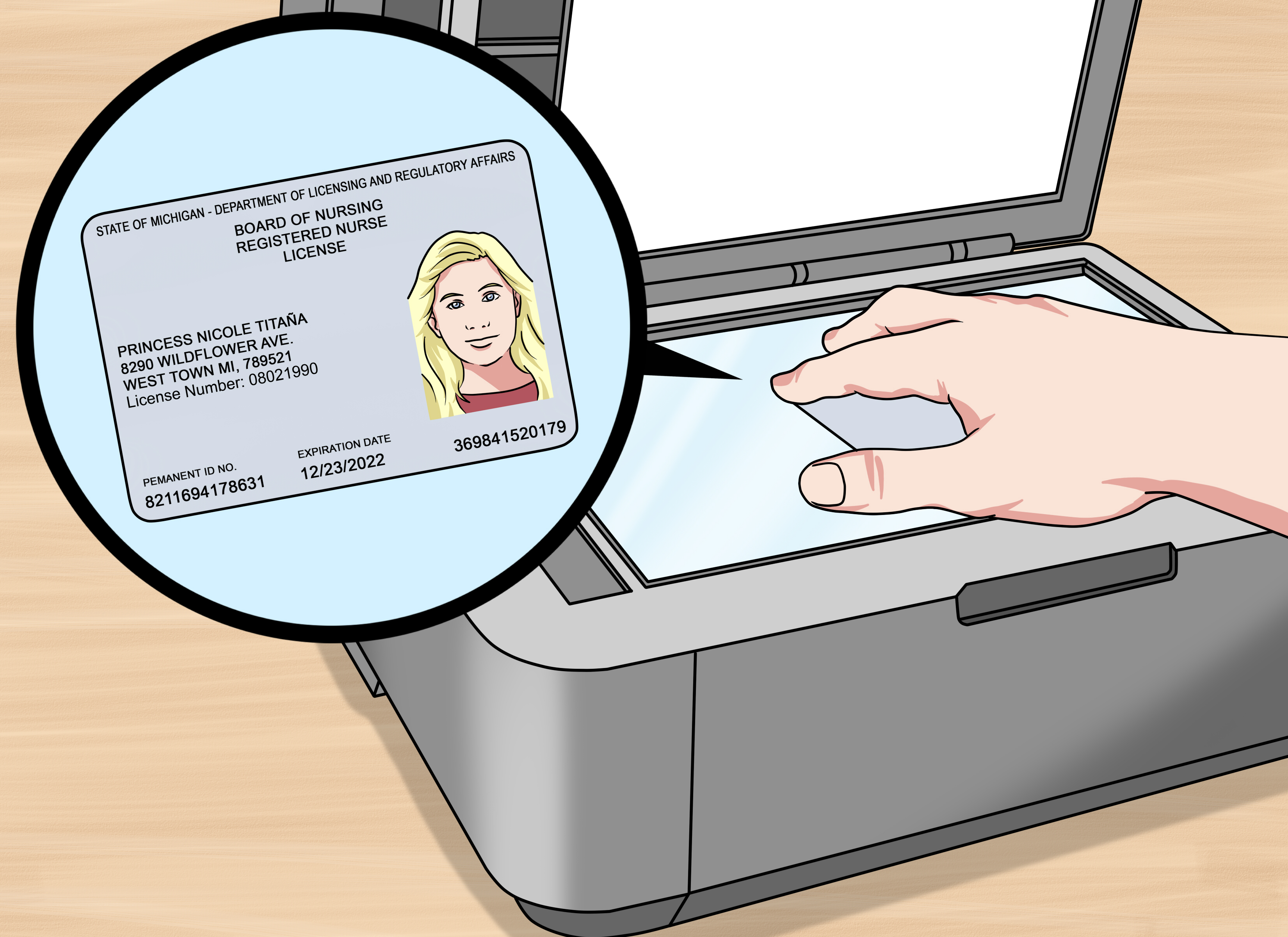
Misplacing your RN license number is one of those tiny professional emergencies that feels much bigger than it should. You know you passed nursing school. You survived clinicals, care plans, night shifts, NCLEX prep, and possibly a vending-machine dinner at 2 a.m. Yet suddenly, one little number stands between you and a job application, renewal form, travel-nursing assignment, employer verification, or credentialing packet.
The good news? Finding your registered nurse license number is usually simple if you know where to look. In most cases, you can retrieve it online through an official nurse license lookup tool, your state board of nursing portal, or your own licensing documents. The key is using primary-source information, not a random third-party website that looks like it was built during the flip-phone era and updated never.
This guide explains three reliable ways to find your RN license number in the United States, what information you may need, what to do if your name changed, and how to avoid common mistakes. Whether you are a new nurse, a returning RN, a travel nurse, or someone trying to complete yet another “just one more document” onboarding checklist, here is how to track down that important number without turning your desk upside down.
What Is an RN License Number?
An RN license number is the unique identifier assigned to you by a state board of nursing or professional licensing agency after you are licensed as a registered nurse. It is used to confirm that you are legally authorized to practice as an RN in that jurisdiction.
Your license number is not the same as your Social Security number, employee ID, nursing school student ID, or NCLEX candidate number. Think of it as your official nursing “badge number” in a state licensing system. Employers, hospitals, staffing agencies, insurance networks, and other boards of nursing may use it to verify your license status, expiration date, disciplinary history, and whether your license is single-state or multistate where applicable.
Why You Might Need Your RN License Number
You may need your RN license number when applying for a new nursing job, renewing your license, requesting license verification, applying for endorsement in another state, joining a travel nursing agency, completing hospital credentialing, updating a professional profile, or submitting documents for graduate nursing school.
Some employers ask for the license number before they even schedule an interview. Others ask for it during background checks or onboarding. If you are applying for licensure by endorsement, the receiving board may require official verification from your original licensing state or through Nursys. If you are a compact nurse, you may also need to confirm whether your license is single-state or multistate.
In other words, your RN license number is small, but it does a lot of heavy lifting. Let’s find it.
Way 1: Use Nursys QuickConfirm License Verification
For many nurses, the fastest place to start is Nursys QuickConfirm License Verification. Nursys is operated by the National Council of State Boards of Nursing and is widely used for nurse license verification across participating boards of nursing.
How to Search for Your RN License Number on Nursys
Go to the Nursys license lookup service and choose the option to search for a nurse license. If you already know part of your license information, you can search by license number. If you do not know your RN license number, search by name instead.
Use your legal first and last name exactly as it appears on your nursing license if possible. If you recently changed your name after marriage, divorce, or another legal update, try searching under your former name as well. This is especially important if your state board has not yet processed your name change or if your employer records use a different version of your name.
Once search results appear, review them carefully. Many nurses share similar names, and “Jennifer Smith, RN” is not exactly a rare bird in the nursing ecosystem. Confirm the state, license type, status, and other identifying details before assuming a record belongs to you.
What You Can Usually See
A Nursys QuickConfirm report may show your license type, license number, status, expiration date, jurisdiction, and discipline-related information when available from a participating board. This makes it especially helpful when you need a quick official-looking confirmation for yourself, an employer, or a credentialing file.
Nursys is also useful for nurses licensed in more than one state. Instead of visiting several state websites one by one, you may be able to view multiple participating licenses in the same system. For travel nurses and compact-state nurses, that convenience is worth its weight in caffeine.
When Nursys May Not Be Enough
Not every situation can be solved with a quick Nursys search. Some states or license types may require verification through the state board’s own system. Some endorsement requests require a paid verification process rather than a free public lookup. Also, a pending license may not appear in the same way as an active license.
If your name does not appear, do not panic. Try alternate spellings, former names, partial names, and the state where you were originally licensed. If that fails, move to the state board lookup method below.
Way 2: Search Your State Board of Nursing or Licensing Portal
Every RN license is issued by a state board of nursing or a state professional licensing authority. That means the state’s official license lookup tool is often the best place to find your RN license number, especially if you know where you are licensed.
Search online for your state name plus “Board of Nursing license lookup” or “RN license verification.” Make sure you are using an official government or board website. In many states, official websites end in .gov, though not every board uses the exact same structure.
Examples of State License Lookup Systems
California uses the Department of Consumer Affairs license search system, connected with the Board of Registered Nursing’s BreEZe licensing system. California’s public license verification can show primary-source license information from the board’s licensing records.
Washington uses a provider credential search through the Department of Health. Nurses can search by credential number, individual name, or business name, and the system is treated as a primary-source verification tool. Washington also points nurses to Nursys for active RN, LPN, ARNP, and multistate license verification.
New York’s Office of the Professions provides online license verification for registered professional nurses. New York also has specific formatting rules for searching by license number, such as entering a full six-digit number in many cases. That is a helpful reminder: license number formats vary by state, so read the search instructions before deciding the system “doesn’t work.”
Pennsylvania uses the Pennsylvania Licensing System, commonly known as PALS, where users can search for a professional license number, status, and disciplinary information. Florida provides license lookup through its Medical Quality Assurance search tools and also directs RN and LPN license verification through Nursys for certain certification purposes.
How to Search a State Board Website
Start with the state where you were licensed. Choose “Registered Nurse,” “RN,” or “Registered Professional Nurse” if the search form asks for a profession. Enter your last name and first name. If the form allows city, county, license type, or status filters, use them only if you are confident. Too many filters can accidentally hide your record.
If your name is common, narrow the results by middle initial, city, license type, or issue date if available. If your name has punctuation, a hyphen, an apostrophe, or a suffix, try a simpler version. For example, search “Anne Marie” and “Anne,” or search “Smith Jones” without the hyphen if “Smith-Jones” returns no results.
Once you find your record, write down the RN license number exactly as shown. Include any prefix, leading zeros, or letters if the state uses them. A license number is not a place for creative formatting. One missing zero can turn a smooth onboarding process into a tiny administrative soap opera.
Why Official State Lookup Matters
Official state board tools are important because they are usually considered primary-source verification. Employers and credentialing teams often prefer primary-source data because it comes directly from the licensing authority rather than from a copied database, résumé, screenshot, or old paper card.
If your employer asks for “primary source verification,” do not send a random image of your license from a folder called “Important Stuff Final FINAL.” Use the official board lookup, Nursys, or the process your employer specifically requests.
Way 3: Check Your Online Licensing Account, Documents, and Employer Records
If online public lookup is not giving you what you need, your own records may solve the problem. Most nurses have seen their license number before; it is usually hiding in a portal, PDF, renewal notice, email, employer credentialing file, or printed document.
Check Your State Licensing Account
Many state boards now use online licensing portals where nurses can apply, renew, update contact information, pay fees, and download license documents. Log in to the portal connected with your state board of nursing and look for sections such as “My Licenses,” “License Details,” “Documents,” “License Documents,” “Renewal,” or “Verification.”
Florida, for example, issues electronic licenses through its Medical Quality Assurance system, and licensees can retrieve a PDF copy through the License Documents menu in their online account. California nurses may use BreEZe for license-related requests, including verification requests and employer verification documents.
If you recently passed the NCLEX and your license has just been issued, your online account may show the license number before a paper document ever arrives. In some states, paper licenses are no longer routinely printed, so the portal may be your main source.
Look Through Your Nursing Documents
Search your email for terms like “RN license,” “license renewal,” “Board of Nursing,” “registered nurse,” “Nursys,” “verification,” “credentialing,” or your state board’s name. Your license number may appear in renewal confirmations, electronic license PDFs, payment receipts, approval letters, or board messages.
Also check cloud storage, downloads folders, scanned documents, old onboarding packets, and continuing education records. Many nurses have a “nursing documents” folder that started neatly and then gradually became a digital junk drawer. This is your invitation to open it bravely.
If you still have a paper wallet card, certificate, or renewal notice, the license number may be printed there. Be careful with older documents, though. They may show an expired status, old name, or outdated expiration date. Use them to identify the number, then confirm the current status through an official lookup.
Ask Your Employer or Credentialing Department
If you are currently employed as a nurse, your human resources department, nurse manager, medical staff office, or credentialing department may have your RN license number on file. Hospitals and clinics commonly verify nursing licenses during onboarding and renewal monitoring.
When asking, keep the request professional and specific: “Could you please confirm the RN license number you have on file for my credentialing record?” Avoid sending sensitive personal information unless it is required through a secure channel. Your license number may be public, but your Social Security number and date of birth deserve better security than a casual email chain.
Common Problems When Searching for an RN License Number
Your Name Changed
Name changes are one of the most common reasons nurses cannot find their license record. Search under your current legal name, previous legal name, maiden name, and any hyphenated or spaced versions. Then update your name with the board if needed. Employers usually want your license record to match your legal employment documents.
You Are Searching the Wrong State
If you moved, worked travel assignments, or applied by endorsement, you may have more than one state connected to your nursing history. Search the state where you first received your RN license and any state where you later endorsed or renewed.
Your License Is Pending
A pending application may not display like an active RN license. Some boards show pending statuses in public search tools; others require you to check your application portal. If you recently passed the NCLEX, allow time for the board to post the license.
You Entered Too Much Information
License search tools can be picky. If your search fails, remove extra filters. Try last name only plus profession. Try partial first name. Try leaving city blank. The goal is to give the system enough information to find you, not enough information to become confused and give up like a printer on Monday morning.
You Found an Old or Inactive License
Finding the number is only step one. Always check the status. Active, expired, inactive, suspended, pending, closed, and denied do not mean the same thing. If you need the number for employment, make sure the record shows you are authorized to practice in that state or through a valid multistate license.
How to Keep Your RN License Number Easy to Find Next Time
Once you find your RN license number, save it in a secure professional records file. Create a digital folder for nursing credentials and include your license number, expiration date, state board login information, renewal receipts, continuing education certificates, CPR cards, specialty certifications, and employment health documents.
Do not store sensitive information in an unsecured note on a shared computer. A password manager, encrypted storage folder, or secure cloud drive is a better choice. Your future self will thank you, especially when a recruiter asks for your license number at 4:58 p.m. on a Friday.
It is also smart to set renewal reminders at least 60 to 90 days before your license expires. Add a calendar reminder, and include the state board website name in the note. That way, you are not trying to remember which portal you used two years ago while also hunting for your CE certificates.
Extra Experience-Based Tips for Finding Your RN License Number
In real life, finding an RN license number is rarely difficult because the number is gone forever. It is usually difficult because nurses are busy, state systems use different names, and professional records are scattered across email inboxes, job applications, old PDFs, and board portals. The best approach is to search in layers rather than randomly clicking every result on the internet.
First, start with the broadest official tool. If your state participates in Nursys, use it because it is designed for nurse license lookup and can reduce the number of websites you have to check. When searching by name, do not rush. Review every matching result carefully, especially if you have a common name. Look at the state, license type, and status. An RN record in the wrong state may belong to another person with the same name.
Second, go directly to your state board website. This is especially useful when your license is new, when you are dealing with a nonparticipating process, or when the state has a detailed professional licensing portal. Bookmark the official lookup page once you find it. That bookmark can save time during renewals, employer checks, and future applications.
Third, organize your nursing documents after you solve the immediate problem. Many nurses only create a credential folder after the third or fourth frantic search. Do it now. Save your license number in a secure place, along with the state, expiration date, renewal cycle, username for the state portal, and any instructions you learned the hard way. For example, if your state requires leading zeros in the license number, write that down. If your board uses “Registered Professional Nurse” instead of “Registered Nurse,” write that down too.
Another practical tip: keep screenshots for your personal reference, but do not rely on screenshots as official verification unless an employer says they are acceptable. Screenshots become outdated quickly. A license that was active when you captured the image may later expire, renew, or change status. Official online verification is better because it reflects current board data.
If you are a travel nurse, create a small spreadsheet or secure document listing each state license, license number, compact status, issue date, expiration date, renewal requirements, and login portal. Travel nurses often manage multiple credentials at once, and confusion grows fast when every state has its own portal, fee schedule, and terminology. A tidy tracking document is less glamorous than a new stethoscope, but it may save you from missing an assignment start date.
If you recently graduated, remember that passing the NCLEX and receiving a license number are related but not always simultaneous in your mind. You may see unofficial exam results before your state posts the actual license. Wait for the board to issue the license number before listing yourself as licensed. Once the number appears in the official system, save it immediately.
Finally, if you are completely stuck, contact the board of nursing. Use the official contact information from the board website, not a phone number copied from a random forum. Be ready to provide your full legal name, previous names, date of birth if requested through a secure process, application number if you have one, and the approximate date you were licensed. Board staff cannot magically read your mind, but they can usually point you to the correct lookup, portal, or verification process.
Conclusion
Finding your RN license number does not need to become a detective series with twelve tabs open and a suspicious amount of coffee. Start with Nursys QuickConfirm, then check your state board of nursing or professional licensing portal, and finally review your own licensing documents, online account, and employer credentialing records.
The most important rule is simple: use official sources. Your RN license number is tied to your legal authority to practice, so accuracy matters. Once you find it, save it securely, confirm your license status, and set reminders before renewal season sneaks up like a call light during shift change.
Note: This guide is for general educational purposes. Nursing license lookup procedures, fees, terminology, and verification requirements vary by state. Always follow the instructions from your state board of nursing, official licensing agency, employer, or credentialing department.