Once upon a time, exercising at home meant following a grainy DVD while an aggressively cheerful instructor counted lunges. In 2025, your phone can build a strength plan, stream a Pilates class, map a cycling route, track progressive overload or connect you with a real personal trainer. The only remaining challenge is choosing an app before your motivation wanders off to watch cooking videos.
The best workout apps do more than assemble random exercises beneath a dramatic countdown timer. They provide clear coaching, sensible progression, useful modifications and enough variety to keep exercise from feeling like another household chore. For this guide, we compared trainer-tested recommendations from respected fitness publications with official information from the platforms themselves.
Editorial note: Subscription prices and features change frequently. The prices below reflect typical U.S. offerings advertised during 2025. Check the app before subscribing, especially when a free trial automatically renews.
How We Evaluated the Best Workout Apps
A personal trainer does not judge a program by how shiny its buttons look. We focused on factors that affect actual training quality: exercise instruction, program structure, progressive overload, beginner modifications, workout variety, equipment flexibility, tracking tools, coach qualifications, platform stability and overall value.
We also considered whether an app helps users remain consistent. An enormous library is not automatically useful if finding a 20-minute beginner workout requires the navigational skills of an airport controller. The strongest platforms make the next step obvious without locking users into routines that ignore fatigue, travel, injuries or changing goals.
| Workout App | Best For | Typical 2025 Price | Platforms |
|---|---|---|---|
| Peloton App | Instructor-led classes | From about $13 per month | iOS and Android |
| Apple Fitness+ | Apple users and variety | $9.99 per month | Apple devices |
| Alo Moves | Yoga, Pilates and wellness | About $20 per month | iOS, Android and web |
| Sweat | Structured programs for women | About $25 per month | iOS and Android |
| Centr | Strength, nutrition and recovery | About $30 per month | iOS, Android and web |
| Future | One-on-one personal training | $199 per month | iOS and Android |
| Nike Training Club | Free beginner workouts | Free | iOS and Android |
| Ladder | Progressive strength training | About $30 per month | Primarily iOS in 2025 |
| SHRED | Home-and-gym programming | Free tier; premium about $20 monthly | iOS and Android |
| Strava | Running, cycling and outdoor training | Free tier; premium available | iOS and Android |
1. Peloton App: Best Overall Workout App
Peloton remains one of the strongest choices for people who are motivated by energetic instructors, polished production and a lively fitness community. You do not need a Peloton bike to use its strength, yoga, Pilates, barre, meditation, stretching, boxing or outdoor running sessions.
The filtering system is particularly useful. Users can narrow classes by instructor, duration, difficulty, music style and workout type, which means less scrolling and more sweating. Peloton also adds new sessions frequently, reducing the chance that you memorize an instructor’s jokes before memorizing your squat cues.
Trainer’s take
The coaching quality and class energy are excellent, but the experience is most complete when paired with Peloton equipment. App-only users may not receive all the performance metrics available to Bike, Tread or Row owners.
Best for: Exercisers who enjoy studio-style instruction, music and community motivation.
2. Apple Fitness+: Best for Workout Variety
Apple Fitness+ offers one of the most polished digital fitness experiences available to iPhone users. Its library includes strength, HIIT, yoga, Pilates, cycling, rowing, treadmill workouts, kickboxing, dance, core training, meditation and mindful cooldowns.
Classes generally run from five to 45 minutes and can be filtered by trainer, duration, music and body focus. Multiple trainers often appear onscreen, with one demonstrating modifications. That is valuable for beginners who need a lower-impact option but do not want the instructor to announce, “Here is the easy version for anyone whose legs have filed a formal complaint.”
Trainer’s take
The instruction is clear, inclusive and professionally produced. An Apple Watch is not mandatory, although it enhances the experience by displaying heart rate, calories and activity-ring progress.
Best for: Apple users who want many workout styles under one affordable subscription.
3. Alo Moves: Best for Yoga, Pilates and Wellness
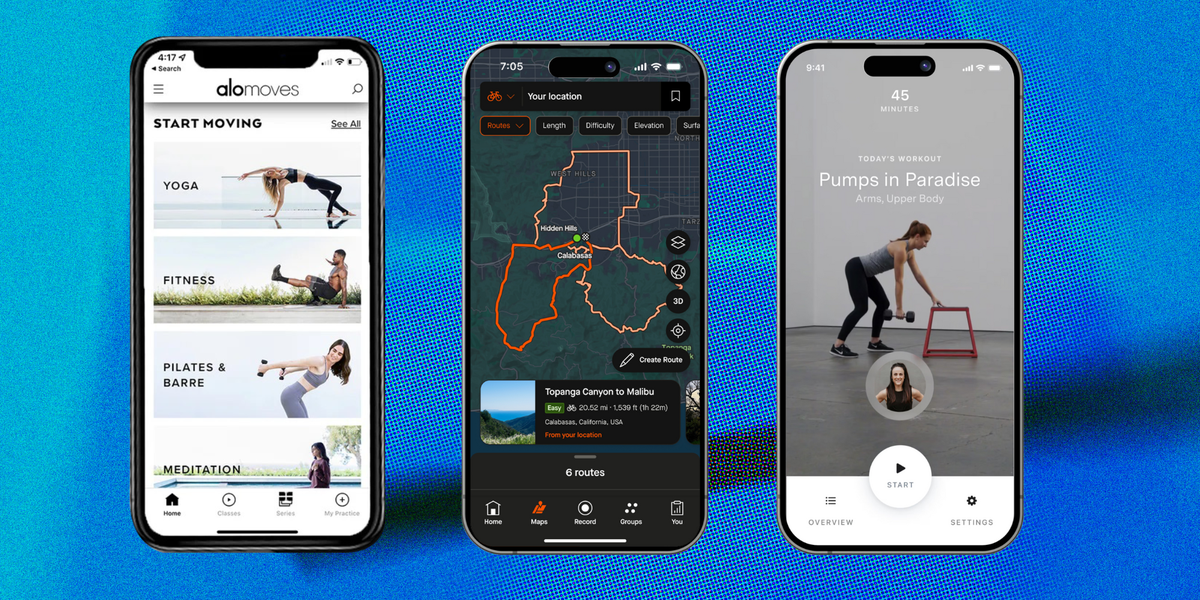
Alo Moves built its reputation around beautifully filmed yoga classes, but its 2025 library extended well beyond downward-facing dog. Users could explore Pilates, barre, strength, mobility, meditation, breathwork and recovery sessions taught by experienced instructors.
The platform works especially well for people who prefer calm, precise coaching rather than a trainer shouting motivational slogans over nightclub-volume music. Many programs are organized by ability, duration and intensity, while downloadable classes make offline exercise practical during travel.
Trainer’s take
The yoga, barre and Pilates instruction is often challenging despite the serene presentation. Beginners should select introductory series rather than assuming that candles in the background mean their abdominal muscles are safe.
Best for: At-home exercisers seeking mobility, mind-body training and boutique studio quality.
4. Sweat: Best Workout App for Women
Originally created around Kayla Itsines’ popular high-intensity program, Sweat developed into a large platform featuring thousands of workouts and dozens of structured plans designed by female trainers.
Training options include gym-based strength, bodyweight exercise, HIIT, low-impact fitness, Pilates, yoga, barre, pregnancy programs and post-pregnancy training. Users can preview exercises, substitute equipment and follow programs lasting from a few weeks to several months.
Trainer’s take
Sweat is strongest when used as a structured program rather than a random workout library. Its calendar and clear weekly schedule remove decision fatigue. However, many sessions are self-paced demonstrations rather than continuous follow-along videos, so users must occasionally tap the screen between sets.
Best for: Women who want long-term programming for home, gym, pregnancy or postpartum fitness.
5. Centr: Best All-in-One Fitness and Nutrition App
Founded by Chris Hemsworth and supported by a team of trainers, chefs and wellness specialists, Centr combines exercise programming with meal planning, recipes, meditation and recovery advice.
The workout selection includes traditional strength training, functional conditioning, boxing, MMA-inspired sessions, HIIT, Pilates and yoga. Some programs are designed for bodyweight training, while muscle-building plans may require dumbbells, a bench or a better-equipped gym.
Trainer’s take
Centr is more comprehensive than the average workout app and can function as a complete wellness platform. Its strength plans are thoughtfully organized, but the volume and difficulty may surprise true beginners. Start with a foundational program instead of selecting something called “Power” simply because the thumbnail looks heroic.
Best for: People who want strength training, recipes, mindfulness and recovery guidance in one subscription.
6. Future: Best Personal Training App
Future differs from ordinary fitness apps because it connects each member with a real personal trainer. After an introductory consultation, the coach creates a customized plan around the user’s goals, schedule, experience, available equipment and physical limitations.
Communication takes place through messages and regular check-ins. Coaches can modify workouts when a member is traveling, short on time or experiencing discomfort. This makes Future far more adaptable than an algorithm that cheerfully schedules heavy squats the morning after a sleepless overnight flight.
Trainer’s take
The accountability and individualization are exceptional, but the approximately $199 monthly fee is considerably higher than a standard fitness subscription. Users generally complete workouts independently rather than meeting their coach live for every session.
Best for: Busy professionals and serious trainees who want human coaching without fixed in-person appointments.
7. Nike Training Club: Best Free Workout App
Nike Training Club proves that “free” does not have to mean three usable workouts followed by 47 upgrade screens. The app provides a substantial collection of strength, conditioning, yoga, mobility and bodyweight sessions for different fitness levels.
Users can browse workouts by muscle group, equipment, duration and training style. Programs range from short standalone sessions to multi-week plans, with trainer demonstrations and verbal coaching to explain each movement.
Trainer’s take
NTC is an excellent starting point for beginners, apartment dwellers and anyone trying home fitness before paying for a subscription. Its library is smaller than those of some premium services, and serious barbell athletes may need more detailed load tracking and progression tools.
Best for: Beginners and budget-conscious users who want credible instruction with minimal equipment.
8. Ladder: Best Strength Training App
Ladder focuses on progressive strength training rather than presenting thousands of unrelated classes. Members select a training team based on their goals, preferred equipment and coaching style. A qualified coach then delivers a new weekly schedule with rest days, demonstrations, timing and in-ear guidance.
Programs cover bodybuilding, kettlebell training, functional strength, Pilates-inspired strength, push-pull routines and athletic conditioning. Music integration allows a personal playlist to play while the coach’s voice automatically cuts through when instructions are needed.
Trainer’s take
Ladder’s greatest advantage is continuity. Each week builds on the previous one, supporting progressive overload and skill development. It is less suitable for people who only want occasional five-minute workouts or a large collection of dance and cardio classes.
Best for: Users who want to stop improvising gym sessions and follow a coach-designed strength plan.
9. SHRED: Best for Home and Gym Workouts
SHRED combines trainer-designed programming with AI-assisted personalization. During setup, users identify their goals, experience, schedule and available equipment. The app then recommends sessions for a fully equipped gym, a small home setup or bodyweight-only training.
Programs include hypertrophy, strength circuits, HIIT, cardio and studio-style classes. Exercises can often be substituted when equipment is unavailable or a movement does not suit the user. That flexibility is useful for anyone whose gym owns exactly one cable machine and apparently rents it permanently to the same person.
Trainer’s take
SHRED is a practical choice for people who alternate between home and gym environments. The free tier is limited, and advanced personalization requires a subscription. Some users may also encounter occasional performance glitches.
Best for: Intermediate exercisers who need adaptable strength and conditioning plans.
10. Strava: Best for Runners and Cyclists
Strava is not a conventional follow-along workout app. It is a sophisticated activity tracker and social platform built around running, cycling, hiking and many other outdoor sports.
The app records metrics such as distance, pace, speed, elevation and route data. Users can join clubs, complete challenges, exchange kudos, compare efforts on segments and discover routes created from community activity. Premium features add deeper performance analysis, training logs and more advanced route tools.
Trainer’s take
Strava is excellent for tracking consistency and connecting with an active community, but it does not teach beginners how to run, ride or strength train safely. Pair it with a structured training plan if you need progression rather than data alone.
Best for: Runners, cyclists and outdoor athletes who enjoy statistics, routes and friendly competition.
How to Choose the Right Fitness App
Start with one primary goal
Choose the problem you most want the app to solve. Someone preparing for a first 5K needs different tools from someone learning barbell lifts or rebuilding core strength after pregnancy. Trying to find one app that is perfect for every possible goal usually leads to paying for features you never use.
Check the required equipment
Read several sample workouts before subscribing. A program advertised as suitable for home may still expect dumbbells, resistance bands, a bench and enough floor space to avoid kicking a coffee table.
Look for progression, not just variety
Random workouts can make you tired, but a structured program helps you improve. Strength-focused users should look for planned increases in repetitions, resistance, volume or movement difficulty. Runners should prioritize scheduled changes in distance, pace and recovery.
Evaluate trainer qualifications
Charisma is useful, but it is not a professional credential. Look for certified personal trainers, strength coaches, physical therapists or specialists with relevant experience. Clear demonstrations and modifications are especially important when nobody is physically present to correct your form.
Use the free trial intelligently
Complete at least three different workouts during the trial. Test the search filters, casting options, music controls, exercise substitutions and progress tracking. Also inspect the cancellation process before entering payment information. Your future self will appreciate this administrative cardio.
Do Workout Apps Really Work?
A workout app can provide programming, instruction and accountability, but it cannot perform the workout on your behalf. Results depend on consistency, appropriate intensity, recovery and nutrition. For general health, American adults are commonly advised to accumulate at least 150 minutes of moderate-intensity aerobic activity weekly and perform muscle-strengthening activities on two or more days.
Apps can make those targets easier to organize by reducing planning time and offering sessions that fit different schedules. However, they cannot fully replace an attentive trainer who can observe technique, assess pain and make immediate corrections. Anyone with an injury, chronic condition or major health concern should discuss a new exercise plan with an appropriate healthcare professional.
Real-World Experiences: What Using Workout Apps Actually Feels Like
The first week with a new workout app is usually delightful. The interface is fresh, the instructors are encouraging and every completed session produces a tiny digital celebration. By the third week, real life begins testing the program. Meetings run late, muscles feel sore and the couch starts presenting a persuasive counteroffer.
The apps that work best in everyday life are not necessarily those with the largest libraries. They are the ones that reduce friction. A well-designed home screen should answer three questions immediately: What am I doing today? How long will it take? What equipment do I need? When an app requires ten minutes of browsing before a 20-minute workout, choosing a class becomes the warm-up.
Trainer-led platforms such as Peloton and Apple Fitness+ are particularly effective on low-motivation days. Pressing play creates a sense that somebody else is managing the session. The instructor controls the timing, announces transitions and provides enough encouragement to prevent a discreet escape during the final round. Music also matters more than many reviewers admit. A perfectly programmed interval can feel strangely long when accompanied by a playlist that makes you reconsider every decision leading to that moment.
Structured strength apps create a different experience. Ladder, SHRED and similar platforms are most useful when users resist the temptation to replace every difficult movement. Exercise substitutions are important, but replacing split squats because they are uncomfortable is not the same as replacing them because they cause pain. Productive training is sometimes inconvenient. The goal is to distinguish normal muscular effort from warning signs such as sharp pain, dizziness or unstable movement.
Apps with human coaching provide the strongest accountability. With Future, for example, skipping a workout does not simply leave an empty square on a calendar. A real coach may ask what happened and adjust the plan. That interaction can be highly motivating, especially for people who understand exercise but struggle to organize it around work, parenting or travel. The higher subscription price makes sense only when the member communicates honestly and uses the personalization. Paying for a coach and then ignoring every message is an unusually expensive method of collecting notifications.
Free apps can be equally effective when the user’s goal is straightforward. Nike Training Club works well for someone building a three-day home routine around bodyweight strength, yoga and mobility. The absence of a fee also removes the psychological pressure to complete advanced workouts merely to “get your money’s worth.” Fitness subscriptions should support good decisions, not turn rest days into a financial crisis.
Outdoor athletes often experience the motivational power of Strava differently. Posting a run, receiving encouragement and watching weekly mileage increase can make consistency feel rewarding. The downside is that comparison can quietly distort training. A recovery jog does not become better because someone else ran farther before breakfast. Data should guide the program, not bully the athlete into racing every ordinary Tuesday.
Another practical lesson is that short workouts are not consolation prizes. A focused 15-minute strength or mobility session is often more valuable than an ambitious 60-minute class that never gets started. The most sustainable app routine usually includes full training days, shorter backup options and genuine rest. Consistency grows when the program has room for imperfect schedules.
Finally, notifications should be customized. A reminder before a planned workout can help. Six daily messages about challenges, streaks, recipes and community achievements can make uninstalling the app feel like the day’s most satisfying exercise. Keep the alerts that lead to action and silence the rest.
Final Verdict
Peloton is the best overall workout app of 2025 for users who value charismatic instructors, premium classes and community. Apple Fitness+ offers outstanding variety and value for Apple households, while Nike Training Club remains the easiest free recommendation for beginners.
Ladder is the strongest choice for structured strength training, Future delivers the most individualized coaching and Strava remains essential for runners and cyclists who love routes, statistics and social motivation. The right app is not necessarily the one with the most features. It is the one you can use consistently, safely and without needing a second app to remind you to open the first one.