Note: This guide is designed for a fun, consent-based friend group challenge. Keep it kind, avoid collecting private information, and never turn a joke form into a public roast session. The internet already has enough chaos; your Google Form does not need to become a tiny courtroom with purple buttons.
What Is the Google Forms Friend Group TikTok Challenge?
The Google Forms friend group TikTok challenge is exactly what it sounds like: you create a funny survey in Google Forms, send it to your friends, collect everyone’s answers, and then reveal the results in a TikTok-style recap. It usually includes questions like “Who is most likely to become famous?”, “Who gives the best advice?”, “Who would survive a zombie apocalypse?”, or “Who says they are five minutes away while still wearing pajamas?”
The trend works because it combines three things people already love: personality quizzes, group chat drama, and the oddly satisfying charts Google Forms creates automatically. Instead of guessing what your friends think, you get answers, percentages, graphs, and enough evidence to lovingly accuse someone of being the group’s designated late person.
At its best, the challenge is harmless, hilarious, and surprisingly sweet. A well-made form can turn into a memory book, a party game, a birthday surprise, or a group bonding activity. At its worst, it can become awkward if the questions are too personal, too mean, or shared without consent. So the golden rule is simple: make the form funny, not feral.
Why This TikTok Challenge Became So Popular
TikTok challenges spread quickly when they are easy to copy, visual, and emotionally relatable. The friend group Google Form checks all three boxes. Anyone with a Google account can make a form, customize the theme, share a link, and turn the results into a short video. You do not need fancy software, editing skills, or a film crew. You just need friends who are willing to answer questions and possibly expose that one person who always “forgets” to reply.
The challenge also taps into a bigger social trend: people love seeing themselves through the eyes of their friends. That is why personality quizzes, “most likely to” games, ranking templates, and group chat screenshots do so well online. The results feel personal, but the format is playful. When done respectfully, a Google Forms friend group survey lets everyone laugh at shared inside jokes without needing to post anything too private.
Another reason it works is that Google Forms makes results look organized. The platform can show response summaries, charts, individual answers, and spreadsheet data. That means a casual friend quiz can suddenly look like an extremely official investigation into who is the group therapist, who is the snack supplier, and who should absolutely not be trusted with navigation.
Before You Start: Set the Rules of the Challenge
Before building your form, decide what kind of challenge you want. Is it a silly “friend group awards” form? A compatibility quiz? A birthday tribute? A group chat superlatives game? A “who knows me best” quiz? Having a clear concept keeps the form focused and prevents it from becoming a 97-question emotional obstacle course.
Next, set boundaries. Tell your friends what the form is for and whether you plan to post the results on TikTok. If names, photos, usernames, screenshots, or private answers might appear in a video, ask permission first. A good friend group challenge should feel like a party game, not like everyone accidentally signed up for a documentary.
Also decide whether responses will be anonymous. Anonymous answers can make people more honest, but they can also encourage unnecessary boldness. If your group loves chaos, anonymity may produce comedy gold. If your group has unresolved tension, anonymity may produce a group chat meeting with agenda items. Choose wisely.
How to Make a Google Forms Friend Group Challenge
Step 1: Open Google Forms and Start a Blank Form
Go to Google Forms and create a blank form. Give it a title that matches the vibe of the challenge. You can use something simple like “Friend Group Awards,” “The Ultimate Group Chat Survey,” or “Who Is the Main Character?” If your friends enjoy dramatic nonsense, go bigger: “Official Friendship Investigation: Extremely Serious Edition.”
Add a short description under the title. This helps people understand the rules before they begin. For example:
Answer honestly, keep it nice, and do not start a civil war in the group chat. Results may be used for a funny TikTok recap, but no private answers will be posted without permission.
Step 2: Choose the Right Question Types
Google Forms offers several question formats, and each one works differently for a friend group challenge. For most TikTok-style forms, these are the most useful:
- Multiple choice: Best when each person can choose one friend as the answer.
- Checkboxes: Good when multiple friends can fit the same category.
- Short answer: Great for inside jokes, explanations, or “say something nice” prompts.
- Linear scale: Useful for rating energy levels, chaos levels, or how likely someone is to text back.
- Multiple choice grid: Helpful if you want people to match friends with categories.
For example, a multiple-choice question might be: “Who is most likely to become famous?” The answer options would be your friends’ names. A checkbox question might be: “Who would you trust to plan a road trip?” because more than one friend might deserve that honor. A short answer question might be: “What is the funniest thing someone in this group has ever said?” That one is dangerous, but in a beautiful way.
Step 3: Add Friend Names as Answer Options
For “most likely to” questions, add each friend’s name as an option. Keep the names consistent throughout the form. If you write “Maddie” in one question and “Madison” in another, your results may get messy. Google Forms is useful, but it is not a mind reader wearing friendship bracelets.
If your group has a lot of people, consider using first names, nicknames, or initials. For privacy, avoid full legal names if you plan to record the results for TikTok. Nicknames are usually funnier anyway. “Soup,” “CEO of Being Late,” and “The Human GPS” are far more entertaining than government names.
Step 4: Write Fun Questions That Are Not Mean
The secret to a successful friend group Google Form is balance. You want questions that are specific enough to be funny but not so sharp that someone leaves the group chat and starts posting mysterious quotes on their story.
Try these friendly question ideas:
- Who is most likely to become famous?
- Who gives the best advice?
- Who is the group photographer?
- Who would survive the longest in a horror movie?
- Who has the best style?
- Who is most likely to start a business?
- Who is secretly the funniest?
- Who sends the best memes?
- Who is the emotional support friend?
- Who is most likely to plan a last-minute trip?
- Who has the best music taste?
- Who always knows the gossip but says, “I’m not involved”?
Avoid questions that target appearance, money, relationships, family issues, insecurities, grades, mental health, or anything someone has shared privately. A good test is this: if you would not want the question asked about you in front of the whole lunch table, do not put it in the form.
Step 5: Customize the Form So It Looks TikTok-Worthy
Google Forms lets you change the theme, font, colors, and header image. This matters because the form’s appearance may show up in your TikTok video. Pick a color palette that matches your group’s personality. Soft pastels feel cute and friendly. Neon colors feel chaotic and energetic. Dark colors feel dramatic, which is perfect if your friend group treats brunch plans like a Netflix finale.
You can also upload a custom header image. Keep it simple: a collage, a funny group phrase, or a clean title graphic. Avoid using embarrassing photos unless everyone agrees. The goal is “fun recap,” not “evidence board in a teen detective series.”
Step 6: Adjust the Settings
Click the Settings tab before sharing your form. Decide whether you want to collect email addresses, limit responses, allow editing after submission, or let people submit more than once. For a casual friend group challenge, you usually do not need to collect email addresses unless you want to confirm who answered.
If you want anonymous answers, turn off email collection and do not ask for names. If you want one response per person, you may need sign-in requirements, but that can make the form feel less casual. Choose the option that fits your group.
For most friend group surveys, a practical setup is:
- Do not collect emails unless necessary.
- Make important questions required.
- Preview the form before sending.
- Turn off questions that collect sensitive information.
- Keep the form short enough that people actually finish it.
Step 7: Preview the Form
Before sending the link, use the preview option and take the form yourself. This step saves you from awkward mistakes like missing answer options, repeated questions, or accidentally asking “Who is most likely to get married first?” three times. Previewing also helps you see whether the form is too long. If you get bored while testing your own quiz, your friends will absolutely abandon it halfway through and claim their phone died.
Step 8: Share the Form With Your Friends
Once the form looks good, copy the responder link and send it to your friend group. You can share it in a group chat, Instagram close friends story, Discord server, private TikTok message, or wherever your group communicates. If the link is long, use the built-in short link option when available.
Add a message that explains what to do. For example:
Fill this out for our friend group TikTok challenge. Be honest, be funny, and please remember I have screenshots from 2021.
Give people a deadline if you want to post results quickly. A form without a deadline becomes a digital fossil. Someone will answer it six months later and ask, “Is this still happening?”
How to Turn the Results Into a TikTok Video
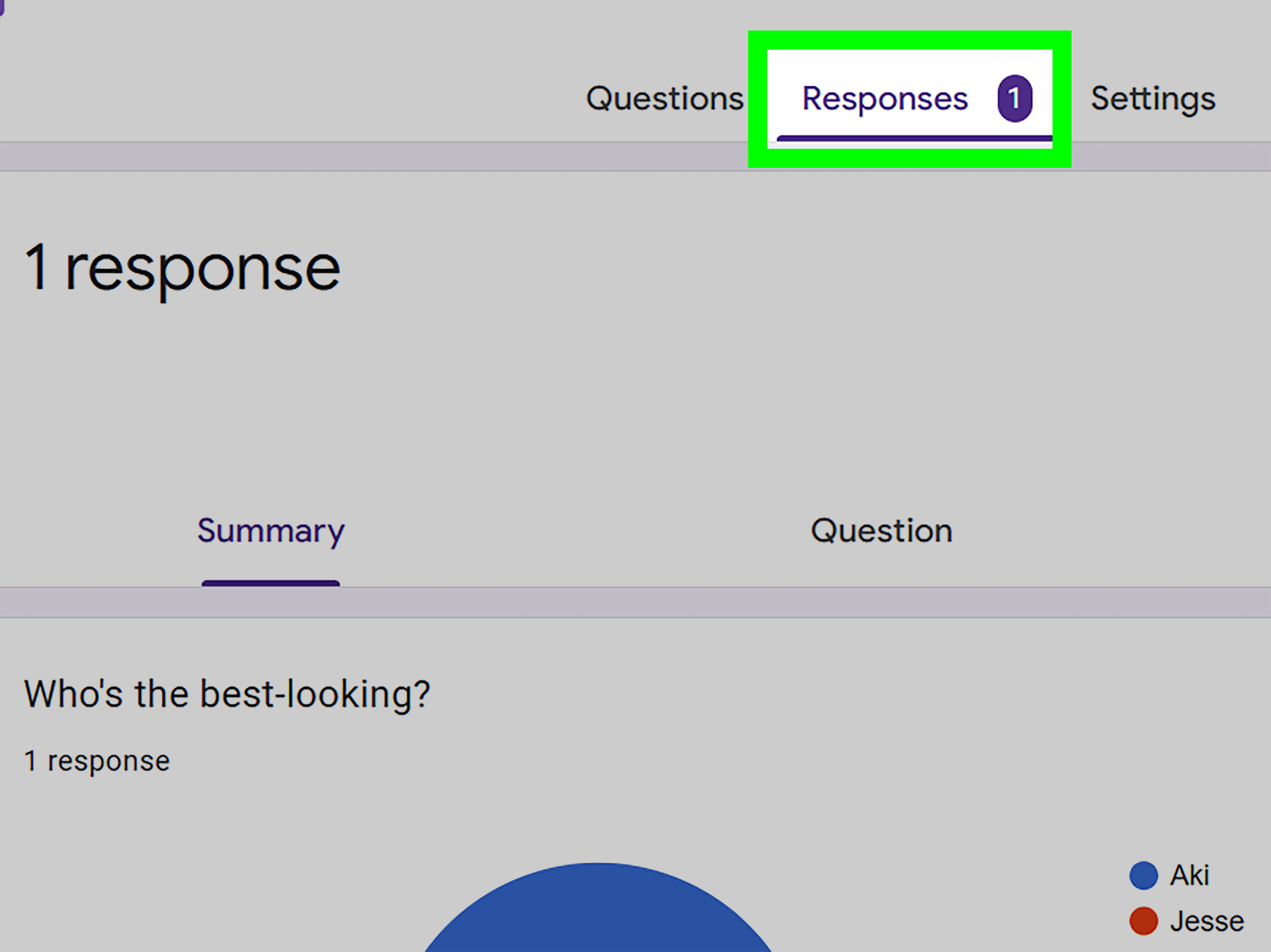
After your friends respond, open the Responses tab in Google Forms. You can view summaries, charts, individual responses, or send the answers to Google Sheets for easier sorting. The built-in charts are perfect for a TikTok reveal because they show percentages and winners clearly.
Here are a few video ideas:
- Screen recording reveal: Record yourself scrolling through the response charts.
- Countdown format: Show one category at a time, then reveal the winner.
- Group reaction: Film everyone reacting to the results together.
- Voiceover recap: Narrate the funniest results with commentary.
- Award show style: Announce each winner like it is a major ceremony.
For example, you could start your TikTok with: “I made my friend group take a Google Form, and the results were personal.” Then show the question: “Who is most likely to disappear during plans?” Pause dramatically, reveal the chart, and let the comments do their thing.
Keep the pacing quick. TikTok viewers usually respond well to fast reveals, readable text, and a clear hook. Use captions so people can understand the video without sound. If you include screenshots, blur private names, emails, or anything your friends would not want public.
Best Google Forms Friend Group Questions for TikTok
Funny “Most Likely To” Questions
- Who is most likely to become TikTok famous by accident?
- Who is most likely to laugh at the wrong moment?
- Who is most likely to start a sentence with “Don’t be mad…”?
- Who is most likely to forget what they were saying mid-story?
- Who is most likely to turn a simple plan into a full production?
- Who is most likely to say “I’m on my way” while still at home?
- Who is most likely to survive on iced coffee and vibes?
Sweet Friend Group Questions
- Who makes people feel included?
- Who gives the most thoughtful advice?
- Who has the best laugh?
- Who would you call during a bad day?
- Who is the most loyal?
- Who makes the group better just by being there?
- What is one nice thing you wish this group heard more often?
Chaotic but Safe Questions
- Who would accidentally join a cult because the branding was cute?
- Who would bring snacks to a haunted house?
- Who would become mayor of a small town for no clear reason?
- Who would win an argument with a GPS?
- Who would turn a minor inconvenience into a three-part storytime?
- Who would befriend the villain in a movie?
- Who would pack 14 outfits for a two-day trip?
Privacy and Safety Tips Before Posting
Because this challenge often involves real friends, personal jokes, and social media, privacy matters. Keep your form focused on opinions, jokes, and harmless superlatives. Do not ask for home addresses, phone numbers, passwords, school schedules, private confessions, medical details, or anything that could identify someone too specifically online.
If your participants are teens, be extra careful. Social media platforms include privacy and safety tools, but that does not replace good judgment. Ask permission before posting someone’s name, face, username, or answer. If someone says they do not want to be included, respect that immediately. Friendship is more important than a 12-second video with a trending sound.
Also think about your audience. A joke that makes sense inside your group may look harsh to strangers. If a category could embarrass someone when taken out of context, keep it private. You can still make a funny TikTok by using nicknames, blurred names, or fictional labels like “Friend A,” “The Planner,” “The Late One,” and “The Snack Goblin.”
Common Mistakes to Avoid
Making the Form Too Long
A friend group challenge should be fun, not a standardized test with glitter. Aim for 10 to 20 questions. If your form has more than 30 questions, only the most loyal friends will finish it, and even they may need emotional support.
Using Questions That Are Too Personal
Do not ask questions that pressure people to reveal crushes, private conflicts, embarrassing stories, or personal struggles. You can make a form interesting without turning it into a confession booth.
Posting Results Without Consent
This is the biggest mistake. A private group game can feel very different once it is posted publicly. Always ask before sharing names, screenshots, or reactions. When in doubt, blur it out.
Forgetting to Check the Settings
If your form accidentally collects emails, requires sign-in, or allows unlimited repeat answers, your results may not match what you intended. Check settings before sharing the link.
Letting the Results Become Drama
Some answers may surprise people. Keep the tone light when revealing results. If someone seems uncomfortable, move on. The goal is laughter, not a group chat press conference.
Creative Variations of the Challenge
Once you understand the basic format, you can remix the challenge in dozens of ways. Try a friend group awards night, where everyone wins a funny category. Try a birthday edition, where the questions are all about the birthday person. Try a travel edition, where friends vote on who packs too much, who gets lost first, and who finds the best food. You can also make a group chat wrapped, inspired by year-end recaps, with questions about the funniest moments, best screenshots, and most iconic quotes from the year.
Another fun version is the compatibility challenge. Ask friends to choose favorite foods, ideal weekend plans, dream vacations, music preferences, and personality traits. Then compare answers and see which friends are weirdly similar. Just remember: this is entertainment, not a scientific friendship diagnosis. If two people both choose fries over salad, it means they have taste, not necessarily destiny.
How to Make the Results More Entertaining
The form is only half the challenge. The reveal is where the magic happens. Add commentary, reactions, captions, and dramatic pauses. If the chart shows a landslide winner, make it a moment. If the results are split evenly, call it “the most divided this group has been since choosing where to eat.”
You can also make digital certificates or fake awards. For example:
- Most Likely to Become Famous: Main Character Certificate
- Best Advice: Unpaid Therapist Award
- Funniest Friend: Human Laugh Track Trophy
- Most Organized: CEO of Calendar Invites
- Most Chaotic: Emergency Contact for Bad Ideas
These little details make your TikTok more original and more memorable. Anyone can show charts. The real fun is in how you frame them.
Experience Section: What It Feels Like to Make a Google Forms Friend Group Challenge
Making a Google Forms friend group challenge feels simple at first. You open a blank form, add a title, and think, “This will take five minutes.” Then you spend 45 minutes deciding whether “Who is most likely to become famous?” should come before or after “Who is most likely to accidentally start drama?” This is normal. The creative process is mostly clicking, laughing, deleting a question because it was too spicy, and then adding three more because your group chat deserves content.
The best part is writing questions that only your friends will understand. Generic prompts are fine, but inside jokes make the form feel special. For example, instead of asking “Who is most likely to be late?” you might write, “Who is most likely to say ‘parking’ while still looking for socks?” That tiny detail turns a basic question into a shared memory. The more specific the prompt, the funnier the answers usually become.
Sharing the form is its own mini-event. Someone answers immediately. Someone replies, “I’ll do it later,” which means they may complete it in three business days. Someone asks if it is anonymous before deciding how honest they want to be. Someone else treats the form like a college application and writes paragraph-length responses with punctuation, emotional depth, and possibly a thesis statement. This range of reactions is part of the fun.
When the responses start coming in, the challenge becomes addictive. Google Forms turns everyone’s answers into neat charts, and suddenly your friend group has data. Not official data, of course, but emotionally compelling data. A pie chart saying one person is “most likely to become famous” can feel more powerful than a yearbook superlative. A bar graph showing who gives the best advice can make someone’s whole day. That is why this trend is not just about jokes. It can also highlight the roles people play in a group: the planner, the comfort friend, the comic relief, the honest one, the stylish one, the brave one, the one who always knows where to get food.
The reveal is where you need the most care. If the group is together in person, reading the results out loud can be hilarious. People gasp. People object. People demand a recount like it is an election. If you are making a TikTok, the experience becomes more polished. You screen record charts, crop screenshots, add captions, and choose a sound that matches the mood. But even then, the best videos usually feel natural. They do not overexplain. They simply show a funny question, reveal the result, and let the audience understand the friendship dynamic.
The biggest lesson from making this challenge is that tone matters. A playful form can make friends feel seen and appreciated. A careless form can make someone feel singled out. The difference is often one sentence. “Who is the most annoying?” is mean. “Who is most likely to send 12 messages in a row because they are excited?” is funny and affectionate. Keep the humor pointed at habits, not insecurities.
Done well, the Google Forms friend group TikTok challenge becomes more than a trend. It becomes a snapshot of your group at a specific moment in time. Months later, you might look back at the results and remember the jokes, the plans, the personalities, and the tiny details that made your friend group feel like its own little universe. And honestly, if a free form builder can create that kind of memory, it deserves a seat at the group hangout.
Conclusion
The Google Forms friend group TikTok challenge is popular because it is easy, funny, personal, and highly shareable. You can create a form in minutes, fill it with “most likely to” questions, collect responses, and turn the results into a TikTok video your friends will want to watch repeatedly. The key is to keep the challenge light, respectful, and consent-based.
Use Google Forms features like multiple choice questions, checkboxes, short answers, response summaries, and custom themes to make the quiz polished. Use TikTok-style storytelling to make the results entertaining. Most importantly, protect your friends’ privacy and avoid questions that could embarrass or hurt someone. The best friend group forms are the ones that make people laugh and feel appreciated at the same time.
So grab your friend names, write your funniest prompts, preview your form, and prepare for the results. Someone is about to be crowned the group therapist, someone is about to win “most chaotic,” and someone is absolutely going to argue with the chart like Google Forms personally betrayed them.